How to Deploy Between Salesforce Environments: Sandbox, Production, Dev & Git — Every Combination

Deploying between Salesforce environments means moving metadata — objects, fields, Apex, flows, profiles, layouts — from a source to a target. The catch most people hit first: change sets only work between a production org and its own sandboxes, so the moment you need to deploy between two unrelated orgs, a Git branch, or a backup, you have to step up to the Metadata API (via SFDX, the CLI, or a tool like mtdt.io), which deploys between any two connected orgs regardless of type or lineage. This guide walks every source→target combination, when you'd use each, and what won't travel on its own.
The Salesforce environments you deploy between
Before the combinations, the environments:
- Production — your live org, where real users and data live.
- Sandboxes — copies of production for building and testing. Types differ by what they copy and how often they can refresh: Developer and Developer Pro (metadata only, small data), Partial Copy (metadata + a sample of data), and Full (a complete replica, including data). Every sandbox belongs to one production org.
- Scratch orgs — disposable, source-driven orgs spun up from a definition file for a single feature or CI run, then thrown away.
- Developer Edition orgs — free standalone orgs, often used by ISVs or for isolated prototyping; unrelated to any production org.
The word "environment" hides an important fact: a sandbox is tied to its production org's family, while a scratch org, a Developer Edition org, or another customer's production is a separate lineage entirely. That lineage is what decides whether change sets can help you.
The native methods — and where each stops
| Method | Which combinations | Deletions | Automatable | Notes |
|---|---|---|---|---|
| Change sets | Production ↔ its own sandboxes only (same family) | No | No | Point-and-click; requires a deployment connection; components picked by hand; can't cross into an unrelated org. |
Metadata API (SFDX / sf CLI / Ant) | Any org you can authenticate to | Yes (destructiveChanges.xml) | Yes | Manifest- or source-driven and scriptable; the foundation everything else builds on. |
| Managed / unlocked packages | Distribute to any org via install | Version-based | Partly | Built for ISVs and modular releases, not day-to-day config moves. |
| mtdt.io | Any connected org → any connected org, plus Git and backups as source | Yes (Destructive toggle) | Yes | OAuth-connect the orgs, compare, pick, deploy — no manifest to hand-build. |
The single biggest limitation to internalize: change sets can't deploy between unrelated orgs. Sandbox-to-its-own-production works; sandbox-to-a-different-customer, scratch-to-production, or Developer-Edition-to-production does not. Those need the Metadata API.
Every deploy combination — and when you'd use it
This is the part the classic "how do I deploy between environments" question never spells out. Here's each source→target pairing, when it comes up, and how to run it.
| From → To | When you need it | How |
|---|---|---|
| Sandbox → Production | Releasing a tested change to live users | Change set (same family) or Metadata API deploy |
| Sandbox → Sandbox | Promoting a change up a sandbox pipeline (dev → QA → UAT), or seeding a fresh sandbox with another's config | Change set (same family) or Metadata API |
| Production → Sandbox | Aligning a sandbox with current prod config, or back-porting a hotfix made in prod | Change set or Metadata API |
| Scratch / Dev org → Sandbox or Production | Bringing a feature built in isolation into a shared environment | Metadata API only (different lineage) |
| Unrelated Org → Org | Cloning config between two customers, or standing up a brand-new org from an existing one | Metadata API only |
| Git branch/commit → Org | Deploy what's merged, with source control as the single source of truth | Git-sourced Metadata API deploy |
| Backup / archive → Org | Rolling back a bad deploy, disaster recovery, or restoring config to a rebuilt org | Restore from a metadata backup |
Sandbox → Production
The everyday release. You built and tested in a sandbox; now the change goes live. If the sandbox belongs to that production org, a change set works — but it's manual and can't delete anything. The Metadata API path (mtdt.io or SFDX) additionally lets you validate against production first, deploy deletions, and script it.
Sandbox → Sandbox
Two common cases: promoting a change along a pipeline (a dev sandbox → a QA sandbox → a UAT sandbox before it reaches production), and seeding — copying config from an established sandbox into a freshly refreshed one so it's ready to work in.
Production → Sandbox
You deploy backwards more often than you'd expect: to bring a sandbox back in line with production's current configuration, or to move a fix that was (against best practice) made directly in production back into the sandbox where the source of truth lives.
Scratch org, Developer Edition, or another org → Anywhere
The moment the source isn't a sandbox of the target's production org, change sets are out — there's no deployment connection between unrelated lineages. This covers scratch-org development, ISV work in Developer Edition orgs, and consultancies moving a proven configuration from one customer to another. All of it runs on the Metadata API.
Git branch → Org
In a source-driven team, the org isn't the source of truth — the Git repo is. mtdt.io connects to a GitHub, GitLab, or Gitea repository and deploys a branch or commit into a target org without anyone hand-running the CLI.
Backup / archive → Org
Deploying isn't only forward. A metadata backup taken before a change is itself a source you can redeploy — that's what a rollback is. The same mechanism covers disaster recovery and restoring a known-good configuration into a rebuilt org.
How mtdt.io covers all three source types
Native change sets handle one narrow combination. mtdt.io deploys from three source types into any connected org, which is what lets one tool cover the whole matrix above:
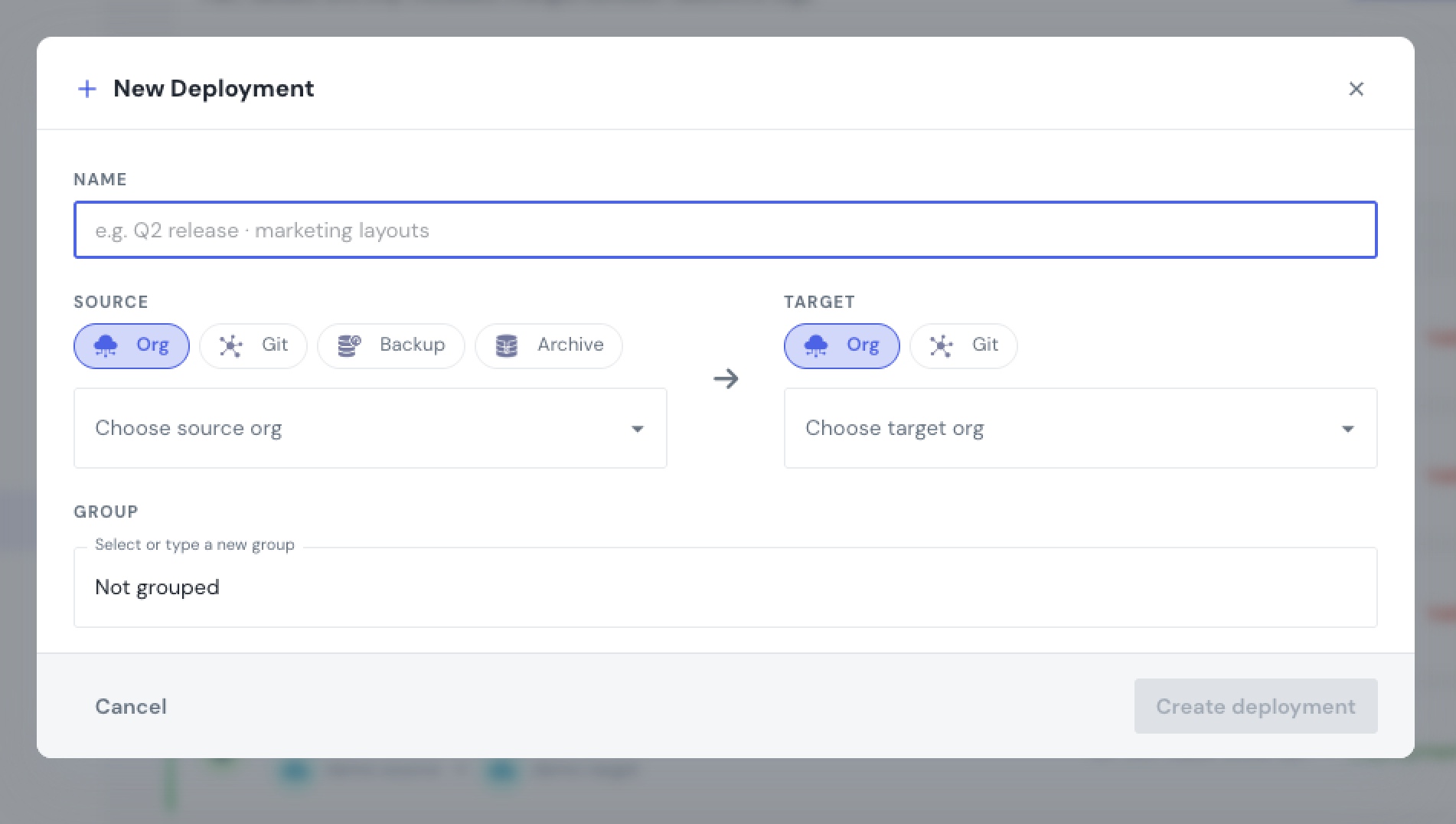
- Org → org. Connect both orgs over OAuth, compare source against target, pick exactly what to deploy, and deploy — no manifest to assemble and no lineage requirement, so any connected org can deploy to any other.
- Git → org. Point a deployment at a branch or commit in a connected GitHub, GitLab, or Gitea repository for source-controlled releases.
- Backup → org. Redeploy from a metadata backup to roll back or restore.
Because the target is always a live org you've connected, the same review, validation, and rollback flow applies no matter which source you started from.
What won't migrate on its own
A metadata deploy — by any tool — doesn't carry everything. Some things are recreated by hand on the target, and some deploy but need a follow-up step. The classics:
- Field deletions aren't expressed by a normal source deploy — you delete via a
destructiveChanges.xml(mtdt.io makes this a checkbox). See Deploy Destructive Changes Without Hand-Writing destructiveChanges.xml. - Secrets — a Named Credential password, a Connected App's consumer secret, an Auth. Provider token — are never included in metadata and must be set on the target. See the Connected App guide.
- Record types can't be deleted through the Metadata API at all — you deactivate them. See Can You Delete a Record Type Through the Metadata API?.
- Converting a picklist from inline values to a global value set can't be deployed in place — see Deploy Picklist Value Changes — Inline and Global.
- Some automation and setup data — time-dependent workflow actions, queues, groups, and running-user context — often need reconfiguring on the target.
The safe move is to see these before they fail the deploy. mtdt.io's Impact Analysis surfaces the dependencies a component needs, and its deploy-error hints decode the terse Salesforce message when one slips through.
Deploy safely: validate, back up, roll back
Whichever combination you're running, the same three habits keep a cross-environment deploy from becoming an incident:
- Validate first. Run a check-only deploy against the target so you see failures — coverage gaps, missing dependencies, references that won't resolve — before they touch the org. (Validation is native Salesforce; every serious tool exposes it.)
- Back up the target. A metadata backup taken right before the deploy is your rollback point. mtdt.io takes one by default and flags it in the pre-deployment checks.
- Deploy with rollback-on-error, so a partial failure leaves nothing half-applied, and keep the backup so you can restore if the successful deploy turns out wrong.
FAQ
How do I deploy from a sandbox to production in Salesforce? If the sandbox belongs to that production org, you can use an outbound change set (manual, no deletions). For a repeatable, scriptable deploy — or to include deletions and validate first — use the Metadata API via SFDX or a tool like mtdt.io, which connects both orgs and deploys the components you pick.
Can I use change sets between two different Salesforce orgs? No. Change sets only travel between a production org and its own sandboxes (same family, via a deployment connection). To deploy between unrelated orgs — two customers, a scratch org to production, a Developer Edition org to a sandbox — you need the Metadata API.
How do I deploy between two sandboxes? If both are sandboxes of the same production org, a change set works. Otherwise, or for automation, deploy over the Metadata API: compare the two orgs and push the difference. mtdt.io deploys sandbox-to-sandbox the same way it does any org-to-org pair.
What's the difference between a change set and a Metadata API deploy?
A change set is a manual, point-and-click deploy limited to a production org and its sandboxes, and it can't delete anything. A Metadata API deploy works between any two orgs you can authenticate to, supports deletions via destructiveChanges.xml, and can be scripted. Tools like mtdt.io put a UI on the Metadata API so you get the reach without hand-building manifests.
Can I deploy Salesforce metadata from Git? Yes. In a source-driven workflow the Git repo is the source of truth. mtdt.io connects to GitHub, GitLab, or Gitea and deploys a branch or commit to a target org.
What can't be deployed between environments? Field deletions need a destructive deploy; secrets (Named Credential passwords, Connected App consumer secrets, Auth. Provider tokens) never travel and are set on the target; record types can't be deleted via the API; and some setup data — time-dependent workflow actions, queues, groups — is recreated by hand. Impact Analysis and deploy-error hints help you catch these before they fail a deploy.
Deploy any environment to any other — without hand-building manifests
mtdt.io connects your orgs, Git repositories, and backups, compares source against target, and deploys exactly what you pick — sandbox to production, org to org, Git to org, or a backup for rollback.
Log in to mtdt.io and deploy between environments by clicking, not scripting.
Related: Deploying Metadata with mtdt.io · Pre-Deployment Checks · Detect Target-Org Changes Before a Deploy · Compare Metadata Without Reading XML · Why Salesforce Deployments Fail
Was this page helpful?
Let us know how we did