Deploy Picklist Value Changes Between Salesforce Orgs — Inline and Global

Can you deploy picklist values between Salesforce orgs? Search it and you hit a wall of half-answers: the values seem not to come across, someone tells you to "just deploy the whole object," and global value sets are apparently a separate thing entirely. The short answer is yes — and the confusion comes down to where a picklist's values actually live.
Picklist values have two homes
A picklist's values sit in one of two places, and that's the whole source of the muddle:
- Inline on the field. The values live inside the field's own metadata —
valueSet › valueSetDefinition › value. Each value carries its label, default flag, and active state. - In a Global Value Set. The values live in a separate, shared
GlobalValueSetcomponent, and the field only holds a reference to it (valueSet › valueSetName). To move a value change here you deploy both the field and the global value set.
One platform fact worth knowing up front: the Metadata API can't hard-delete a picklist value — removing a value means deactivating it (isActive=false). That's a Salesforce platform rule that applies to every deployment tool.
Deploy inline values — value by value
With mtdt.io, an inline picklist value change rides along in the field deploy. Pick the field and the comparison shows the change at the individual-value level — every value with its label and default, the added one marked against the target:
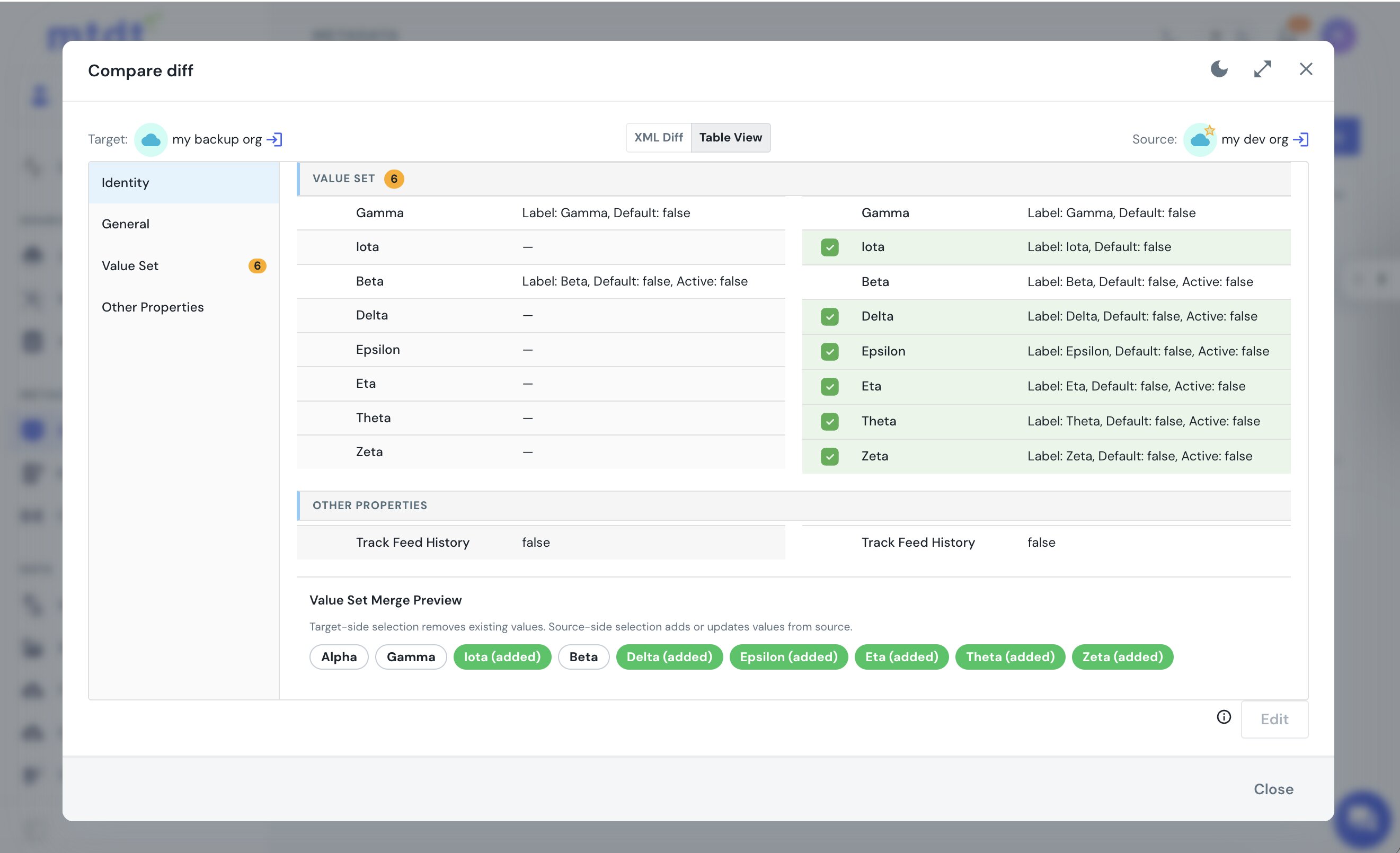
Add a value, rename one, change the default, reorder them — they all travel in a single field deploy, because deploying a CustomField replaces its value set as a unit. There's no "deploy the whole object" workaround. This is the same field-level scoping covered in Safe Field-Level Deployments: Ship Only What Changed.
Deploy Global Value Set values — and the field that points at them
When the values live in a Global Value Set, the change is in the GVS component and the field just references it. mtdt.io deploys global value sets as first-class components, and its Impact Analysis connects the two: deploy a GVS-bound field and mtdt surfaces the global value set it depends on, one click to include:
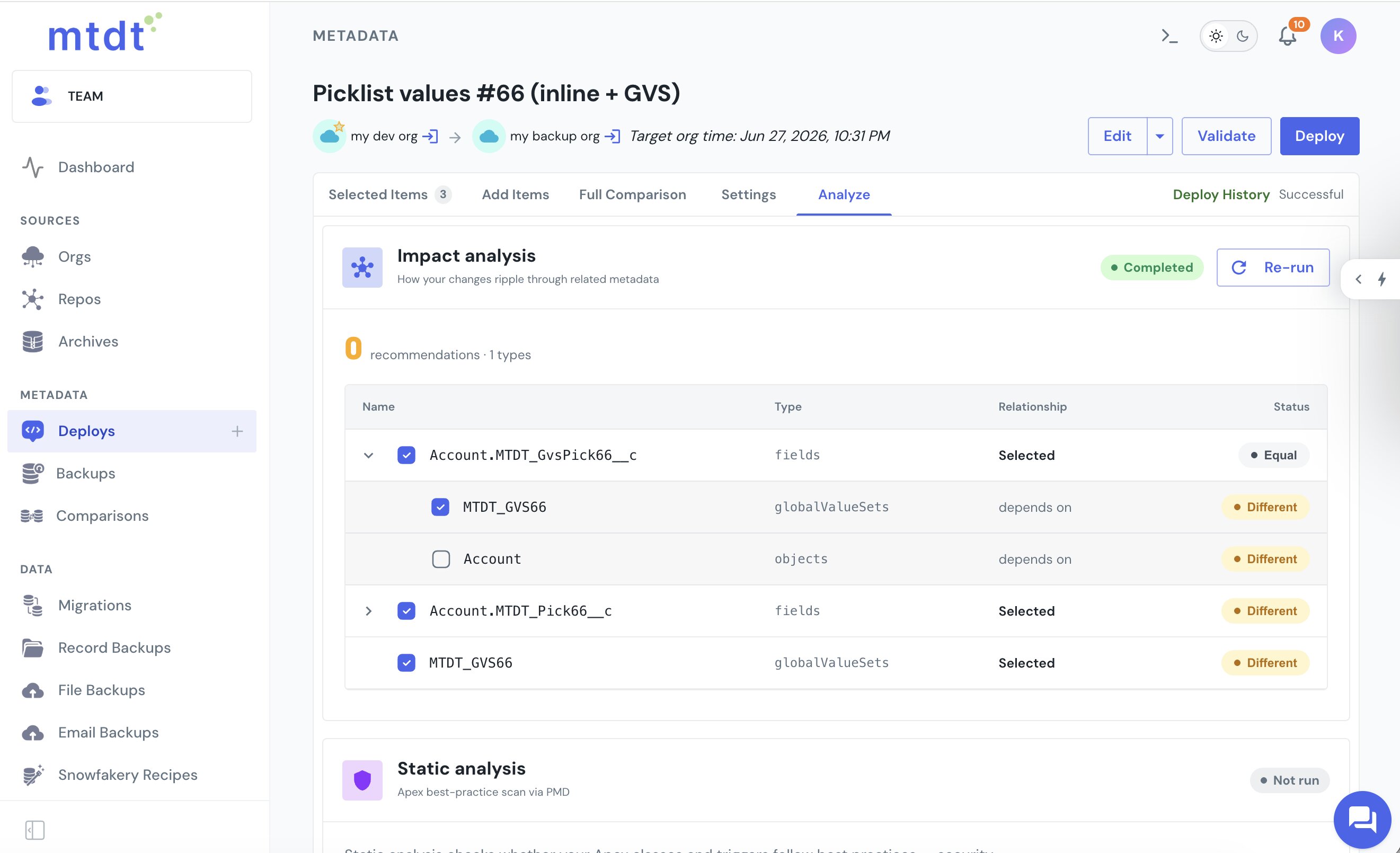
That dependency is exactly what trips up a field-only deploy — leave the GVS out and the deploy fails because the value set can't be resolved. The deep-dive on that error is Fix 'Global Value Set Cannot Be Resolved' on Salesforce Deploy.
Converting an existing field from inline to global — the one Salesforce won't deploy
There's one picklist change the Metadata API flatly refuses: taking an existing field whose values are inline and switching it to reference a Global Value Set. In Setup this is the "Promote to global value set" action; it works there, on that one org. Deploying the same conversion to another org does not.
We tried it live, both as a validation and as a real deploy, on two orgs — the field bundled together with its new global value set in the same deployment. Salesforce rejects it every time with:
Cannot change which global value set this picklist uses.
The whole deploy rolls back and nothing changes on the target. It's a Salesforce platform limit, not a packaging problem — no tool can deploy this conversion in place, because the Metadata API has no supported path to change a field's value-set representation (inline → global) once the field exists.
The only path that works is to delete the field and recreate it pointing at the global value set. That deploys cleanly — but on a real field it's destructive: deleting a picklist field sends it (and the picklist data stored on existing records) to the recycle bin, and the recreated field is a new field as far as record data is concerned. So treat an inline→global conversion as a field replacement with data migration, planned per org, and not as something a deploy carries across for you. A brand-new field can start on a global value set from day one; it's only the conversion of an existing one that the platform blocks.
If you do run the conversion as a deploy and hit the wall, mtdt.io decodes the bare Cannot change which global value set this picklist uses. error in Deploy History — explaining that the field can't be converted in place and that delete-and-recreate is the only path, so you're not left guessing at a one-line platform error.
Removing a value means deactivating it
Since Salesforce won't hard-delete a value, "removing" one means deploying it as inactive. mtdt.io carries that like any other value change — the value's diff shows it set to Active: false, so you see exactly what a deploy will retire. On the target it goes inactive (hidden from users), and the rest of the values stay untouched.
FAQ
Can you deploy picklist values between Salesforce orgs?
Yes. Where the deploy actually happens depends on whether the values are inline on the field or in a Global Value Set — inline values ride along with the CustomField deploy, while Global Value Set values deploy as their own GlobalValueSet component. mtdt.io handles both and shows the change at the individual-value level either way.
Why can't I delete a picklist value in a deploy?
Because the Metadata API can't hard-delete a picklist value at all — this is a Salesforce platform rule, not a limitation of any particular tool. Removing a value means deploying it as inactive (isActive=false); mtdt.io shows that as the value's diff going to Active: false, and it goes inactive (hidden from users) on the target while the rest of the values stay untouched.
Do I need to deploy the whole object to change a picklist value?
No. An inline picklist value change deploys as part of the field, since deploying a CustomField replaces its value set as a unit — there's no need to deploy the whole object as a workaround.
Why does a field deploy fail with "Global value set cannot be resolved"?
Because the field only holds a reference (valueSetName) to the Global Value Set, not the values themselves — if the GVS isn't included in the same deploy, the reference can't resolve. mtdt.io's Impact Analysis detects that a GVS-bound field depends on its global value set and surfaces it as one click to include.
Can I deploy a picklist field after changing its value set from local to global?
No — Salesforce blocks converting an existing field from inline to a Global Value Set through the Metadata API. Deploying it (even with the global value set bundled in) fails with Cannot change which global value set this picklist uses. and rolls back. The only working path is to delete and recreate the field on the global value set, which is destructive to the picklist data already on records. A new field can use a global value set from the start; an existing one can't be converted in place across orgs.
What's the difference between an inline picklist and a Global Value Set?
An inline picklist's values live directly inside the field's own metadata (valueSet › valueSetDefinition › value), while a Global Value Set's values live in a separate, shared GlobalValueSet component that one or more fields reference. Deploying an inline change only needs the field; deploying a GVS-backed change needs both the field and the global value set.
Deploy picklist values across orgs, value by value
Let mtdt.io move your picklist changes — added, renamed, or deactivated, inline or global — and show you the difference one value at a time before it ships.
Log in to mtdt.io and deploy your picklist values.
Was this page helpful?
Let us know how we did