Secrets Don't Deploy in Salesforce: Certificates, Named Credentials & Auth Providers

You deploy a Certificate, a Named Credential, or an Auth Provider from one Salesforce org to another. The deploy goes green — and then the integration that depended on it is broken. It's not your deployment tool: the Metadata API never carries a component's secret, by design. The piece that makes the component work stays behind.
One rule, three faces
Salesforce won't expose a secret through metadata — a private key, a password, or a client secret never leaves the org in a retrievable form. That's a sensible security stance, and it shows up in three places that bite during a deployment.
Certificates: the private key never leaves the org
A Certificate's metadata carries only the public X.509 certificate — there's no private-key field at all. Deploy a certificate into an org that doesn't have it and Salesforce generates a brand-new key pair on the target (a different certificate, with a new expiry date). So anything pinned to the source key — mutual-TLS callouts, JWT signing — stops working, even though the deploy "succeeded."
"Salesforce doesn't allow the import or export of the private key via the API." — Salesforce Metadata API Developer Guide, Certificate
The only way the private key moves between orgs is a keystore (JKS), and even that is conditional. Export to Keystore appears only for a self-signed certificate created with Exportable Private Key turned on. For a CA-signed certificate — or any certificate with that option off, which is the secure default — there's no export at all; you'll see only Import from Keystore, and the key can't be pulled out of the source org. In that case you import a JKS from the certificate's original source, or re-issue the certificate on the target.
Named Credentials: the password is write-only — and the deploy can hard-fail
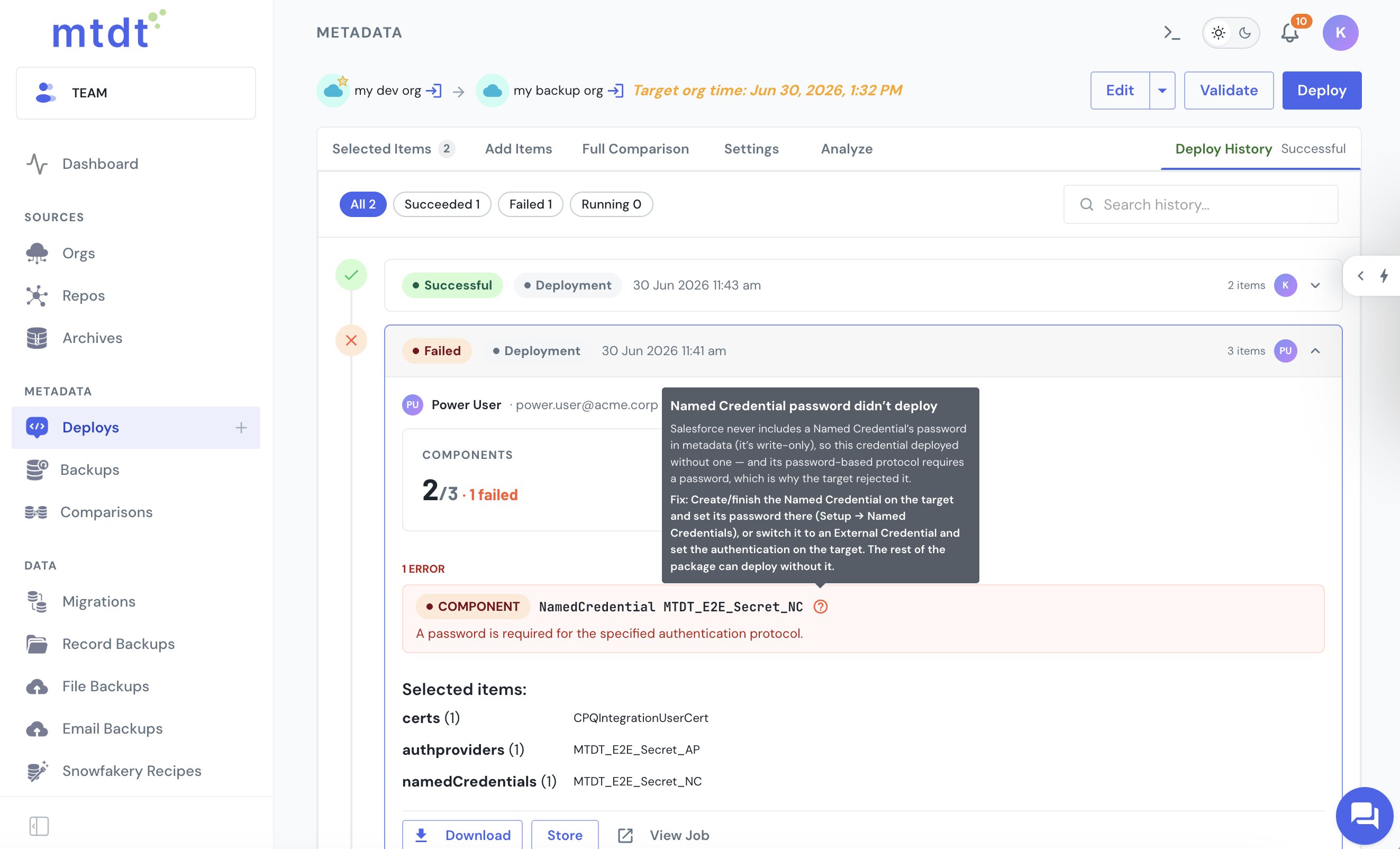
A Named Credential's <password> is a write-only field: it's omitted entirely when you retrieve the credential, so no package can carry it. Worse than landing empty, a password-protected Named Credential fails the deploy outright with A password is required for the specified authentication protocol — and because Metadata API deployments are atomic, that one failure rolls back the whole package, taking any certificate or auth provider you bundled with it down too.
Modern Named Credentials delegate their secret to an External Credential, and that secret doesn't travel either.
"Packaged credentials don't include the access tokens or certificates that are needed for users to perform authenticated callouts." — Salesforce Named Credentials guide
Auth Providers: the consumer secret arrives as Placeholder_Value
An AuthProvider carries a consumerKey and a consumerSecret — the client ID and client secret from your external identity provider. On retrieve, the key comes across verbatim, but the secret is always replaced with the literal string Placeholder_Value. Deploy it and the auth provider lands on the target with that placeholder in place of the real secret — present, but non-functional until you set the secret by hand.
"If a consumer secret is defined on an authentication provider, the consumer secret is always exported as a placeholder value, not as an encrypted secret." — Salesforce Metadata API Developer Guide, AuthProvider
(One exception worth noting: PublicKeyCertificate and PublicKeyCertificateSet hold only public key material, so there's no secret to lose — they deploy fine.)
mtdt.io warns you before you ship a broken component
None of this is fixable in a deployment tool — the secret genuinely can't travel. What a tool can do is stop the silent surprise. Pick a certificate, Named Credential, or auth provider for a deploy and mtdt.io flags it up front, naming each component, the exact secret that won't travel, and what to do about it:
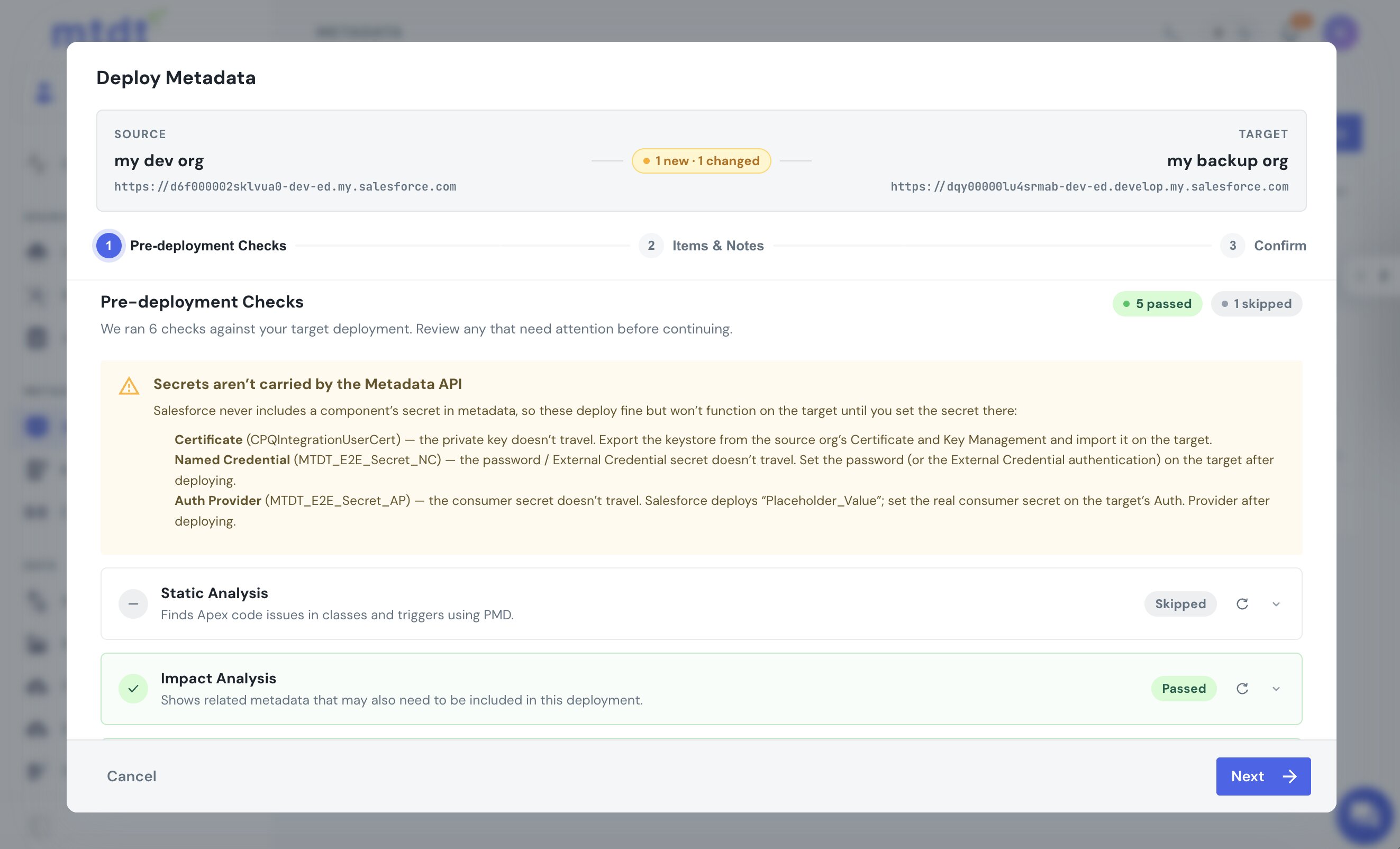
The warning is informational, not a block — you may well want to deploy the configuration and set the secrets on the target yourself. And when the password-protected Named Credential does hit its hard failure, mtdt decodes the cryptic error into plain language with the fix, instead of leaving you to guess:
The same check runs on Git-to-org deploys, where there's no one watching a wizard: mtdt records the warning on the run so a reviewer sees the same caveat before trusting the deploy.
What to actually do
The secret has to be set on the target — there's no deploying around it:
- Certificate — import a keystore (JKS) holding the private key, from the certificate's original source; or, for an exportable self-signed cert, Export to Keystore on the source and Import on the target. Otherwise re-issue the certificate on the target.
- Named Credential — deploy the credential without the password, then set the password (or wire up its External Credential) on the target in Setup → Named Credentials.
- Auth Provider — deploy it, then set the real consumer secret on the target in Setup → Auth. Providers.
FAQ
Why does a Salesforce Certificate deploy but stop working on the target org? A Certificate's metadata carries only the public X.509 certificate — there's no private-key field. When you deploy it into an org that doesn't already have it, Salesforce generates a brand-new key pair on the target with a different expiry date, so anything pinned to the source key, like mutual-TLS callouts or JWT signing, breaks even though the deploy itself succeeds.
Why does deploying a Named Credential sometimes fail the whole deployment, not just that component? A Named Credential's password field is write-only, so it's omitted entirely on retrieve and can't be packaged. A password-protected Named Credential fails the deploy outright with "A password is required for the specified authentication protocol," and because Metadata API deployments are atomic, that one failure rolls back the entire package — including any certificate or auth provider bundled with it.
Does an Auth Provider's consumer secret deploy correctly between orgs?
No. The consumer key comes across verbatim on retrieve, but the consumer secret is always replaced with the literal string Placeholder_Value. The auth provider lands on the target with that placeholder in place of the real secret, so it's present but non-functional until you set the real secret by hand.
Can mtdt.io deploy the actual secret for a Certificate, Named Credential, or Auth Provider? No — this isn't fixable by any deployment tool, since the Metadata API itself never carries the secret. What mtdt.io does is flag the affected components before you deploy, naming each one, the exact secret that won't travel, and what to do about it, both in the deploy wizard and on pipeline (git → org) runs.
Is there any secret-bearing metadata that deploys without this problem?
Yes. PublicKeyCertificate and PublicKeyCertificateSet hold only public key material, so there's no secret to lose — they deploy fine.
Don't let a green deploy hide a broken secret
Let mtdt.io flag the certificates, Named Credentials, and auth providers in your deploy whose secrets the Metadata API can't carry — in the wizard and in your pipelines — so you fix them on the target instead of finding out when the integration fails.
Log in to mtdt.io and deploy with your eyes open.
Related: Why Salesforce Deployments Fail · Pre-Deployment Checks
Was this page helpful?
Let us know how we did