Deploying a Connected App from Sandbox to Production
Short answer: a Connected App is a Metadata API component, so mtdt.io can retrieve and deploy it sandbox→production. The catch is a Salesforce platform gate: as of Spring '26, creating a brand-new connected app is blocked on any org unless Salesforce Support enabled connected-app creation there. Deploying a create fails with:
You can't create a connected app. To enable connected app creation, contact Salesforce Customer Support.
Deploying an update to a connected app that already exists on the target still works. And the consumer secret never travels in metadata — the target org issues its own consumer key/secret, so you repoint integrations after deploying.
Can you deploy a connected app at all?
It depends on the tool:
- Change sets — historically don't list ConnectedApp as a deployable component. This is the original pain behind the question ("Salesforce has not provided any option to deploy a connected app").
- Metadata API (what mtdt.io uses) — ConnectedApp is a real metadata type (
connectedApps/ConnectedApp), so it retrieves and deploys. Updating an existing app is unaffected; creating a new one now hits the Spring '26 gate below. - Managed / unlocked package — a connected app bundled in a package still creates on install, which is the supported way to distribute one to orgs that can't create it directly.
A connected app is meant to have one host org — other orgs "install" it on first use rather than each recreating it. So the durable pattern is to host it in a permanent org (production or a DE you keep), not a sandbox that gets refreshed away.
The Spring '26 gate: new connected apps can't be created
As of the Spring '26 release, Salesforce blocks creating new connected apps through the UI, the API, and the Metadata API on any org that hasn't had the capability enabled. Attempting it returns a FUNCTIONALITY_NOT_ENABLED component failure with the message above.
What this means in practice:
- Re-enabling creation is not a self-service Setup toggle — you have to request it from Salesforce Customer Support for that specific org.
- Existing connected apps keep working and can still be updated via deploy.
- Connected apps that arrive as part of a managed package still create on install.
- Salesforce is steering new integrations toward External Client Apps, the connected-app successor created in App Manager.
This is a genuine Salesforce platform behavior — no deployment tool can create the app for you where the platform blocks it. What mtdt.io does is make sure the failure doesn't surprise you.
The consumer secret doesn't travel
When mtdt.io reads a connected app's metadata, the consumerKey is present but the consumerSecret is absent — Salesforce never returns it. Everything else deploys: OAuth callback URL and scopes, IP relaxation and refresh-token policy, session policy, attributes, IP ranges, and the profile/permission-set grants.
The consequence: even where a create is allowed, the target org issues its own consumer key and secret for the app. The source's credentials don't come along, so any integration authenticating against the app has to be repointed to the target's values after the deploy. (This is the same behavior as deploying an Auth. Provider or a Named Credential — the secret is a per-org value you set on the target.)
mtdt.io warns before, and decodes after
mtdt.io treats a connected app the way it treats other secret-bearing components — with two surfaces so you're not left staring at a terse platform error.
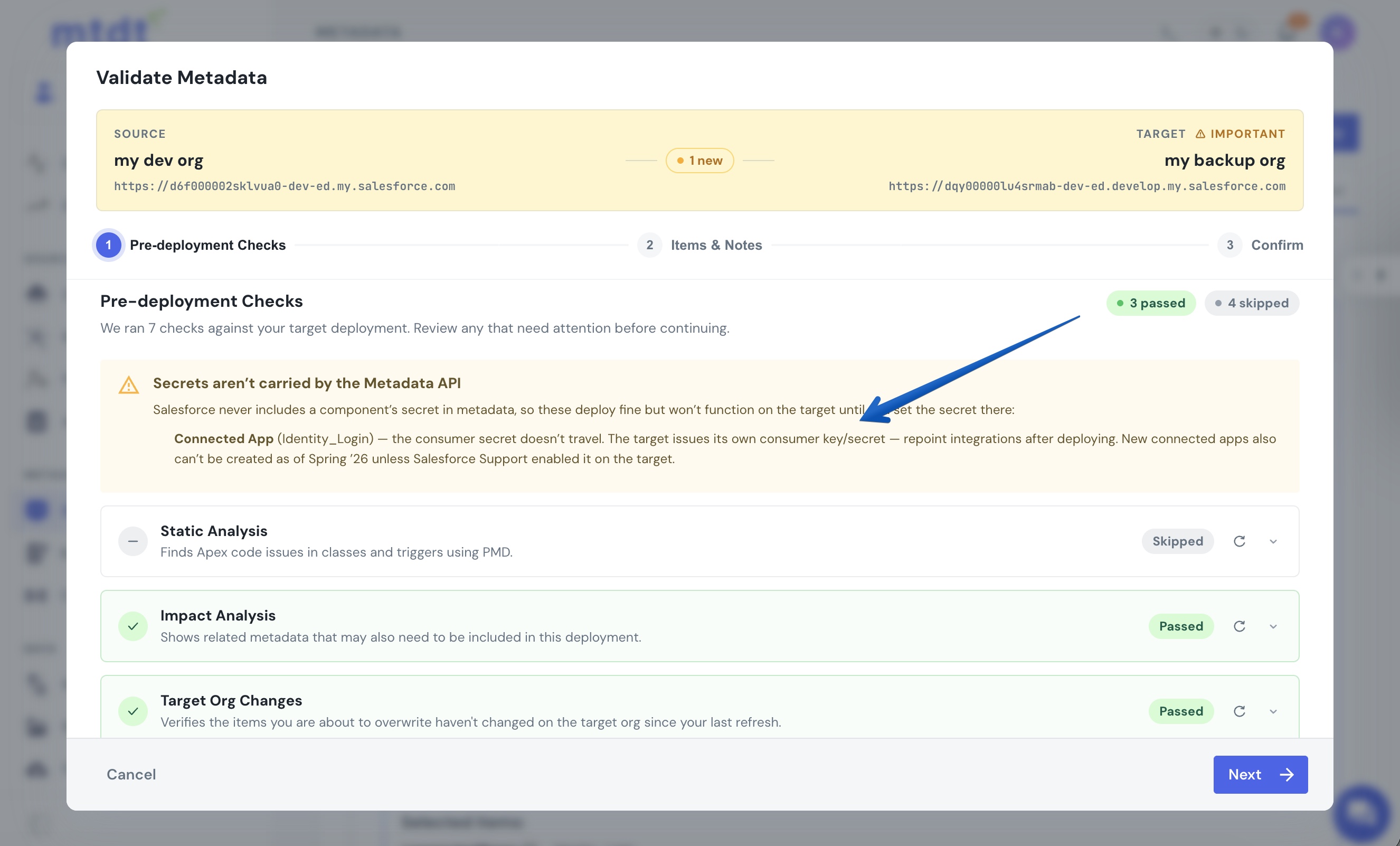
Before the deploy, the wizard's pre-deployment checks show a Secrets aren't carried by the Metadata API banner that calls out the connected app by name: the consumer secret won't travel, the target issues its own key/secret, and new apps can't be created as of Spring '26 unless Support enabled it on the target.
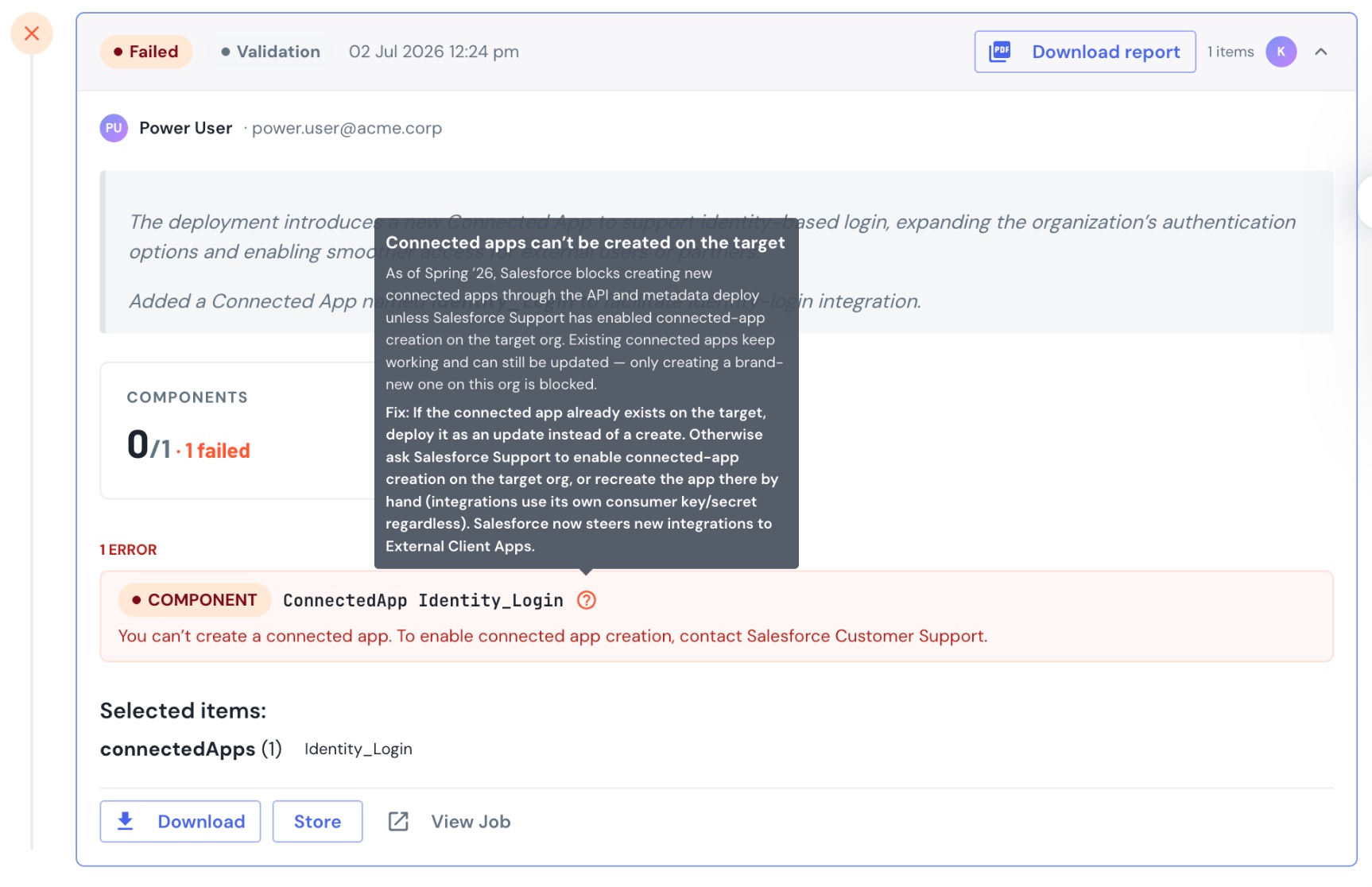
If a create is attempted anyway, the deploy result shows the raw Salesforce failure with a hint that decodes it — what the gate is, that existing apps can still be updated, and the paths forward (deploy as an update, request creation from Support, or move to an External Client App):
FAQ
How do I deploy a connected app from sandbox to production? Include the ConnectedApp component in a Metadata API deployment — mtdt.io retrieves and deploys it like any other metadata. Change sets don't support it. If the app already exists on the target it deploys as an update; if it's new, you'll hit the Spring '26 creation gate.
Why do I get "You can't create a connected app. To enable connected app creation, contact Salesforce Customer Support"?
As of Spring '26, Salesforce blocks creating new connected apps on any org that hasn't had the capability enabled — through the UI, the API, and the Metadata API alike. It's a FUNCTIONALITY_NOT_ENABLED platform gate. You have to ask Salesforce Support to enable connected-app creation on that org, deploy the app as an update to an existing one, or install it via a managed package.
Does the consumer key and secret transfer when I deploy? No. The consumer secret is never included in metadata, so the target org issues its own consumer key/secret for the app. Repoint any integration to the target's values after deploying.
Can I still update an existing connected app? Yes. The Spring '26 gate only blocks creating a new one. Deploying changes to a connected app that already exists on the target is unaffected.
What should I use for new integrations instead? Salesforce is directing new integrations to External Client Apps, the connected-app successor created in App Manager. Existing connected apps continue to work.
Related
- Pre-deployment checks — the checks that surface the secret-bearing warning before a deploy.
- Metadata deployment — how source↔target deployments work in mtdt.io.