Why Salesforce Deployments Fail (and How to Stop the Pain)

It's 4 PM on release day. You hit Deploy, the spinner turns, and a few minutes later Salesforce hands you a wall of red text that explains nothing useful. The release is blocked, the team is waiting, and you're now debugging in production under pressure.
If that feels familiar, here's the good news: Salesforce deployments don't fail randomly. They fail for a handful of well-understood reasons — and once you can name them, you can prevent almost all of them.
The anatomy of a failed deploy
Every deployment is really three steps: collect the right components, validate them against the target org, and commit. A failure is just one of those steps going wrong — usually because something was missing, something didn't compile or pass tests, or the target org wasn't what you assumed. Let's walk the seven culprits.
1. Missing dependencies — the #1 killer
You deploy a flow, and it fails because it references a field that isn't in the target org. Or you include the field, and it depends on a record type, which depends on a picklist value set… and so on.
Why it happens: native change sets only surface direct dependencies. Nested ones — a subflow that calls another subflow, a component referenced two layers deep — simply don't appear in the list. You find out they were missing only when the deploy fails.
How to prevent it: build your deployment package from a real dependency-aware comparison between source and target, not from memory. Seeing the full diff (and what each component needs) before you deploy is the single biggest reduction in failed releases.
2. Code coverage below 75%
Salesforce won't deploy Apex to production unless at least 75% of your code is covered by passing tests. One failing test method, or one class that dips under the line, fails the entire deployment.
Why it happens: coverage is measured at deploy time against the target org's full codebase — not just what you're shipping. A test that passed in your sandbox can fail in production because the data or surrounding code differs.
How to prevent it: run a validation-only deploy first (a "check-only" run executes the tests without committing). You get the same pass/fail verdict with zero risk, and you fix coverage on your schedule instead of during the release window.
3. Oversized deployments and governor limits
Try to push thousands of components or run every test in one shot and you can hit platform limits — timeouts, DML/SOQL ceilings during test execution, or sheer deploy duration.
Why it happens: Salesforce treats a deployment as a single transaction-like operation with limits. Bigger isn't always better.
How to prevent it: deploy what actually changed, not the whole org. Scoping each release to the real delta keeps you well under the limits and makes failures (when they happen) far easier to diagnose.
4. Cryptic validation errors
INVALID_CROSS_REFERENCE_KEY. Cannot find the X in Y. The error tells you something is wrong but not why, and decoding it takes deep platform knowledge.
Why it happens: validation runs against the target org's current state, which may differ from where you built the package. The message describes the symptom (a broken reference) without the cause (the referenced component is missing or different).
How to prevent it: validate early and often, and use a tool that translates raw Salesforce errors into plain language with the specific component at fault — so you're fixing a named problem, not interpreting a stack trace.
5. Environment mismatch
The package validated fine yesterday. Today it fails — because someone changed the target org in between.
Why it happens: orgs drift. A hot-fix in production, a manual admin change, a parallel sandbox refresh — any of these can move the target out from under your package so it no longer applies cleanly.
How to prevent it: compare the target with your source of truth immediately before deployment so you catch unexpected changes before they break the release.
6. Profiles and permissions breaking on partial deploys
You deploy a profile without one of its fieldPermissions nodes, and Salesforce silently removes that field access in the target org. Users lose visibility, and nobody knows why until tickets roll in.
Why it happens: Salesforce treats an omitted permission as an intentional removal. Partial profile/permission deploys are a minefield precisely because leaving something out is a destructive action.
How to prevent it: deploy permission changes deliberately and at the field level, with a clear view of exactly what's included — not a hand-edited XML file you hope is complete.
7. No rollback when it does fail
Sometimes a deploy succeeds and then the trouble starts — a regression, a broken integration. With change sets there's no undo: reverting means rebuilding the previous state by hand, under pressure, while production misbehaves.
Why it happens: change sets are one-directional and stateless. There's no captured "before" to return to.
How to prevent it: capture a rollback point before every important deploy, so recovering is one action instead of an emergency project.
How to stop the pain
Most of these failures share a root cause: deploying blind. You can eliminate the majority with a simple pre-deploy discipline:
- Compare, don't remember — build the package from a real source↔target diff.
- Validate before you commit — a check-only run catches coverage and validation errors risk-free.
- Ship the delta — scope each release to what changed.
- Know your target — watch for drift so the org is what you expect.
- Be deliberate with permissions — field-level, fully visible.
- Always have an undo — capture a rollback point first.
This is exactly the workflow mtdt.io is built around: visual metadata comparison with dependency detection, one-click validation, scoped deploys, safe field-level changes, and a rollback point captured before every important release. The cryptic-red-text afternoons mostly just… stop.
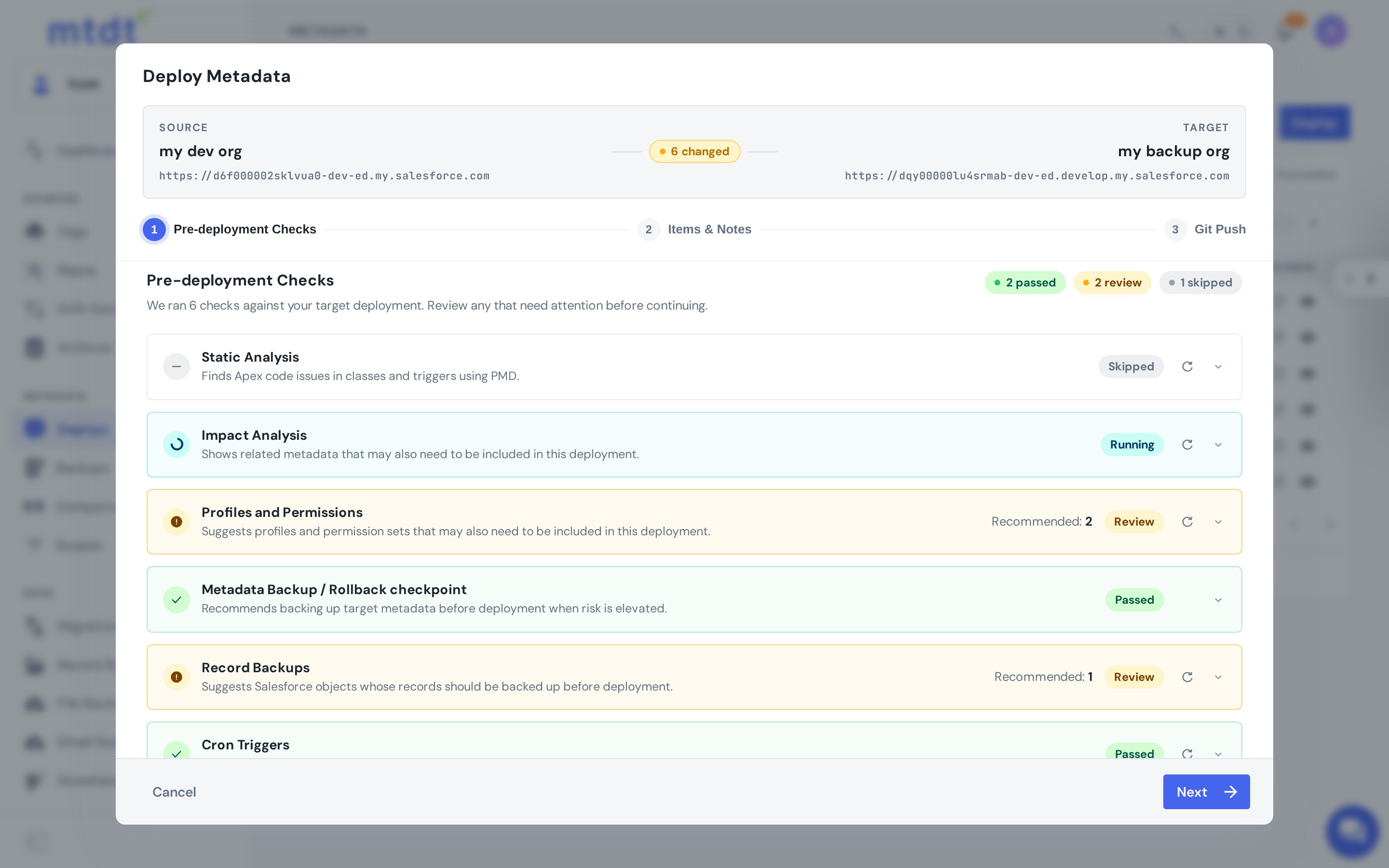
If you're still weighing tools, see mtdt vs Change Sets and our Salesforce deployment best practices.
FAQ
What's the single most common reason Salesforce deployments fail? Missing dependencies. Native change sets only surface direct dependencies — nested ones, like a subflow calling another subflow or a component referenced two layers deep, don't show up in the list, and you only find out they were missing when the deploy fails. Building the package from a real dependency-aware comparison between source and target is the biggest single reduction in failed releases.
Why does a Salesforce deploy fail on code coverage even though it passed in my sandbox? Because coverage is measured at deploy time against the target org's full codebase, including code you aren't shipping — a test that passed in your sandbox can fail in production if the surrounding code or data differs. Running a validation-only (check-only) deploy first gives you the same pass/fail verdict with zero risk, so you can fix coverage on your schedule instead of during the release window.
Why does a deploy that worked yesterday fail today with no code changes? Someone changed the target org in between — a hot-fix in production, a manual admin change, or a parallel sandbox refresh. The package no longer applies cleanly because the target moved out from under it. Comparing the target with your source of truth before deploying catches this early.
Why does deploying a Profile break other users' field access?
Salesforce treats an omitted fieldPermissions node as an intentional removal, not "leave it alone." If you deploy a Profile without one of its permission nodes, Salesforce silently removes that field access in the target org, and users lose visibility until tickets start rolling in. The fix is deploying permission changes deliberately at the field level, with full visibility into exactly what's included.
What can I do if a deployment succeeds but then causes a regression? Have a rollback point captured before the deploy ran. Change sets are one-directional with no captured "before" state, so reverting means rebuilding the previous configuration by hand under pressure. Capturing a rollback point before every important deploy turns recovery into one action instead of an emergency project.
New to moving changes between orgs? See How to Deploy Between Salesforce Environments for every source→target combination — sandbox to production, org to org, Git, and backups — and when to use each.
Stop debugging deploys in production
Every failure mode above is preventable with the right pre-deploy workflow.
Log in to mtdt.io and run a validation-only deploy before your next release.
Was this page helpful?
Let us know how we did