Permission Sets vs Profiles in Salesforce: What's the Difference (and Which to Use)

In Salesforce, every user has exactly one profile and can have many permission sets. A profile sets the baseline — and the settings that can only have one value per user, like default app, record types, page layout assignments, and login hours. A permission set grants additional access on top and stacks additively, so you can assign the same set to many users. The model Salesforce now recommends is minimal profiles plus permission sets (composed into permission set groups), and that's where the ecosystem is heading — though, as of 2026, there's no deadline forcing it.
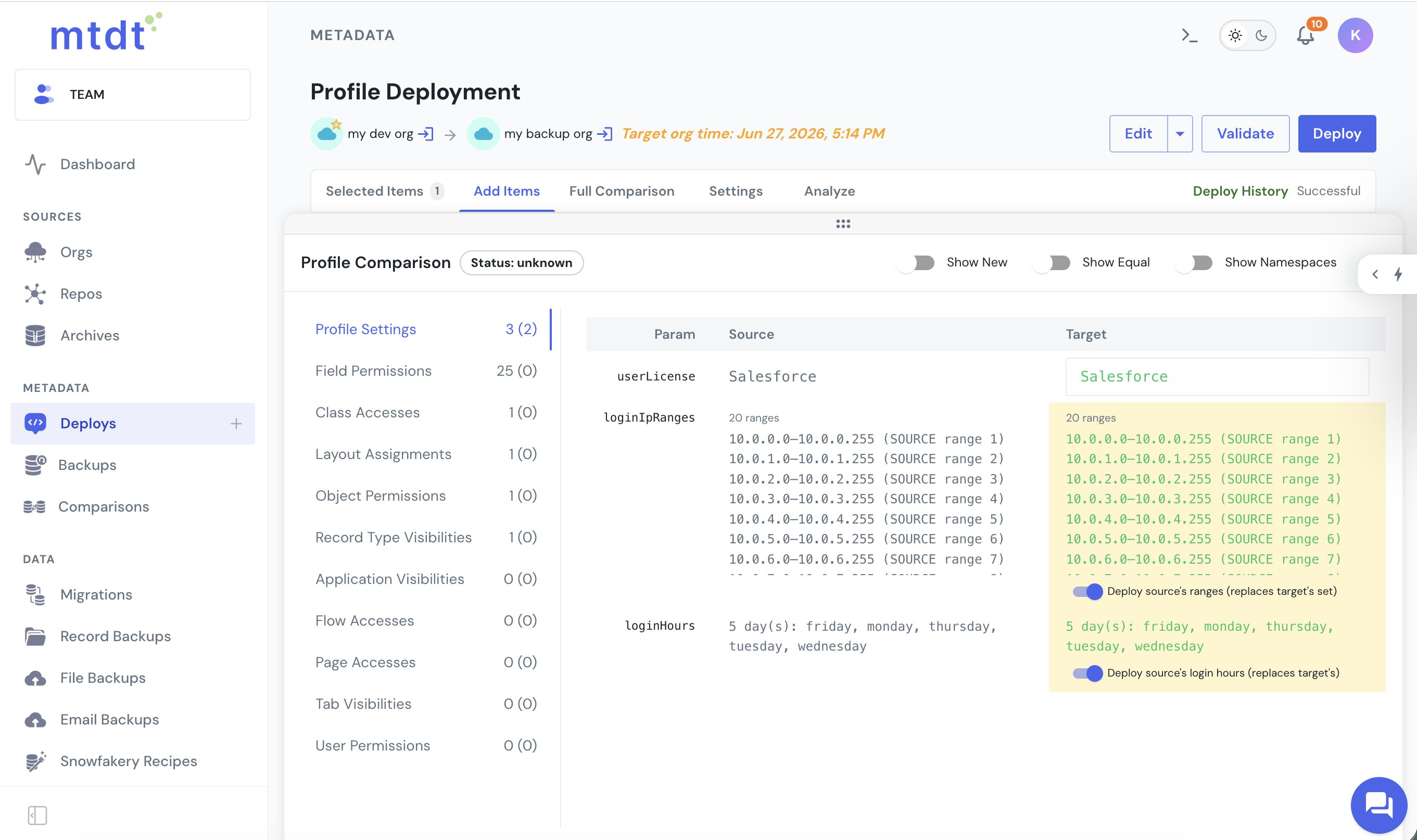
What a profile does
A profile is assigned one-per-user, so it's the natural home for settings that must have a single value per user:
- Default app and default record type per object
- Page layout assignment
- Login hours and login IP ranges
- Password and session policies
Historically, profiles also carried object permissions, field-level security, and user/system permissions. They still can — but that's the part Salesforce is steering away from.
What a permission set does
A permission set grants access and is assigned to as many users as you like, stacking additively — object and field permissions, Apex and Visualforce access, app and tab visibility, and system or custom permissions. Adding one only ever grants; it never removes what a user already has. That makes permission sets modular and reusable: one "Case Edit" set can be shared across every persona that needs it, instead of copying the same permission into a dozen profiles.
Permission set groups (and muting)
A permission set group bundles several permission sets into one assignable unit — you build a group per persona (say, "Support Tier 1") and assign that single group instead of ten separate sets. Inside a group, a muting permission set can subtract specific permissions that its member sets would otherwise grant, so one group can serve near-identical roles without duplicating whole sets. Muting is powerful, so most teams use it sparingly and only after the core migration is done — it can make "what can this user actually do?" harder to trace.
What only profiles can do — so profiles don't disappear
Even in a fully permission-set-led org, a fixed set of things live only on the profile and have no permission-set equivalent:
- Login hours, login IP ranges, password and session settings
- Default app and default record type
- Page layout assignment
- Per-profile Lightning record page activation
- Experience Cloud membership and sharing sets
Because of these, profiles stay — usually trimmed down to a lean baseline like the standard Minimum Access – Salesforce profile, with everything else moved to permission sets.
Are Salesforce profiles going away?
Short version: not on any announced schedule. In 2023 Salesforce said permissions on profiles would reach end-of-life (targeting the Spring '26 release) and began pushing teams toward permission sets. That enforcement was cancelled in 2024 based on customer feedback and remaining feature gaps, and no new retirement date has been set. So permission-set-led access is Salesforce's recommended direction, but profiles still exist and still own the settings listed above. Any guide claiming "profiles die in Spring '26" is citing the original, now-cancelled plan.
Which should you use?
The current best-practice model:
- Assign every user a minimal baseline profile (Minimum Access – Salesforce) that grants almost nothing.
- Grant all object, field, and system access through permission sets, named by feature rather than by role ("Opportunity – Edit" over "Sales Rep").
- Compose those sets into a permission set group per persona and assign the group.
- Keep on the profile only what has to live there (defaults, login, layout assignment).
The payoff is least-privilege by default, reusable and auditable access, no profile sprawl, and smaller, faster metadata deploys. It's best done incrementally and as its own project — trying to also consolidate the number of profiles at the same time tends to break things, because profiles are referenced in places (Lightning page activation, layout assignment, Experience Cloud) that aren't visible from the profile itself.
FAQ
What's the core difference between a profile and a permission set? A profile is assigned one-per-user and owns baseline and single-value settings (default app, record types, page layouts, login hours) plus, historically, permissions. A permission set grants additional access, is assigned to many users, and stacks additively — it only ever adds.
Can I completely replace profiles with permission sets? No. You can move nearly all permissions to permission sets, but some settings live only on profiles — login hours and IP ranges, password/session policies, default app, default record type, page layout assignment, per-profile Lightning page activation, and Experience Cloud sharing. You minimize profiles to a baseline; you don't delete them.
Are Salesforce profiles being deprecated? The retirement of permissions on profiles was announced in 2023 (targeting Spring '26) and then cancelled in 2024. There is no current deadline. Permission-set-led access remains Salesforce's recommended direction, but profiles are not being removed.
What is a permission set group? A bundle of permission sets assigned as one unit, typically one group per persona. A single muting permission set inside the group can subtract specific permissions its member sets would otherwise grant.
Should I put a new permission on a profile or a permission set? On a permission set. It keeps profiles minimal, makes the permission reusable across users, and follows Salesforce's recommended direction.
Move access between orgs without hand-editing XML
Whether access lives on a profile or a permission set, mtdt.io compares and deploys both as a permission-manager grid — source versus target, one row per permission — and deploys only the rows you pick, so you can move exactly the access you mean to without editing profile XML.
Log in to mtdt.io and manage permissions by clicking, not editing XML.
Related: The Best Way to Deploy Profiles · Deploy Objects Without Their Profile Permissions · Compare Metadata Without Reading XML
Was this page helpful?
Let us know how we did