Why Your Salesforce Report Won't Deploy — filterLanguage, Folders, and Report Types

Search "error deploying reports" and you hit the same wall thousands of others have — a terse failure with no obvious cause:
Action: NO ACTION Result: FAILED Problem: filterlanguage: Invalid value specified: 1
Reports look like simple metadata, so the errors feel out of proportion. Most report-deploy failures trace back to one of a few specific causes: a Filter Language set for a Translation Workbench language the target doesn't have, a missing report folder, a missing Custom Report Type, or a currency filter that assumes multicurrency is on. Two of those are Salesforce platform rules no tool can deploy around; the rest — the folder, the report type, the referenced fields — mtdt.io resolves automatically. Here's the whole picture, and where a tool can actually help.
The error that starts it all: filterLanguage
Every report has a Filter Language property — a small dropdown in the report builder that's only meaningful when Translation Workbench is enabled. Set it, and the value rides inside the report's metadata:
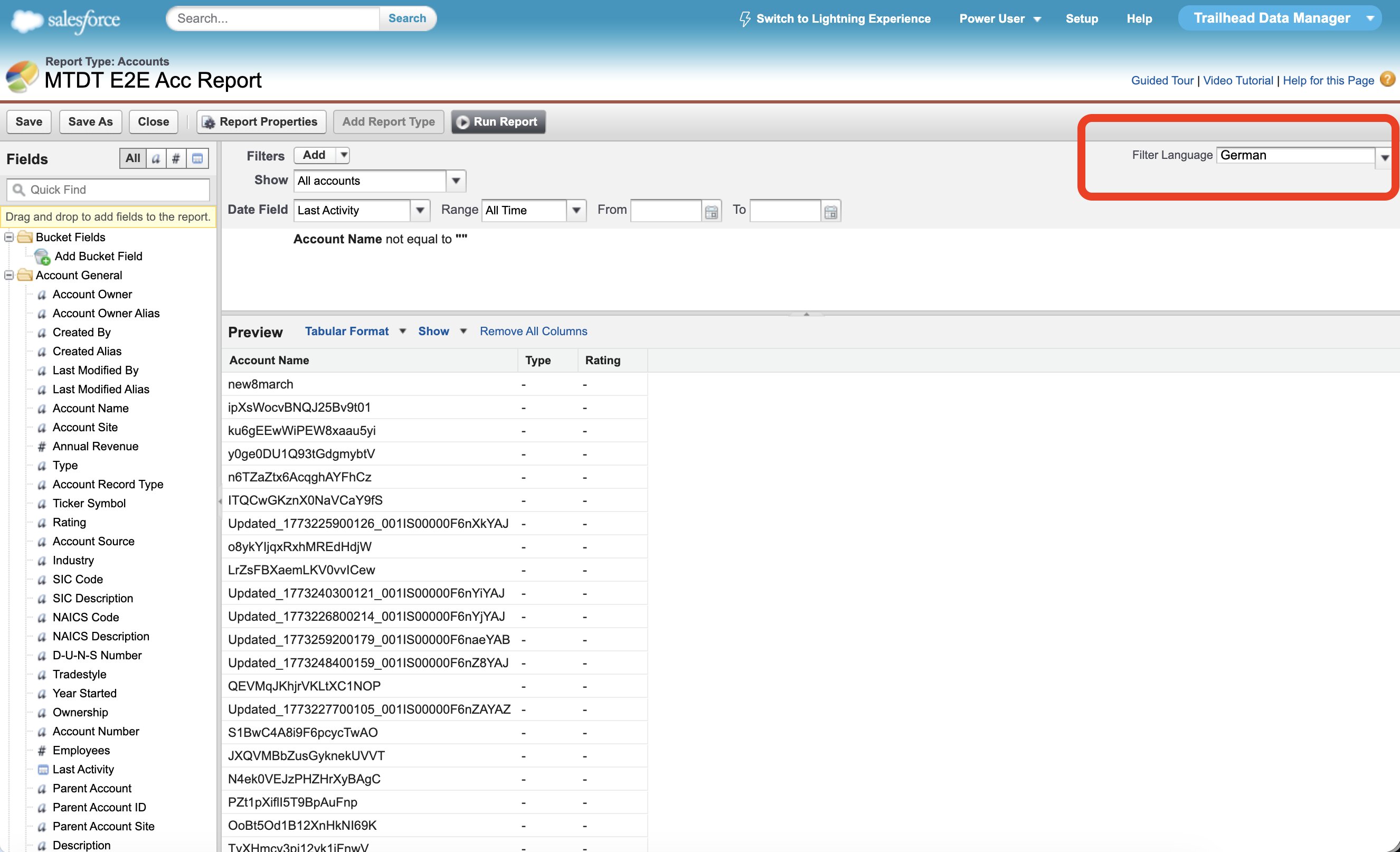
Deploy that report into an org where Translation Workbench is off (or doesn't have that language enabled) and Salesforce rejects the value — that's the filterlanguage: Invalid value specified error. The fix lives entirely in the target org's settings, not in the deployment:
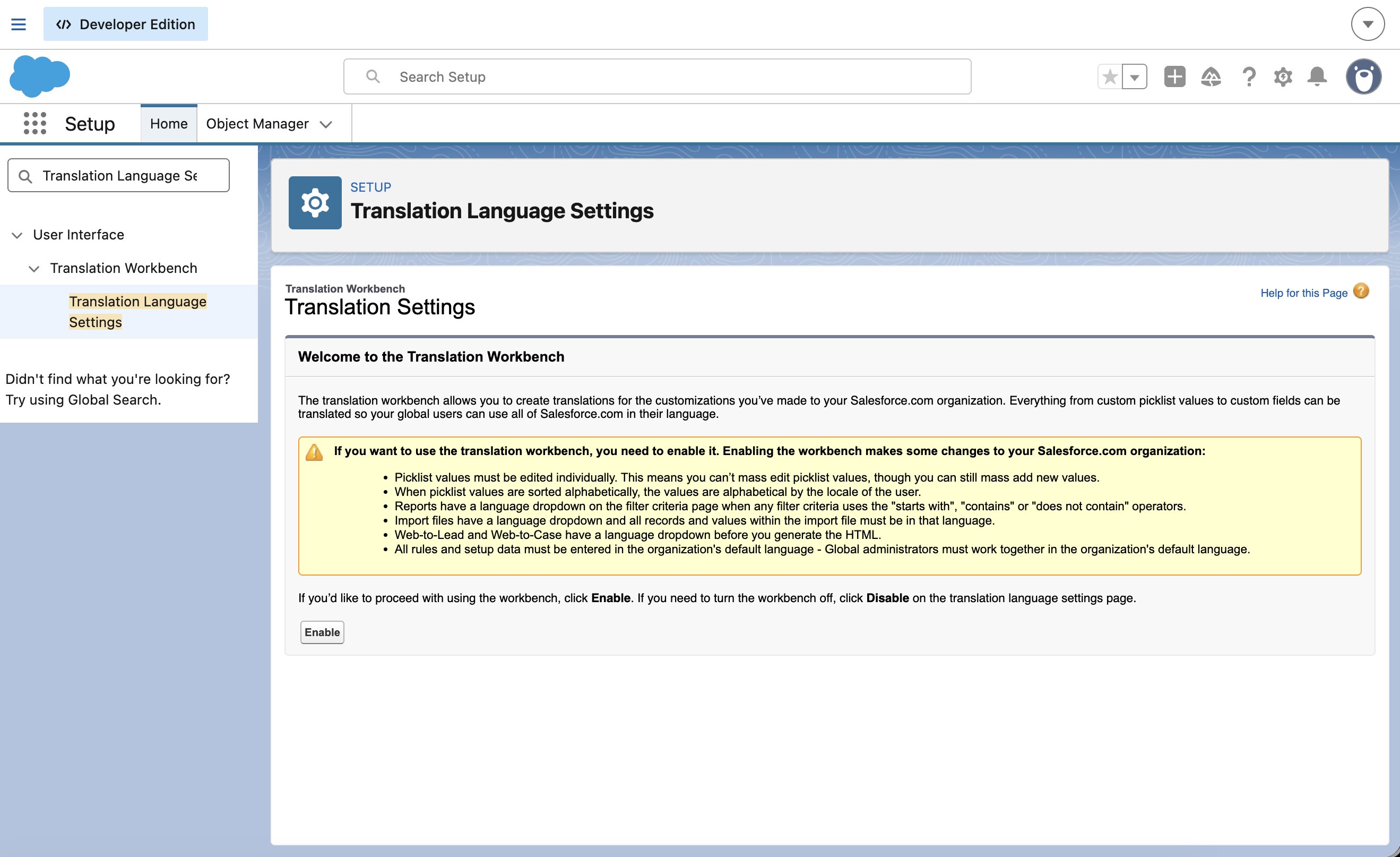
This is a Salesforce platform precondition: enable Translation Workbench (and the report's language) on the target, or clear the report's Filter Language on the source. No deployment tool can ship around it — Translation Workbench is an org setting, not deployable metadata.
What a tool can do is stop making you decode the error. mtdt.io matches the raw Salesforce message and explains it in place — what triggered it and the two ways to resolve it:
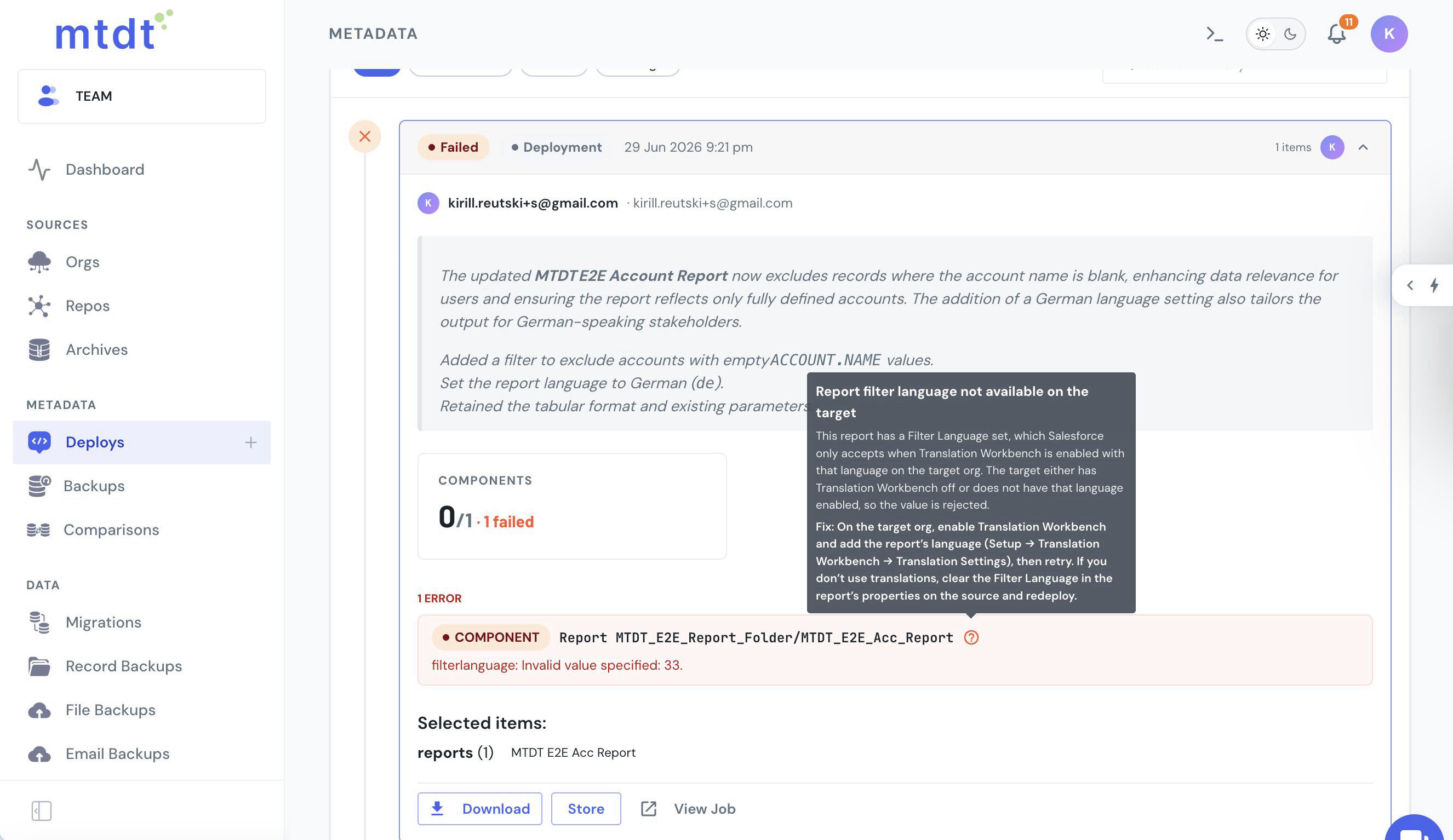
Reports deploy as first-class metadata
With mtdt.io, reports, report folders, and report types are all selectable metadata in their own right — pick what you need and deploy it org→org, no change set:
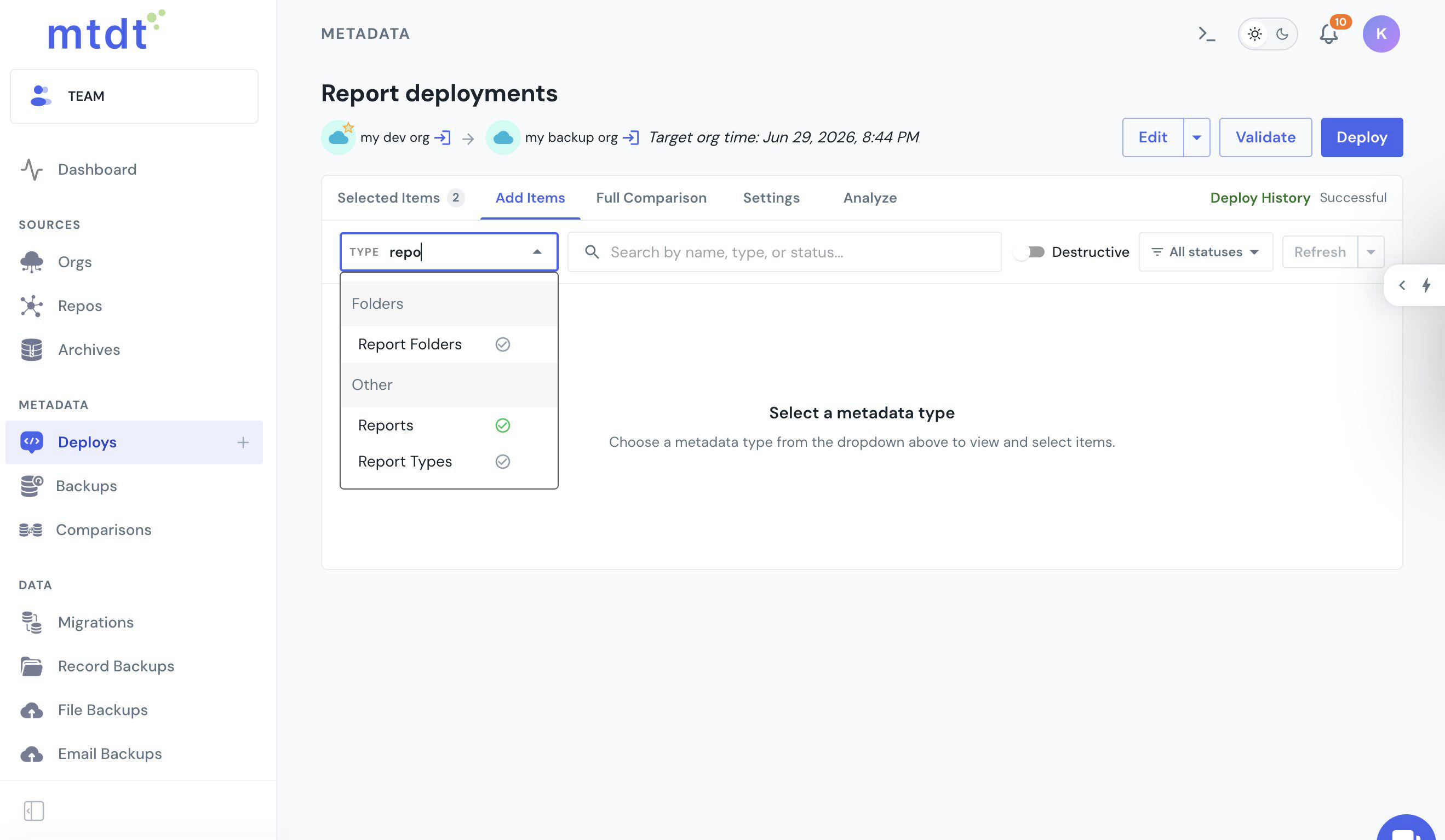
That removes the usual "deploy the whole thing" guesswork. The next two sections cover the dependencies that trip up a report-only deploy — and how mtdt handles each.
It brings the report's folder automatically
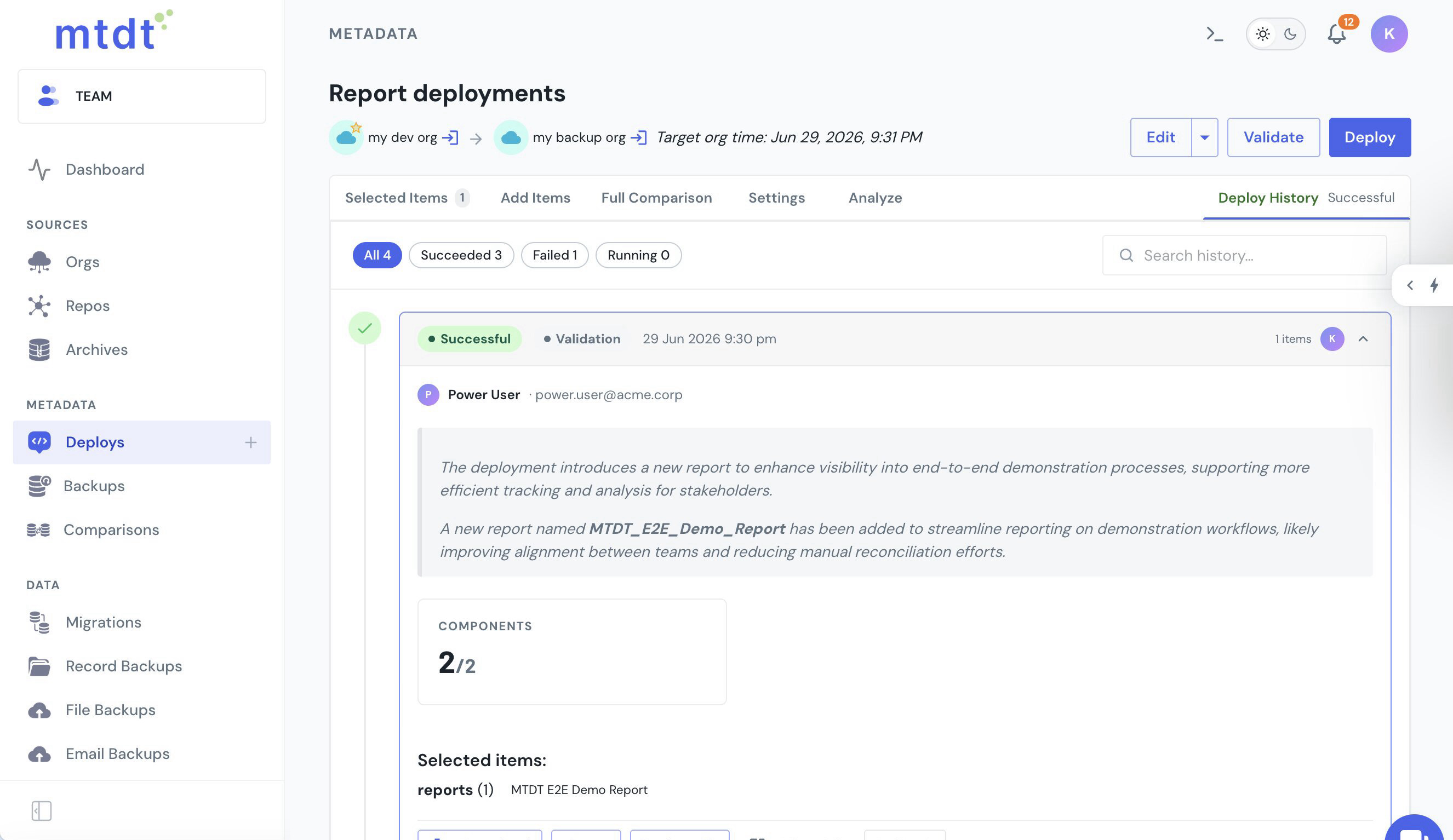
A report lives in a folder, and the folder is a hard dependency: deploy a report whose folder doesn't exist on the target and it fails with a folder-not-found error. mtdt.io handles this for you — it checks the target for each selected report's folder and adds any missing one to the deployment. Select a single report whose folder is new to the target, and mtdt deploys two components: the report and its folder.
It recommends the report type the report is built on
A custom report is built on a Custom Report Type, and that's another hard dependency — ship the report without its report type and Salesforce rejects it with invalid report type. Salesforce's own dependency graph (MetadataComponentDependency) returns nothing for a report, so a tool leaning on it gives no warning. mtdt.io reads the dependency out of the report's metadata and its Impact Analysis recommends the report type — flagged New when the target is missing it, one click to include:
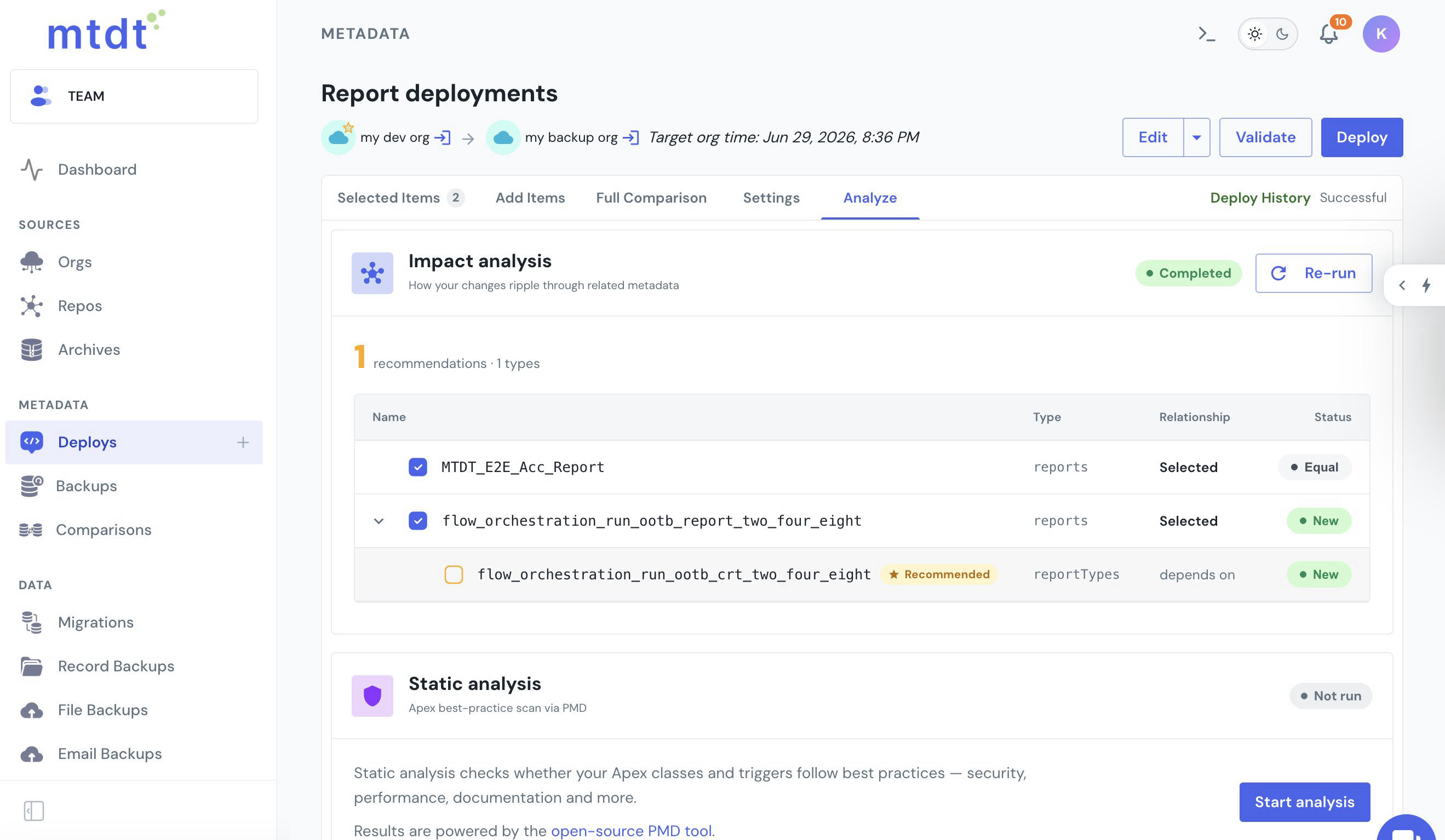
It does the same for the custom fields a report shows, filters, or groups on — so the columns referencing them don't fail with no CustomField named …. Include the recommendations and the report lands in one clean deploy. (For the report type on its own, see Deploy a Salesforce Custom Report Type to Production.)
The two limits that are Salesforce's, not the tool's
Some report-deploy problems are platform rules, and it's worth knowing them up front so you don't burn time looking for a tool setting that doesn't exist:
- Filter Language needs Translation Workbench on the target. Covered above — an org setting, enabled on the target (or the language cleared on the source). mtdt decodes the error so you know which it is.
- Multicurrency state has to match for currency-amount filters. A report filter like "Amount > 100 EUR" depends on the org being multicurrency. Org-level multicurrency is not deployable metadata, so this is the target admin's setting to align, not something a deploy carries.
Everything else in the report-deploy family — the folder, the report type, the referenced fields — is a real dependency mtdt resolves for you.
FAQ
What causes the "filterlanguage: Invalid value specified" error when deploying a report? The report has a Filter Language property set (only meaningful when Translation Workbench is enabled), and the target org either has Translation Workbench off or doesn't have that specific language enabled. This is a Salesforce platform precondition tied to the target org's settings, not something a deployment tool can carry around — you fix it by enabling Translation Workbench and the language on the target, or clearing the Filter Language on the source.
Why does a report deploy fail with a folder-not-found error? A report always lives in a folder, and the folder is a hard dependency — if it doesn't exist on the target, the deploy fails. mtdt.io checks the target for each selected report's folder and automatically adds any missing folder to the deployment, so a single selected report can deploy as two components: the report and its folder.
Why does deploying a custom report fail with "invalid report type"?
A custom report is built on a Custom Report Type, and Salesforce rejects the report if that report type doesn't exist on the target. Salesforce's own dependency graph (MetadataComponentDependency) doesn't return this dependency for a report, so most tools give no warning. mtdt.io reads the dependency out of the report's metadata and its Impact Analysis recommends the report type, flagged New when the target is missing it.
Can mtdt.io fix a currency filter that fails because of multicurrency mismatch? No — that one is a Salesforce platform limit. A report filter like "Amount > 100 EUR" depends on the org itself being multicurrency, and org-level multicurrency is not deployable metadata. It's the target admin's setting to align, not something any deployment tool can ship around.
Does mtdt.io deploy the fields a report references? Yes. Alongside the folder and report type, mtdt.io's Impact Analysis also recommends the custom fields a report shows, filters, or groups on, so the columns referencing them don't fail with a "no CustomField named …" error.
Deploy reports without decoding the errors
Let mtdt.io move your reports org→org as first-class metadata — bringing the folder along, recommending the report type and fields they need, and explaining the two Salesforce limits in plain language when they bite.
Log in to mtdt.io and deploy your reports.
Was this page helpful?
Let us know how we did