Can You Delete a Record Type Through the Metadata API? (And What to Do Instead)

You want to retire a record type, so you add it to a destructive deployment — and Salesforce throws it right back at you. Record types are one of the few components the Metadata API refuses to delete: put one in destructiveChanges and Salesforce hard-rejects it with Cannot delete record type through API, every time. The supported path instead is to deactivate it — deploy it with <active>false</active> — then delete it manually in Setup once no records reference it.
The short answer: you can't
Put a record type in a destructiveChanges deployment and Salesforce hard-rejects it, every time, with the same component error:
Cannot delete record type through API
That's the result for a check-only validation and a real deploy alike — the deletion is rejected outright and the record type is left untouched. It's a platform rule: change sets, the sf CLI, and every DevOps tool hit the same wall.
What to do instead: deactivate
The supported way to retire a record type has two steps:
- Deactivate it — deploy the record type with
<active>false</active>. That is allowed through the Metadata API, so you can move the deactivation between orgs like any other change. - Delete it manually in Setup, once no records reference it. Salesforce keeps the actual deletion a manual, guarded action because existing records may still point at the type.
One rule to know before you try: you can't deactivate the last active record type on an object. Salesforce blocks it with This record type cannot be deactivated because it is the last active record type. One active record type always has to remain.
The dependency catch
Deploying a record type — even only to flip it inactive — pulls in more than you'd expect. Salesforce stamps a record type with picklistValues for every picklist field on the object, so the deploy can fail on a field or global value set that isn't on the target yet (… cannot be resolved). It's the same record-type dependency that trips up an ordinary deploy. See Deploy Salesforce Record Types Without 'Picklist Value Not Found'.
How mtdt.io handles it
mtdt.io stops the dead-end before it costs you a deploy cycle:
- It won't let you select a record type for deletion. In destructive mode, record-type checkboxes are disabled and a banner above the list explains why, pointing you to deactivation — so you never run a full deploy, backups and all, just to learn Salesforce was always going to reject it.
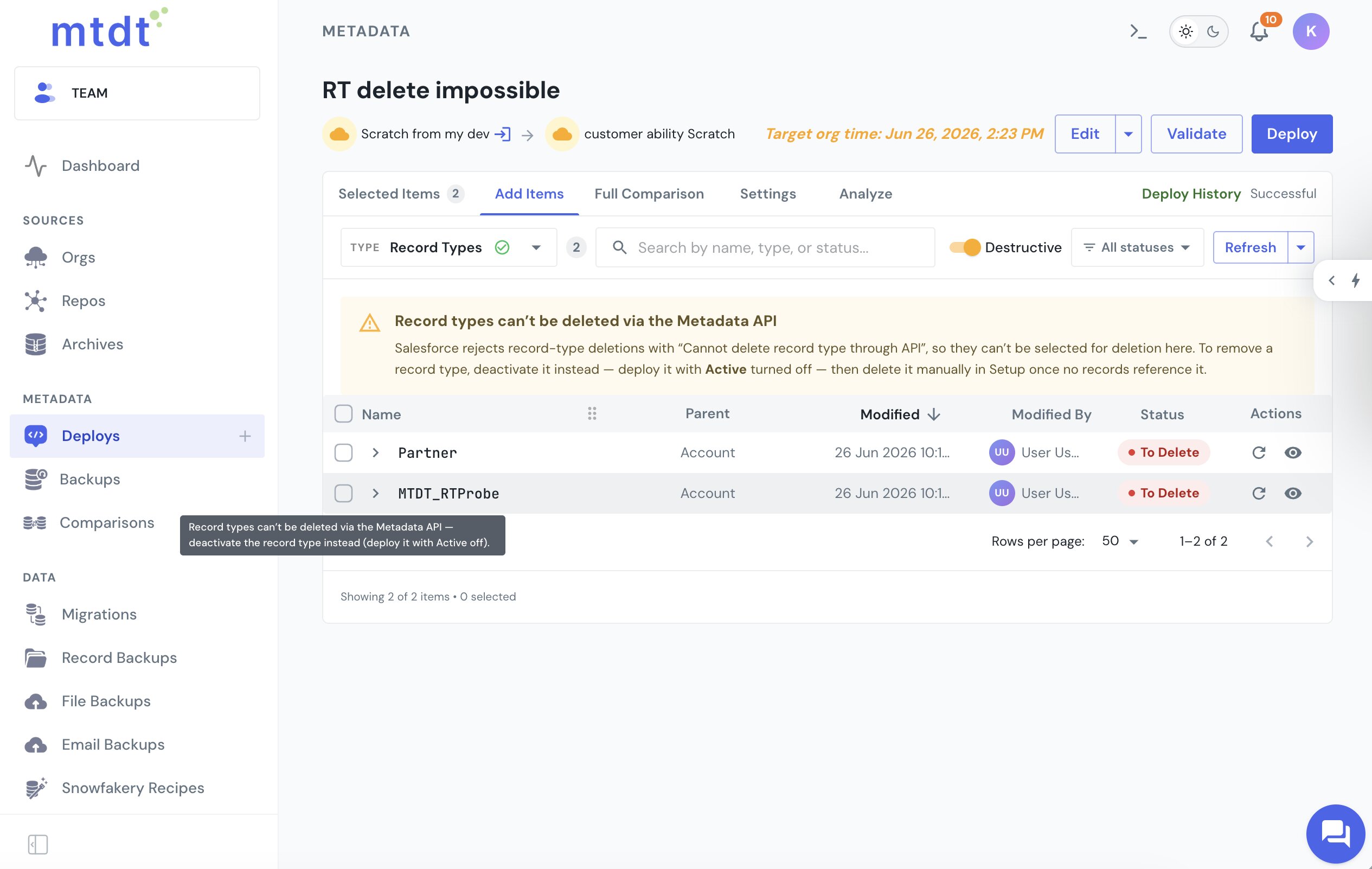
- It deploys the deactivation cleanly. Flip a record type to inactive and mtdt moves the
active=falselike any other change, while its Impact Analysis pulls in the picklist fields the record type depends on, so the deactivation actually lands.
FAQ
Can you delete a Salesforce record type through the Metadata API?
No. Salesforce hard-rejects a record-type deletion in a destructiveChanges deployment with Cannot delete record type through API, for both check-only validations and real deploys. This is a platform rule that applies to change sets, the sf CLI, and every DevOps tool alike — the record type is left untouched.
How do you retire a Salesforce record type if you can't delete it via the API?
Deactivate it first, then delete it manually. Deploy the record type with <active>false</active> (which the Metadata API does allow), and once no records reference it, delete it manually in Setup — Salesforce keeps the actual deletion a guarded, manual action.
Can you deactivate any record type on an object?
Not the last active one. Salesforce blocks deactivating the last active record type on an object with This record type cannot be deactivated because it is the last active record type — at least one active record type always has to remain.
Why does deactivating a record type sometimes fail on a picklist or global value set?
Because Salesforce stamps a record type with picklistValues for every picklist field on the object, so deploying it — even just to flip it inactive — can fail if a referenced field or global value set isn't on the target yet, with a "cannot be resolved" error.
How does mtdt.io handle record type deletion?
mtdt.io disables record-type checkboxes in destructive mode and shows a banner pointing to deactivation instead, so you don't run a full destructive deploy only to have Salesforce reject it. For the deactivation itself, mtdt deploys the active=false change like any other and pulls in the picklist fields the record type depends on through Impact Analysis, so the deactivation actually lands.
Retire record types the supported way
Let mtdt.io keep you off the Cannot delete record type through API dead-end — and deploy the deactivation, dependencies and all, the way Salesforce actually allows.
Log in to mtdt.io and deploy your record types.
Was this page helpful?
Let us know how we did