Deploy Destructive Changes in Salesforce Without Hand-Writing destructiveChanges.xml

You need to delete a field, an object, or a class from a target org — and your SFDX deploy quietly leaves it in place. A source deploy (sf project deploy start --source-dir, formerly force:source:deploy --sourcepath) deploys the components it finds in your source directory. Removing something is a separate instruction the source format doesn't carry — the manual path is a hand-authored destructiveChanges.xml paired with an empty package.xml and a pre/post ordering flag. mtdt.io turns that into a checkbox: pick what to delete, get the manifest built for you, and choose before-or-after deploy ordering with one radio.
Why --sourcepath can't delete
A source/sourcepath deploy describes what should be present — it pushes the components in your directory. Deletion is a different instruction, so to remove metadata you drop down to a manifest deploy and assemble three things by hand:
- a
destructiveChanges.xml— a second manifest, inpackage.xmlsyntax, listing exactly what to delete; - an (often empty)
package.xmlto accompany it; - a choice of ordering — whether the deletions run before or after the additive part — passed as
--pre-destructive-changesor--post-destructive-changes(older CLIs:--predestructivechanges/--postdestructivechanges).
Ordering matters because Salesforce refuses to delete a component while something still references it. Remove a field that an Apex class still uses and the deletion fails if it runs before the deploy that updates the class; run it after and it succeeds. Getting that order backwards is one of the most common reasons a destructive deploy errors out.
For a long stretch the base CLI didn't even apply destructiveChanges.xml on a source deploy at all (forcedotcom/cli#188) — which is why community plugins exist purely to delete metadata.
How mtdt.io handles deletes
With mtdt.io there's no manifest to assemble. In the deploy view's Add Items tab, flip the Destructive toggle. The grid switches to listing the target org's own components, each marked To Delete — tick the ones you want gone:
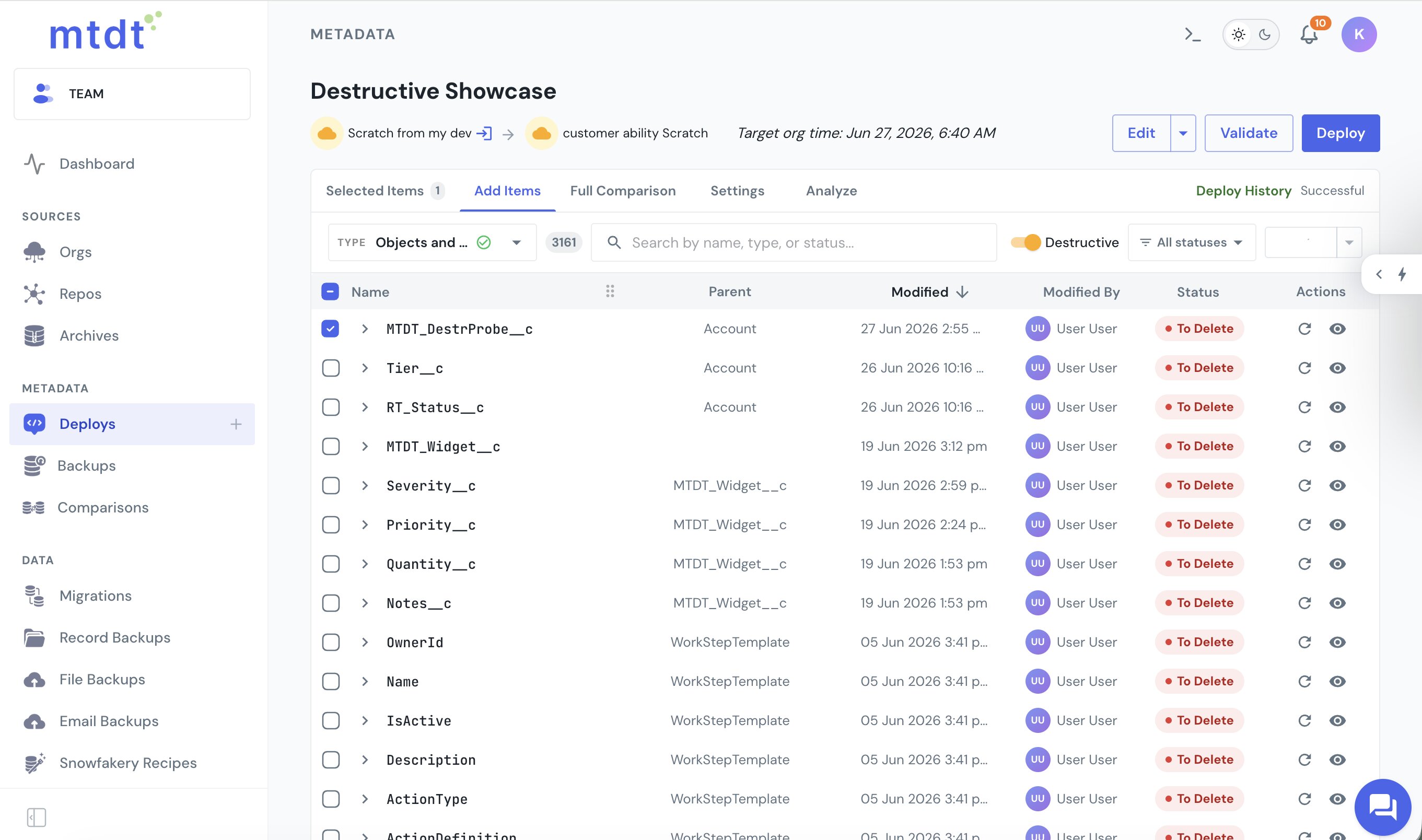
mtdt builds the destructiveChanges.xml and its empty package.xml from that selection. Additive items and deletions sit in separate buckets, so a single deploy can add and remove at the same time.
Before or after — one radio, not a flag
The pre-vs-post ordering that SFDX exposes as two separate flags is a single setting in mtdt. In the Deploy modal's Items & Notes step:
Destructive changes ● Before deploy (default) ○ After deploy
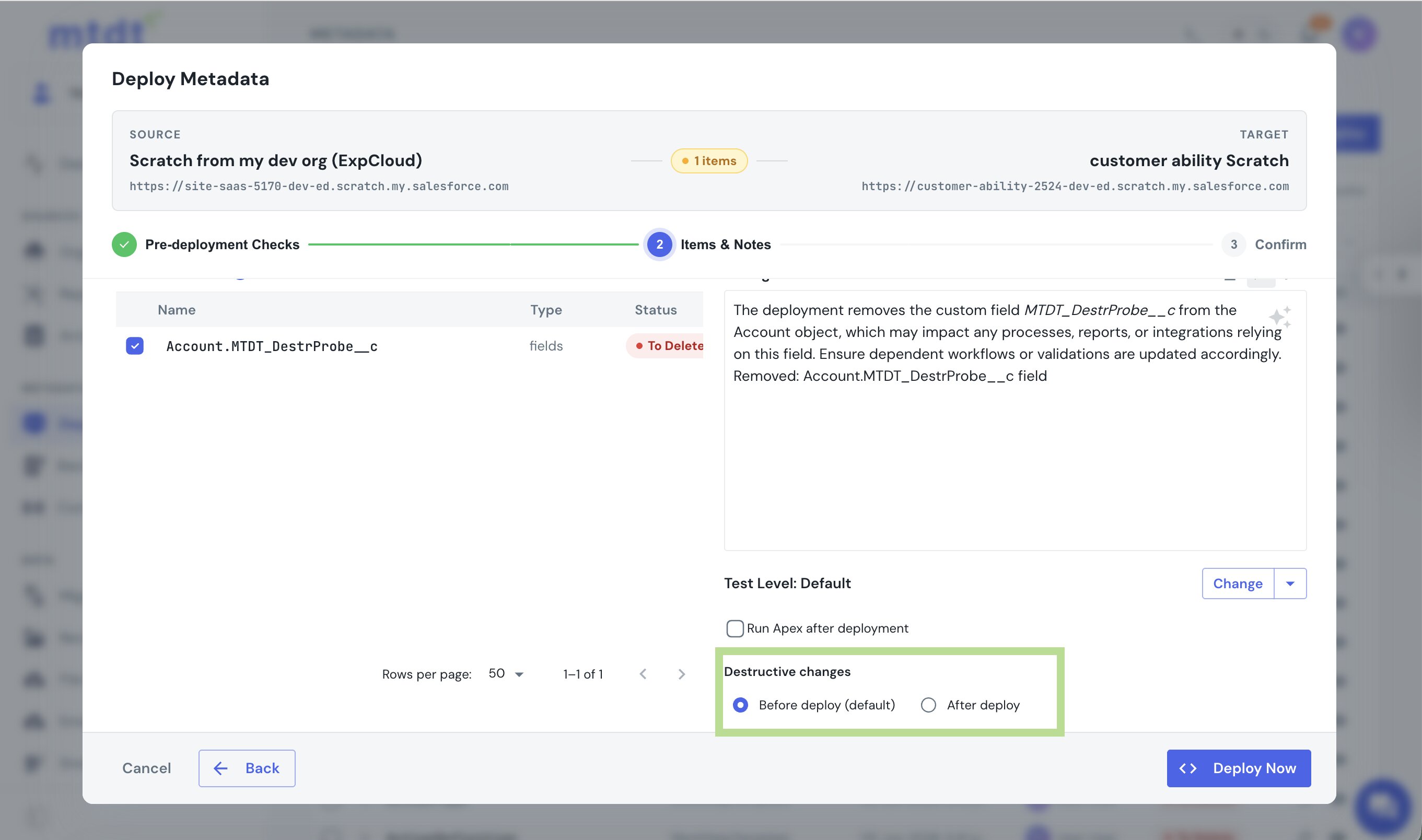
Before deploy writes the deletions into destructiveChangesPre.xml, so they run ahead of the additive metadata. After deploy writes destructiveChangesPost.xml, so the deletions run last and the additive part can clear references first. Same Salesforce semantics, chosen with a click.
A warning when something still references what you're deleting
This is the part that keeps a destructive deploy from failing at the org. When you mark a component for deletion, mtdt checks the target for what still points at it and surfaces it in the pre-deploy Impact Analysis, naming the referrer:
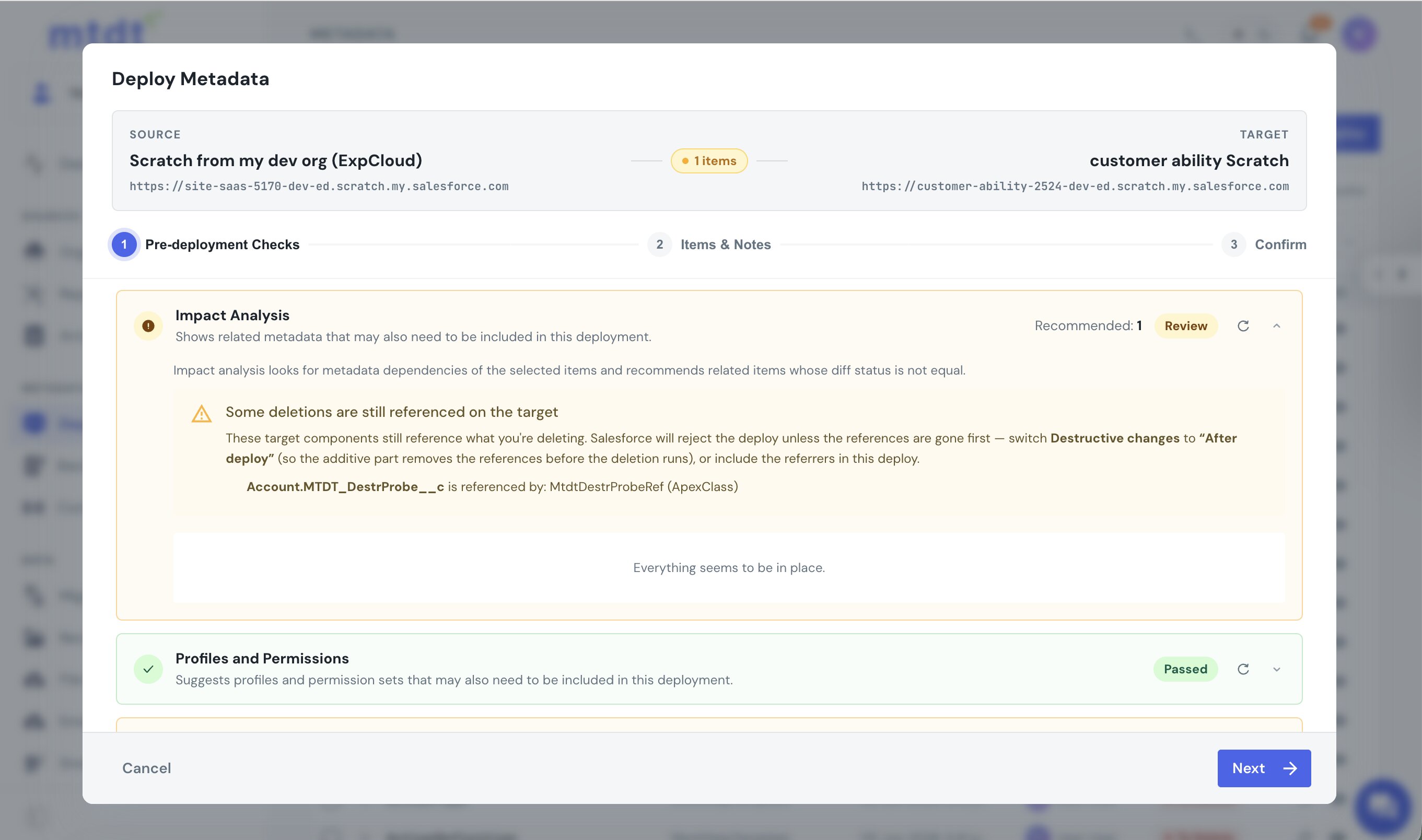
So the referrer shows up before you deploy — the field you're removing, named alongside the Apex class that still uses it — with the suggestion to switch to After deploy so the reference is dropped first. No cryptic org error to decode afterward.
Notice this stops at a warning: mtdt names the referrer without adding it to your deploy as an item. That's a deliberate split from the additive side. When you add metadata, a missing dependency has one correct resolution — include it — so mtdt recommends it and lets you tick it straight in. A still-referenced deletion has several resolutions, and they pull in different directions: maybe the deletion shouldn't happen at all; maybe the referencing Apex should be edited to stop using the field, a source change only you can make; maybe both should go together, or the ordering should move to After deploy so the reference clears first. Auto-adding the referrer would either cascade deletions you never requested or push code you didn't write into the deploy. So mtdt surfaces the exact reference and the ordering control, and leaves the decision to you.
One honest limit: this check reads Salesforce's dependency index, which covers the static reference graph (Apex, layouts, flows, and reports pointing at fields and objects) and misses some dynamic references — a field name built into a SOQL string or fetched with get() won't show up. A clear result means "no indexed references," so Salesforce stays the final word at deploy time, and the wording in the app says exactly that.
Backed up, and reversible
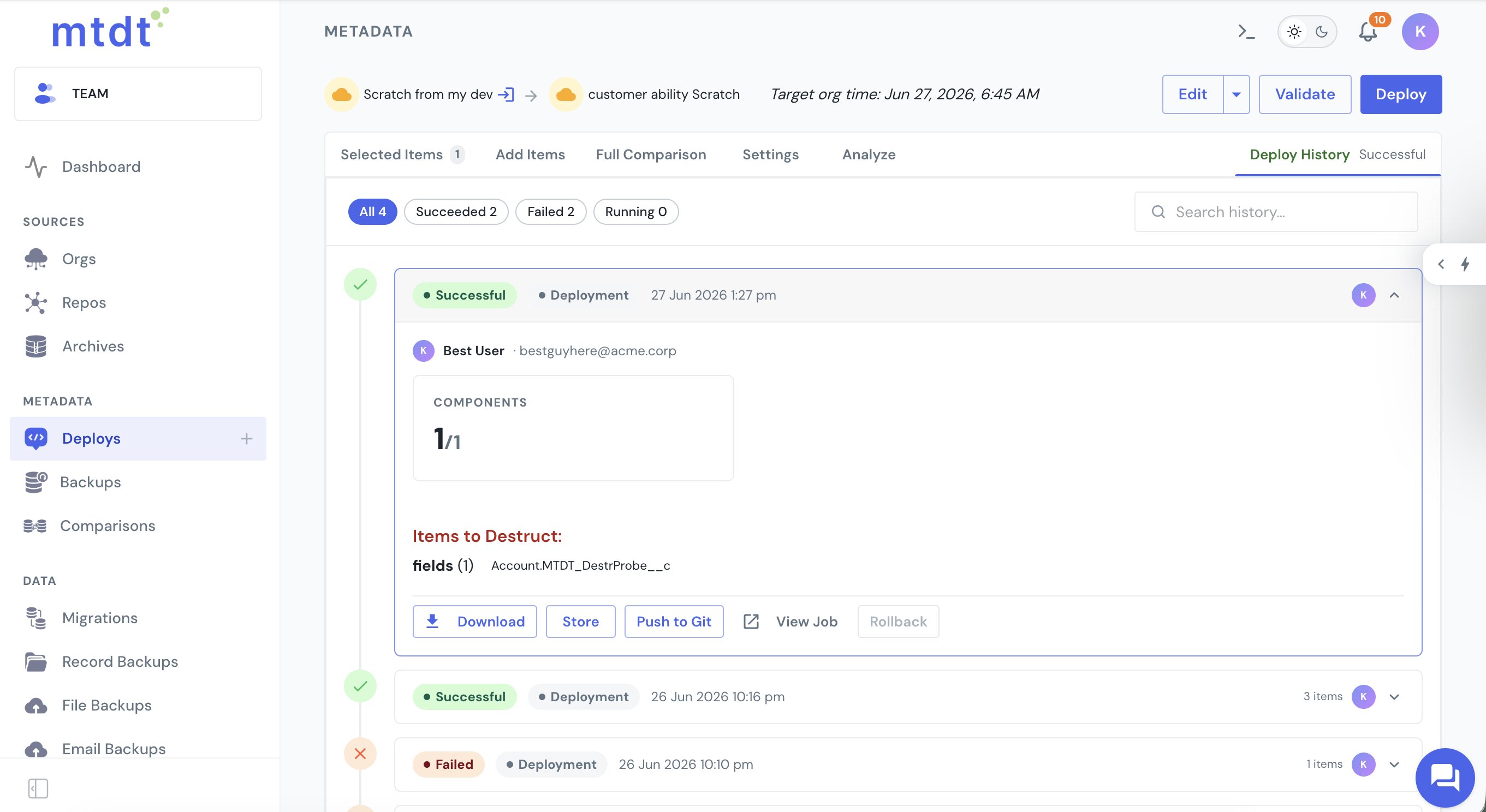
Before a destructive deploy mtdt flags Metadata Backup and Record Backups as recommended in the pre-deploy checks and takes a metadata backup of the target by default. The deploy runs with rollback-on-error, so a failed deletion fails the whole atomic deploy with nothing half-applied. Deploy History records what was removed under an Items to Destruct section, with Rollback available:
Deleting a whole custom object — and the "success" that deletes nothing
Deleting an entire custom object is where hand-rolled destructive deploys catch people out. You list the object under CustomObject in destructiveChanges.xml, zip it with an empty package.xml, deploy — and the job comes back Succeeded with zero components deleted. The object is still there. No error, nothing to decode.
The cause is a deploy() option called singlePackage. When your destructiveChanges.xml and package.xml sit flat at the root of the zip, Salesforce only reads them if singlePackage is true. Leave it at the wrong value and Salesforce treats the root as a package directory, finds no manifest where it expects one, and reports a clean success having done nothing. It's the single most common reason a custom-object deletion silently no-ops.
mtdt.io doesn't expose this as a knob you can get wrong. It builds the destructive zip with destructiveChanges at the root and sends singlePackage: true to match — the two are derived from the same layout, so they can't drift apart. Tick the object in the Destructive tab and the deletion actually lands.
We checked both sides of this against a live org. With mtdt's options the object deletes for real — the component comes back deleted=true and the object is gone. Send the same zip with singlePackage: false and Salesforce returns Succeeded, 0 components deployed, and the object survives — the exact trap the manual path falls into.
It's a soft delete — you have 15 days to change your mind
A custom object removed this way isn't wiped instantly. Salesforce moves it to Setup → Deleted Objects, where it stays recoverable for 15 days by default (extendable to 30 with Extended Recycle Bin Retention, which Salesforce Support enables). Only a deploy that sets purgeOnDelete skips the recycle bin for an immediate, unrecoverable removal — and mtdt.io leaves that off, so a deleted object keeps its undo window. The recycle bin is your safety net if a destructive deploy removed more than you meant.
What can't be deleted at all
Some metadata can't be removed through the Metadata API by any tool — a record type is the classic case: Salesforce rejects it outright with "Cannot delete record type through API." mtdt.io blocks the attempt up front and points you to the supported path — deactivate the record type — so the deploy doesn't stall on something the platform won't allow. That case has its own write-up: Why You Can't Delete a Salesforce Record Type via the Metadata API.
And for the dependency mapping that makes the additive side of a deploy land cleanly, see Deploy Salesforce Record Types Without 'Picklist Value Not Found'.
FAQ
Why doesn't a source-format SFDX deploy delete metadata?
Because a source/sourcepath deploy only describes what should be present — it pushes the components found in your source directory. Deletion is a separate instruction that format doesn't carry, so removing metadata requires dropping down to a manifest deploy with a destructiveChanges.xml.
What do you need to hand-build to delete Salesforce metadata via the Metadata API?
Three things: a destructiveChanges.xml listing exactly what to delete (in package.xml syntax), an often-empty package.xml to accompany it, and a choice of ordering — --pre-destructive-changes or --post-destructive-changes — for whether the deletions run before or after the additive part of the deploy.
Why does destructive-change ordering (pre vs post) matter? Salesforce refuses to delete a component while something still references it. Deleting a field that an Apex class still uses fails if the deletion runs before the deploy that updates the class, but succeeds if it runs after — getting the order backwards is one of the most common reasons a destructive deploy errors out.
Why did my custom-object deletion succeed but not delete the object?
Almost always the singlePackage deploy option. When destructiveChanges.xml and package.xml sit at the root of the zip, Salesforce reads them only if singlePackage is true; with it false, the deploy reports Succeeded with zero components deleted and the object stays. mtdt.io sends singlePackage: true to match its flat-root layout, so the deletion actually applies.
Is a deleted custom object gone for good?
No — it's a soft delete. A custom object removed through a metadata deploy goes to Setup → Deleted Objects and is recoverable for 15 days by default (extendable to 30 via Extended Recycle Bin Retention). Only a deploy that sets purgeOnDelete removes it immediately and unrecoverably; mtdt.io leaves that off, so the undo window stays intact.
Can every type of Salesforce metadata be deleted through the Metadata API? No. A record type is the classic exception — Salesforce rejects a record-type deletion outright with "Cannot delete record type through API," regardless of the tool used. The supported path there is to deactivate the record type instead, then delete it manually in Setup.
How does mtdt.io handle destructive deploys?
mtdt.io replaces manual manifest-building with a Destructive toggle in the Add Items tab: tick the target-org components you want gone, and mtdt builds the destructiveChanges.xml and its empty package.xml for you. It also exposes pre/post ordering as a single radio in the Deploy modal, checks the target for anything still referencing what you're deleting and surfaces it in Impact Analysis, and takes a metadata backup by default so a destructive deploy is reversible.
Delete metadata without hand-building a manifest
Let mtdt.io turn deletions into a checkbox: pick what to remove, get the destructiveChanges manifest built for you, choose before-or-after with one radio, and see what still references a component before Salesforce rejects it.
Log in to mtdt.io and deploy your destructive changes.
Was this page helpful?
Let us know how we did