Pre-Deployment Checks
Before a deployment runs, mtdt.io checks it against the target org and flags anything risky — missing dependencies, forgotten profiles, no rollback point — so you fix it before you deploy, not after a failed release.
The checks run automatically when you open a deployment. You don't configure anything to get them.
How verdicts work
Each check guards against a specific class of deployment problem and gets a clear verdict:
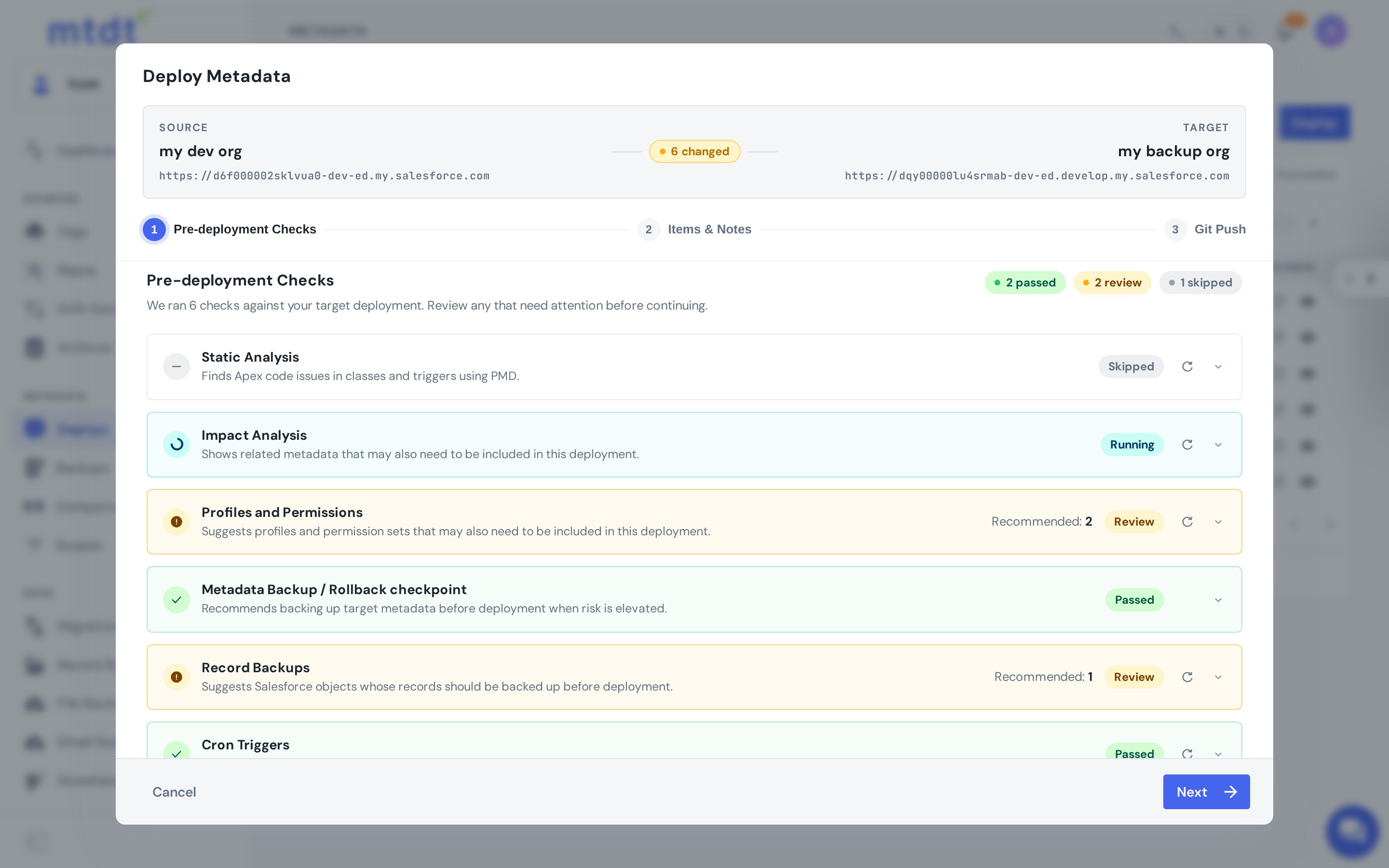
- Passed — the check ran and found nothing to act on.
- Review — the check ran and found something worth your attention. It comes with a concrete recommendation, usually with a count (e.g. "2 profiles recommended", "1 object to back up").
- Skipped — the check doesn't apply to this deployment.
If you change the selected components after a check has run, that check is marked stale and asks you to refresh so its recommendations match what you're actually deploying.
What each check looks for
This is the logic behind each verdict — when a check moves to Review, and what it recommends.
Impact Analysis
Walks the dependencies of your selected components and recommends related metadata whose diff status is not "equal" — i.e. it differs between source and target, so it most likely needs to ship too. Missing such a dependency (a field a flow relies on, a class an Apex test needs) is the single most common cause of a failed deploy.
- Review when related, differing metadata is found.
- Passed when nothing related is out of sync.
You can pull the recommended items into the deployment directly from the check.
Profiles and Permissions
Recommends the profiles and permission sets that grant access to the components you're deploying and aren't already aligned on the target — so a new object, field, or class lands with the access it needs instead of being invisible to users.
- Review when one or more affected profiles/permission sets are found.
- Passed when none are affected.
Recommended access can be added to the deployment as a partial override from within the check.
Static Analysis
Runs PMD against the Apex in the deployment (see Static Analysis).
- Skipped when the deployment contains no Apex.
- Review when there are findings — code-quality recommendations and/or security findings.
These findings are advisory, not deploy blockers — they're surfaced so you can improve quality and maintainability, and (with security findings) catch risky patterns early.
Metadata Backup / Rollback checkpoint
Recommends capturing a rollback point before the deploy when the risk is elevated. It moves to Review when any of these is true:
- the target org is marked as important,
- the deployment includes destructive changes (deletions), or
- Deploy Risks shows a High risk for this deployment.
Otherwise a backup is treated as optional for this deployment. The check is skipped in validation mode. When enabled, mtdt.io backs up the exact metadata this deployment will change before applying it — and that snapshot becomes the one-click rollback point.
Record Backups
Recommends backing up the records of related objects whose data the change could affect (derived from impact analysis). It shows any recent backups of those objects so you can tell whether you're already covered, and lets you add extra objects.
- Review when one or more data-bearing objects are impacted and not yet covered.
- Passed when no impacted objects are found.
Cron Triggers
Finds scheduled jobs (CronTriggers) related to the deployment and recommends a per-job action:
- Create — re-schedule a job (Salesforce doesn't deploy running job instances, so a job tied to a class you're deploying often needs to be re-created — see running Apex after a deployment).
- Delete — remove a job before a destructive change that would otherwise leave it dangling.
Passed when no related scheduled jobs are found.
Deploy Risks
Finds changes in the deployment that affect existing records and users on the target, such as a field made required, a validation rule activated, access removed from a profile or permission set, or a change to org-wide sharing. For each one it counts on the target org how many records or users it touches and lists what to check before and after the deploy (see Deploy Risks).
- Review when at least one risk needs attention.
- Passed when none does.
Shown for Salesforce org targets only.
Acting on a check
The checks don't block you. Review what's flagged, fix what matters — pull in the missing dependency, include the profile, enable the rollback point, add an object to back up — then continue, or deploy as-is if you've decided it's fine. The goal is that when a deployment goes ahead, it does so on purpose.
Best practices
- Always read the Impact Analysis review — including the dependency it names is usually the difference between a clean deploy and a failed one.
- Enable the rollback point whenever the Metadata Backup check flags elevated risk.
- Back up the records the check recommends before a change that touches data.
For the bigger picture, see Pre-deployment checks: catch what breaks a deploy before it runs.