Deploy Individual Salesforce Assignment Rules
Deploying a single Lead or Case assignment rule between orgs runs into two Salesforce platform facts. mtdt.io lets you retrieve, compare, and deploy one assignment rule at a time — a selectable row per rule — and warns before a deploy silently flips which rule is active.
Problem 1: assignment rules are an all-or-nothing container
In the Metadata API, every assignment rule for an object lives in one file — Lead.assignmentRules holds all of Lead's rules. Deploy that file and if any single rule is invalid on the target — say it routes to a queue or user that only exists in the source org — the whole deploy fails, including the one good rule you actually wanted. (Change sets historically couldn't carry assignment rules at all.) This is a packaging fact of the platform, not something a tool can remove.
How mtdt.io works around it. It decomposes the container into one selectable row per rule. You pick the single rule you want, and mtdt.io deploys it as the addressable AssignmentRule member (Object.RuleName), which Salesforce merges — the rule lands, every sibling rule (including a broken one) is left untouched, and the deploy succeeds. The Add Items table shows a Parent column so you can tell each object's rules apart (Lead → Standard versus Case → Standard).
Problem 2: only one rule can be active per object — and activating one silently deactivates the other
Salesforce allows exactly one active assignment rule per object. Deploy a rule with active=true and Salesforce quietly turns off whichever rule was active before — no error, the deploy reports Success. So a one-rule deploy can silently change who receives your new leads or cases, with nothing in the deploy result to tell you. (This applies the same in sandbox and production — assignment rules are not subject to the "deploy as inactive in production" behavior that Flows and Processes have.)
How mtdt.io works around it. A pre-deployment check flags it before you run the deploy. When a selected active rule would deactivate a different currently-active rule on the target, mtdt.io shows the side-effect plainly:
On Lead, deploying CLDE2E_LeadRule will deactivate Standard.
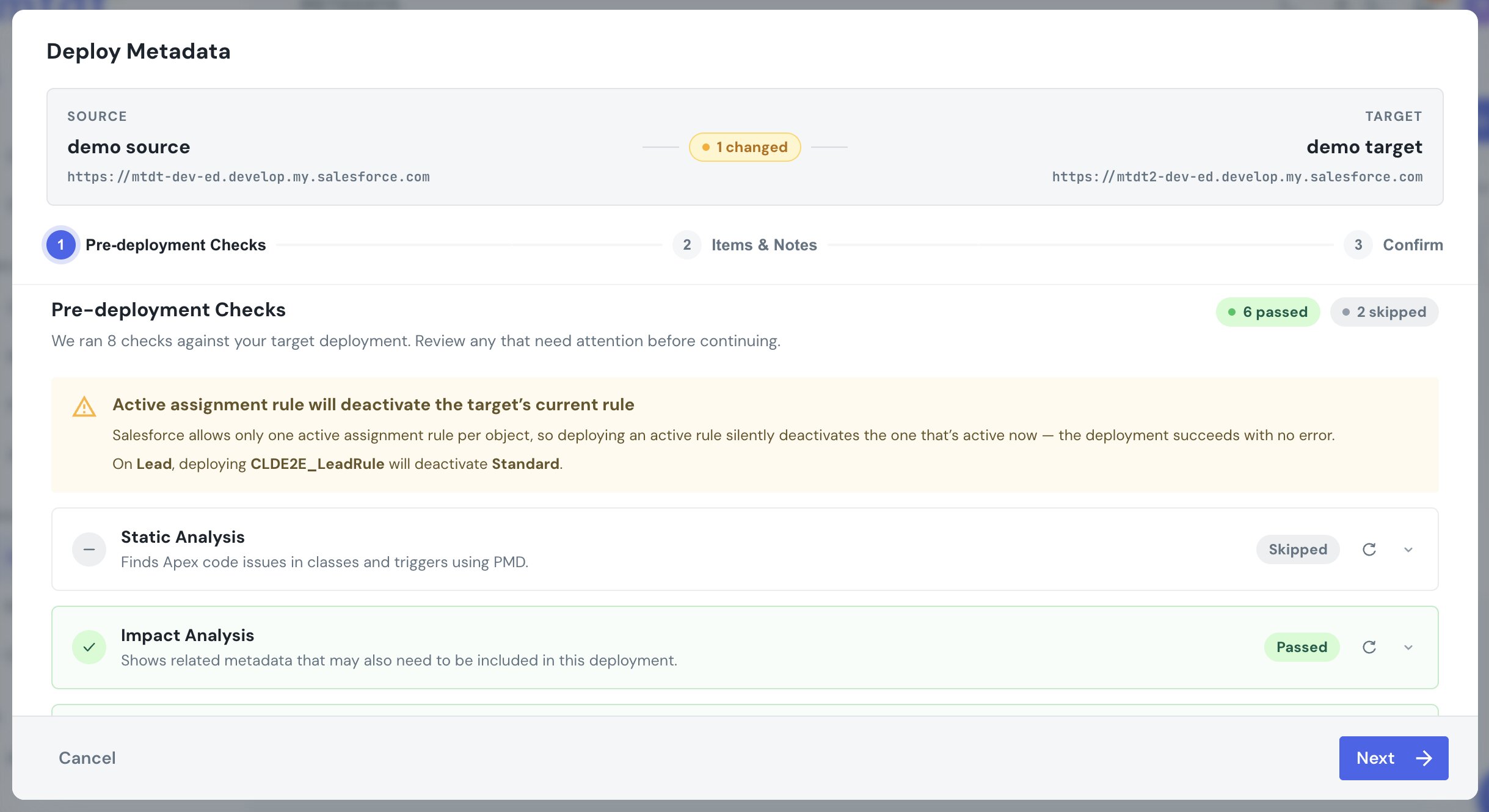
The warning is advisory — it never blocks the deploy, because switching the active rule is often exactly what you intend. It just makes the otherwise-invisible side-effect visible.
How to deploy one assignment rule
- In the deploy's Add Items step, choose the type Assignment Rules.
- Pick the individual rule you want from the per-rule rows (use the Parent column to tell Lead from Case rules).
- Review the Pre-deployment Checks — if the rule is active and would replace the target's live rule, the warning above appears.
- Deploy. The rule merges into the target; its sibling rules are untouched.
FAQ
Why does deploying one assignment rule fail because of a different rule? Because the Metadata API packages all of an object's assignment rules in one file. If any rule in that file is invalid on the target (for example, it routes to a queue or user that doesn't exist there), Salesforce fails the whole deploy. mtdt.io avoids this by deploying the single rule you pick as an addressable member, which merges without touching the others.
Can you deploy a single Salesforce assignment rule?
Yes. mtdt.io decomposes the assignment-rules container into one selectable rule per row and deploys the one you choose as an AssignmentRule member (Object.RuleName). Salesforce merges it in, leaving every sibling rule as it was.
Why did my old assignment rule turn off after a deployment? Salesforce allows only one active assignment rule per object, so deploying a rule with active set to true silently deactivates whichever rule was active before — and the deploy still reports success. mtdt.io's pre-deployment check warns you when a deploy would do this, naming the rule that will be deactivated.
Does mtdt.io remove the one-active-rule-per-object limit? No — that's a Salesforce platform rule and no tool can change it. What mtdt.io does is make the invisible side-effect visible: it warns before a deploy switches which rule is active, so you're not surprised by leads or cases routing somewhere new.
Related
- Pre-deployment checks — the checks that run before a deploy, including this warning.
- Deploying Metadata with mtdt.io — how source↔target deployments work.