Deploy Risks: What a Deploy Changes for Existing Records and Users
A deploy can succeed and still change how the target org behaves the next morning. A field becomes required, and records that have it blank fail on their next edit. A new validation rule starts rejecting saves. A profile stops granting access to fields its users work with. Deploy Risks finds changes like these in your selection, counts on the target org how many records or users each one touches, and lists what to check before and after the deploy.
Where you see it
Deploy Risks is the last card in the pre-deployment checks when you deploy or validate to a Salesforce org. It is not shown for repository push targets.
The check compares the source and target versions of the selected components that are new or different, the same versions you see in the diff. To count records and users it runs read-only count queries on the target org. On a production org with a flow being activated, it also reads the org setting Deploy processes and flows as active. It doesn't change anything in the org.
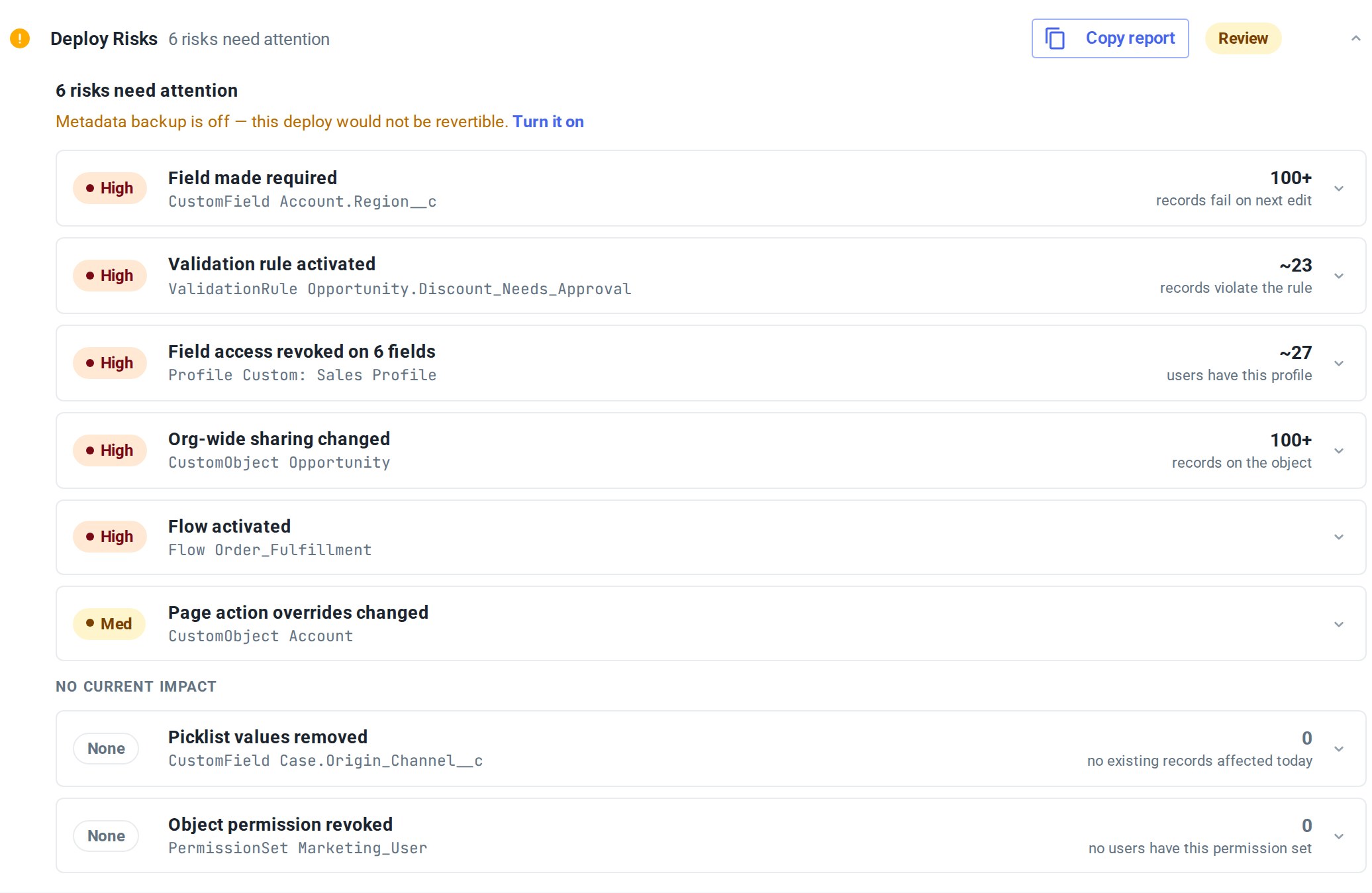
The header shows how many risks need attention. Rows still being counted come first, then High, then Med. Rows counted at 0 go last.
What it finds and what it counts
| Change | Counted on the target org | Shown as |
|---|---|---|
| Field made required | Records where the field is blank | records fail on next edit |
| New required field | All records on the object | records fail on next edit |
| Picklist values removed | Records that hold one of the removed values | records affected |
| Field type narrowed: a Text field gets shorter | Records with values longer than the new length | records over N characters |
| Field type narrowed: other type changes | Not counted | |
| Validation rule activated or Validation rule condition changed | Records that match the rule's condition, when the condition can be fully written as a query | records violate the rule |
| Org-wide sharing changed | All records on the object | records on the object |
| Field access revoked, Object permission revoked, User permission dropped, Apex class access revoked, Tab hidden and other access removed from a profile or permission set | Active users who have the profile, or the permission set directly or through a permission set group | users have this profile / users have this permission set |
| Flow activated | Not counted. On a production org the check reads whether Deploy processes and flows as active is on | |
| Flow deactivated, Validation rule deactivated, Page action overrides changed | Not counted |
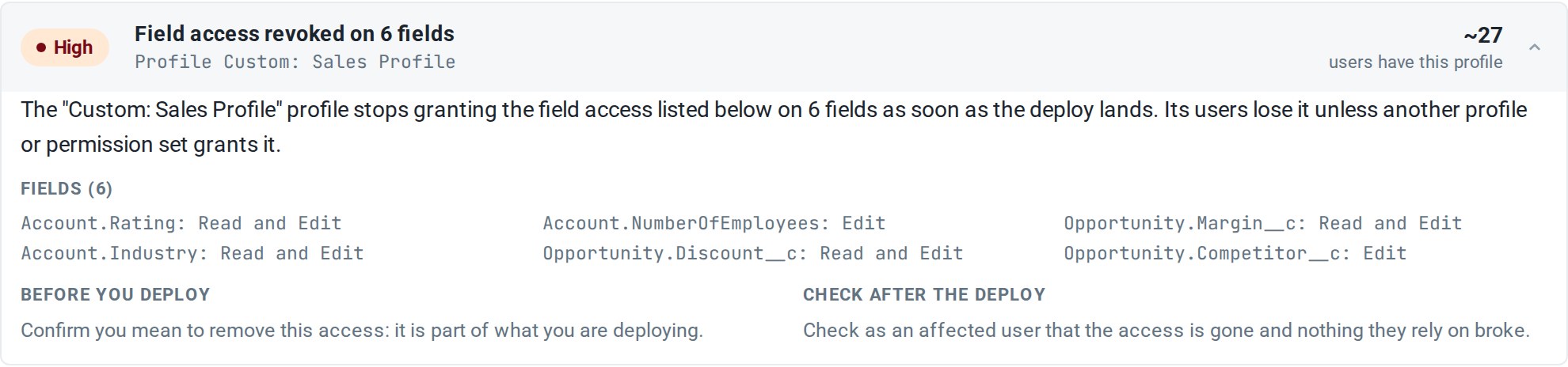
Access changes are grouped by profile or permission set. Each kind of access gets one row, which lists every field, object or permission the profile or permission set stops granting.
The user count is everyone who has that profile or permission set. Some of them may keep the same access through another profile or permission set, so the number of people who actually lose access can be lower.
How to read a row
Impact. Rows are marked High or Med. These start as Med:
- Page action overrides changed, App access revoked and Tab hidden.
- Flow activated on a production org when the flow will land inactive: Deploy processes and flows as active is off on the org, and Activate flows after deployment is off or this flow is excluded from it. If the check couldn't read the org setting, the row stays High.
The number.
- ~23 is the count taken when the check ran. It can change by the time you deploy.
- 100+ means at least 100 records. Record counts stop there.
- measuring… means the count is still running. On a Flow activated row it means the org setting is still being read. While any row is measuring, the header adds still measuring N changes….
- object too large to count means the count didn't finish in time. A High row with this note is shown as Med.
- Some rows have no number: the changes the table marks as not counted, a validation rule whose condition can't be fully written as a query, and rows where the count couldn't be made.
Zero. A row counted at 0 moves under No current impact with a None mark and doesn't count toward the risks that need attention. The change still lands with the deploy. For example, after an org-wide sharing change with no existing records, new records will follow the new sharing model.
Details. All rows start collapsed. Expand a row to see:
- What happens after the deploy lands.
- For a grouped access row, the list of fields, objects or permissions.
- Before you deploy: what to review first, often with a SOQL query you can copy with Copy SOQL. For a validation rule with a count, this is the query the check ran. For a new field, the note under the query says to run it after the deploy, since the field doesn't exist on the target yet.
- Check after the deploy: what to try in the org once the deploy is done.

Copy report
Copy report puts a Markdown report on the clipboard, ready to paste into a ticket, a pull request or release notes. It contains:
- the same summary as the card;
- Effects: each risk with its impact, count, what happens, and the before and after steps, including the SOQL;
- No current impact: the rows counted at 0;
- QA checklist: test steps with an expected result for each risk. Rows with no current impact are left out of the checklist.
An excerpt from the checklist:
## QA checklist

### Field made required — CustomField Account.Region__c
1. **Create an Account record leaving Region__c blank — expect it rejected**
   - Open the Account create page in the target org.
   - Fill every other required field but leave Region__c blank.
   - Save the record.
   - Expected: Save is rejected with a required-field error on Region__c.
Deploy Risks and metadata backup
When the card has at least one High row that isn't counted at 0 or still measuring, and metadata backup is off for this deploy:
- the card shows Metadata backup is off — this deploy would not be revertible. with a Turn it on link that turns the backup on for this deploy;
- the Metadata Backup / Rollback checkpoint check moves to Review and gives this deploy's high-severity risk as the reason.
Neither happens in validation mode. With the backup on, you can roll back the metadata this deploy changed.
It never blocks the deploy
Deploy Risks is informational. You decide whether to clean up records, change the selection or deploy as is.
- The card is Review while at least one risk needs attention, Running while rows are still being counted and none needs attention yet, and Passed otherwise.
- No traceable risks detected. means the check found none of the changes in the table above.
- None of the selected components changed against the target org. means the selected components match the target.
- In validation mode a card with rows adds Validation changes nothing in the org. These effects apply when you deploy.
FAQ
Does the check change anything in my org? No. It only runs read-only count queries on the target org and reads one org setting.
Why does the row say "users have this profile" and not "users lose access"? The check counts everyone who has the profile or permission set. Whether a given user loses the access depends on what their other profiles and permission sets grant, so the number is an upper bound.
What does a row counted at 0 mean? When the check ran, the change affected no existing records or users on the target. The change still deploys and applies from then on, for example to records created later.
Related
- Pre-Deployment Checks: the full set of checks mtdt.io runs before a deploy.
- Detect Target-Org Changes: find out whether the target changed after your last compare.
- Metadata Rollback: restore the target if a deploy still goes wrong.