Deploying Apex & the 75% Coverage Gate
Deploying Apex to production does more than move code: Salesforce runs your tests and enforces coverage. Get it wrong and the whole deployment stops:
Average test coverage across all Apex Classes and Triggers is 71%, at least 75% test coverage is required to complete this deployment.
Each trigger also needs ≥1% of its own, and a single failing test fails the entire deploy. The usual workaround — run every test in the org (RunAllTests) — is slow and tells you nothing about which test actually matters for your change.
Test levels: run only the tests you need
A deploy runs Apex tests according to its test level. Salesforce has four:
- No Test Run (
NoTestRun) — skip tests. Available for sandboxes and tooling only; a production Apex deploy can't use it. - Run Specified Tests (
RunSpecifiedTests) — run only the test classes you name. The fast option for a scoped change, with one catch: each class covering the components you deploy still needs ≥75% coverage. - Run Local Tests (
RunLocalTests) — run every test in your org except managed-package tests. The usual safe choice for production. - Run All Tests In Org (
RunAllTestsInOrg) — everything, managed packages included. The slowest.
How you set the level depends on the tool:
- Change sets — choose the test level on the deployment screen, and for Run Specified Tests type the test class names.
- Metadata API / Salesforce CLI — pass it on the deploy command, e.g.
sf project deploy start --test-level RunSpecifiedTests --tests MyTest1 MyTest2(older CLIs use--testlevel/--runtests). - mtdt.io — the deploy wizard's Test Level control sets it in one place, and can fill in the Run Specified Tests list for you (below). Its Configure Test Level dialog also offers Default — leave the level unset and let Salesforce apply its own default for the target.
RunSpecifiedTests is what most teams reach for to avoid running the whole org on every change — the hard part is knowing which tests cover what you're deploying. That's the part mtdt.io works out for you.
mtdt.io recommends the tests your change needs
Add your Apex classes/triggers to a deployment and open the Validate or Deploy wizard. On the Items & Notes step, mtdt.io analyses what you're shipping and recommends the unit tests that cover it:
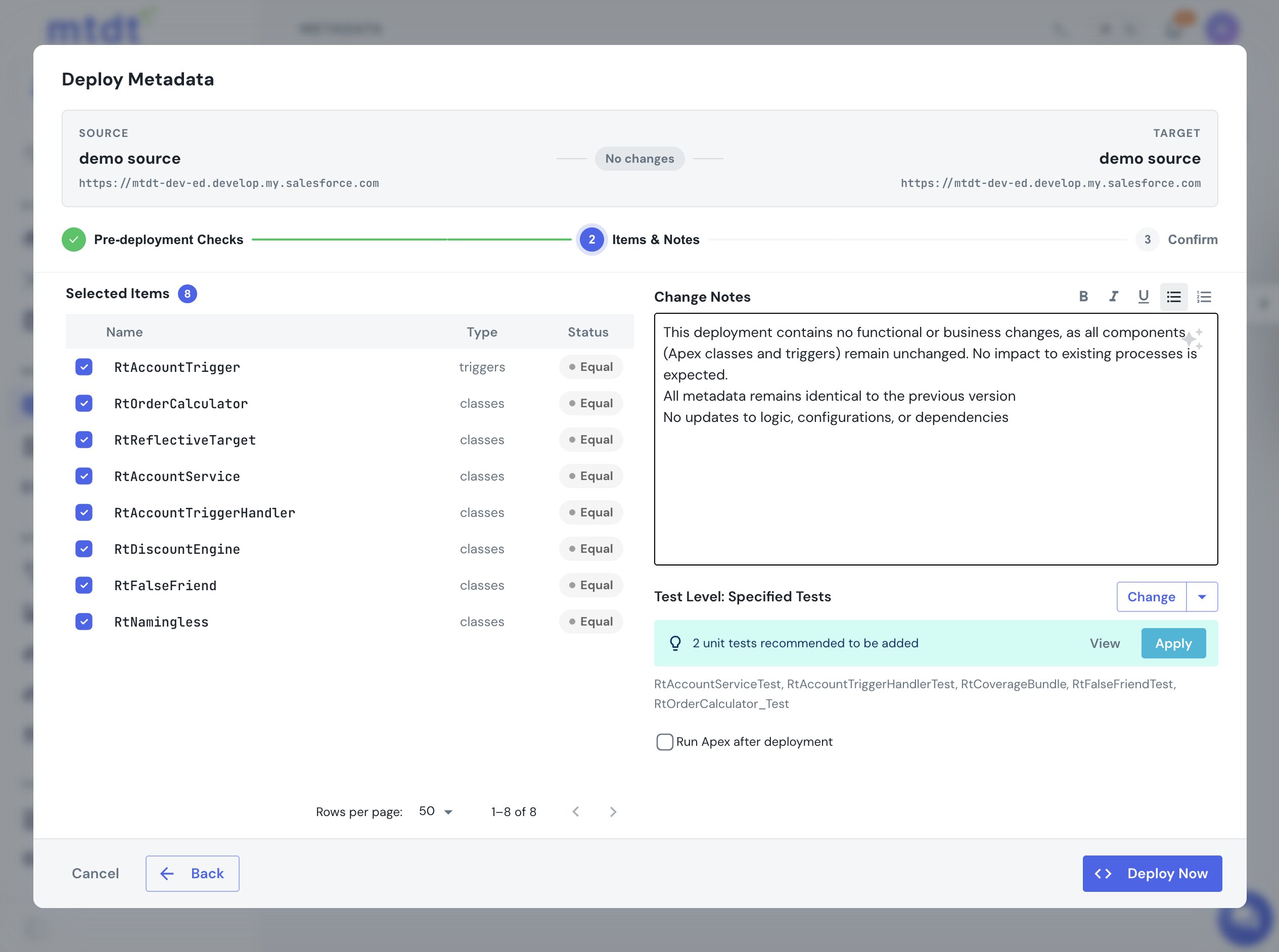
Click Apply and mtdt switches the deployment to Run Specified Tests with exactly those tests — a fast, targeted validation instead of running the whole org. View opens the list so you can see and edit it:
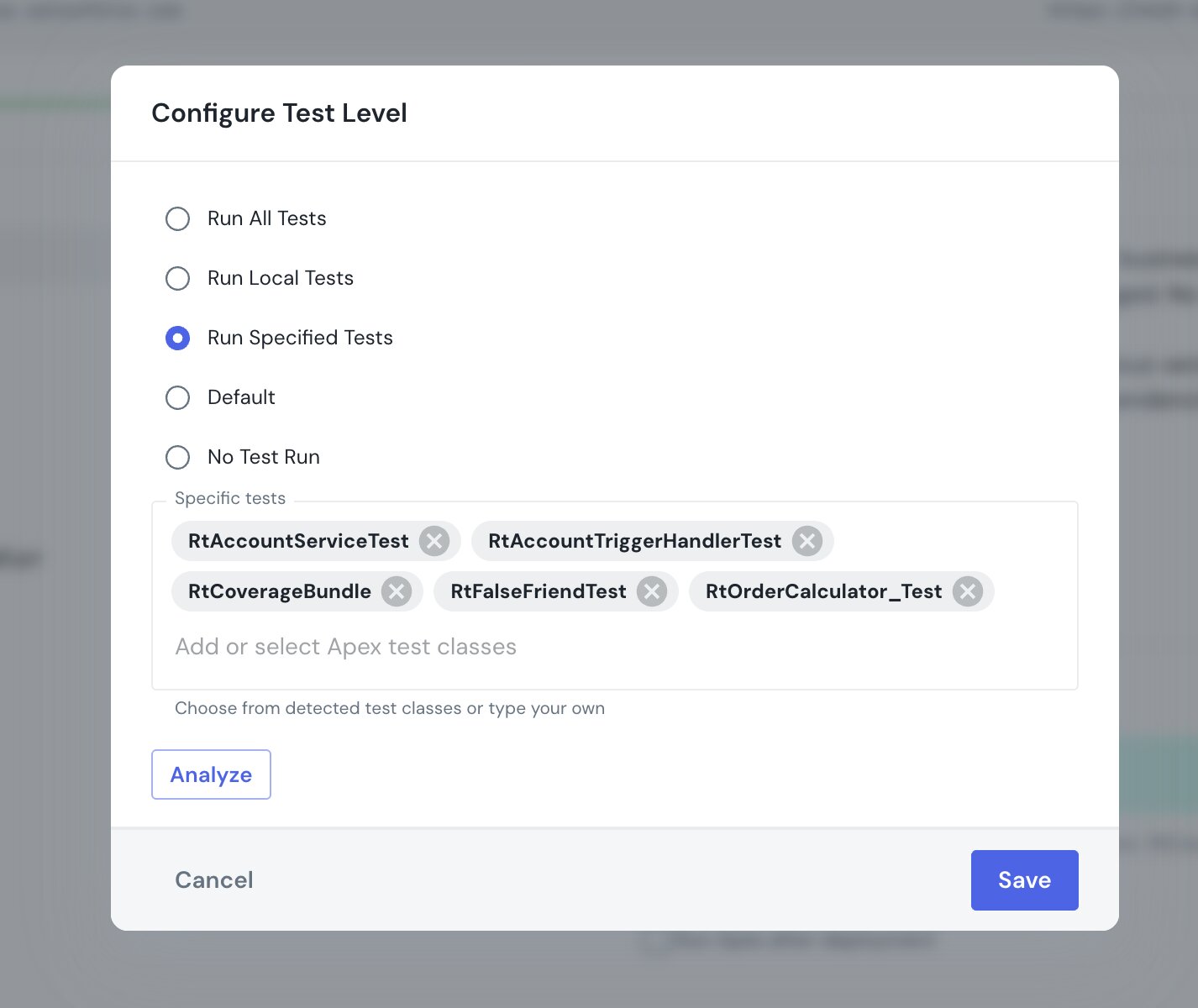
Apply adds to whatever you've already picked (it never silently drops your hand-chosen tests), and Analyze re-runs the recommendation after you edit the deployment.
How the recommendation is found
mtdt.io finds the test classes that actually exercise the code you're deploying by deeply analyzing the actual metadata structure — including tests for triggers and tests that don't follow the usual SomethingTest naming. There's no mapping to maintain and nothing to annotate.
Worth a glance: test selection is best-effort, so for a mandatory-coverage production deploy it's worth reviewing the list (or falling back to Run Local Tests). mtdt never narrows the run behind your back — if a changed class has no matching test, it recommends RunLocalTests rather than under-testing.
A targeted run, checked against the real target
The recommendation ships a RunSpecifiedTests set scoped to your change instead of RunAllTests. Run it as a check-only deploy and the result comes back from the target with per-class coverage and any failures — so you see where you stand against the 75% gate before the production run, not during it.
FAQ
How do I run only specific Apex tests during a deployment?
Set the deploy's test level to Run Specified Tests and name the test classes. In a change set you type them on the deploy screen; with the Salesforce CLI you pass --test-level RunSpecifiedTests --tests Test1 Test2; in mtdt.io the deploy wizard's Test Level control does it, and it can fill in the classes that cover your change automatically.
What are the Salesforce deploy test levels? Four: No Test Run (skip — sandboxes only), Run Specified Tests (only the classes you name), Run Local Tests (all org tests except managed packages), and Run All Tests In Org (everything). A production Apex deploy requires Run Local Tests, or a Run Specified Tests set where each covered class meets the 75% gate.
Why not just use Run All Tests? It runs every test in the org on every deploy — slow, and it doesn't tell you which test actually matters for your change. Run Specified Tests is faster, as long as the named classes still meet the 75% coverage each covered class needs.
Which tests do I need to specify? The ones that exercise the classes and triggers you're deploying. mtdt.io works this out by analyzing the metadata you're shipping and recommends the covering tests — including trigger tests and non-standard names — or falls back to Run Local Tests when a changed class has no matching test.
Notes
- Coverage drifts between sandboxes and production;
@isTest(SeeAllData=true)can pass in a sandbox and fail in prod. Validating against the actual target org catches that.
For the checks that run before every deploy, see Pre-deployment checks. For the why and the full story, see deploying Apex without failing the 75% coverage rule.