Deploying Agentforce Agents (Agent Script)
An Agentforce agent built with Agent Script is stored in an authoring bundle (AiAuthoringBundle): the .agent script plus its descriptor. Deploying that bundle with the Metadata API only puts the script into the target org. The agent version that actually runs is created when the script is published, which normally happens in Agentforce Builder.
mtdt.io handles the whole sequence in a single deployment:
- Deploys the metadata, including the Agent Script as a draft.
- Publishes a new version of each agent in the target org.
- Links the authoring bundle to that version.
- If you turned on Activate AI agent after deployment, activates the new version.
Without activation, the version that is active now keeps serving users. You can check the new version in the target org and activate it when you're ready.
Requirements
- API version 68 or later for the deployment.
- Service agents only. Publication is supported for Agent Script agents of type
AgentforceServiceAgent. - The Agent Script authoring bundle is selected, and only one bundle version per agent.
- A target agent user is confirmed for every agent on the Pre-deployment Checks step (see below).
- No deletions of the same agent in the deployment. Remove destructive changes for its
AiAgentDefinition,AiAgentDefinitionVersion, orAiAuthoringBundlebefore publishing a new version.
mtdt.io checks these requirements before anything is sent to the target org. If one isn't met, the deployment stops with a message naming the agent and the problem. For example:
Support_Agent: confirm a target agent user in Pre-deployment Checks before deploying.
The user behind the target connection also needs Manage AI Agents to publish agents. The readiness card described below warns when it, or Modify All Data, is missing.
When the same agent's AiAgentDefinition or AiAgentDefinitionVersion is also in the selection, mtdt.io leaves them out of the metadata package. Publishing the script creates them in the target org.
Confirm the agent user
A service agent runs under a dedicated Salesforce user, set as default_agent_user in the script. The user from the source org usually doesn't exist in the target org, so for each agent you choose which target user the new version will run as.
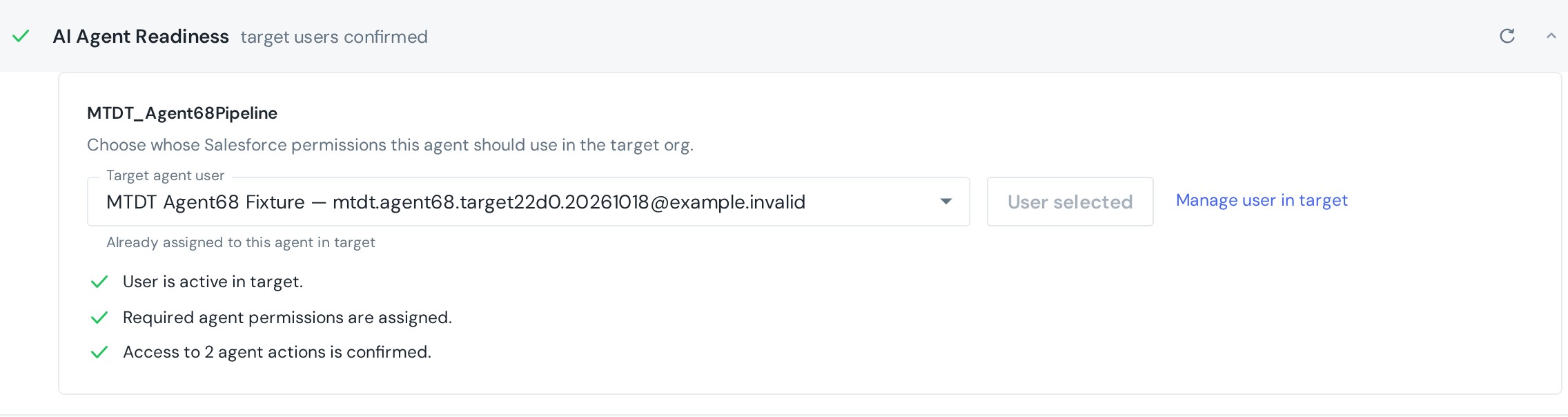
When the selection contains agent metadata, the Pre-deployment Checks step shows an AI Agent Readiness card. For each agent:
- Target agent user lists users with the Einstein Agent User profile in the target org. mtdt.io pre-selects a user when it finds one:
- Already assigned to this agent in target: the user the existing agent in the target org runs as.
- Referenced by the source Agent Script: a target user with the same username as in the source script.
- Click Use this user to confirm the choice. Until every agent has a confirmed user, the card asks you to confirm the user for each agent.
- mtdt.io then checks the selected user's access and lists what it found:
- the user is active;
- the permission sets
AgentforceServiceAgentBase,AgentforceServiceAgentUser, andEinsteinGPTPromptTemplateUserare assigned; - the user can run the Flows and Apex classes the agent's actions call.
- Links like Manage user in target, Open permission sets, and Review Flow access in target open the matching Setup pages in the target org.
- The card also warns when the target connection is missing Modify All Data or Manage AI Agents.
When an action's Flow or Apex class doesn't exist in the target org yet, the card says so: its access can only be checked after the deployment. Access warnings don't block the deployment. Before deploying, either fix them in the target org or decide the agent can run without that access.
mtdt.io writes the confirmed username into the deployed script. Your source script stays as it is.
Choose whether to activate
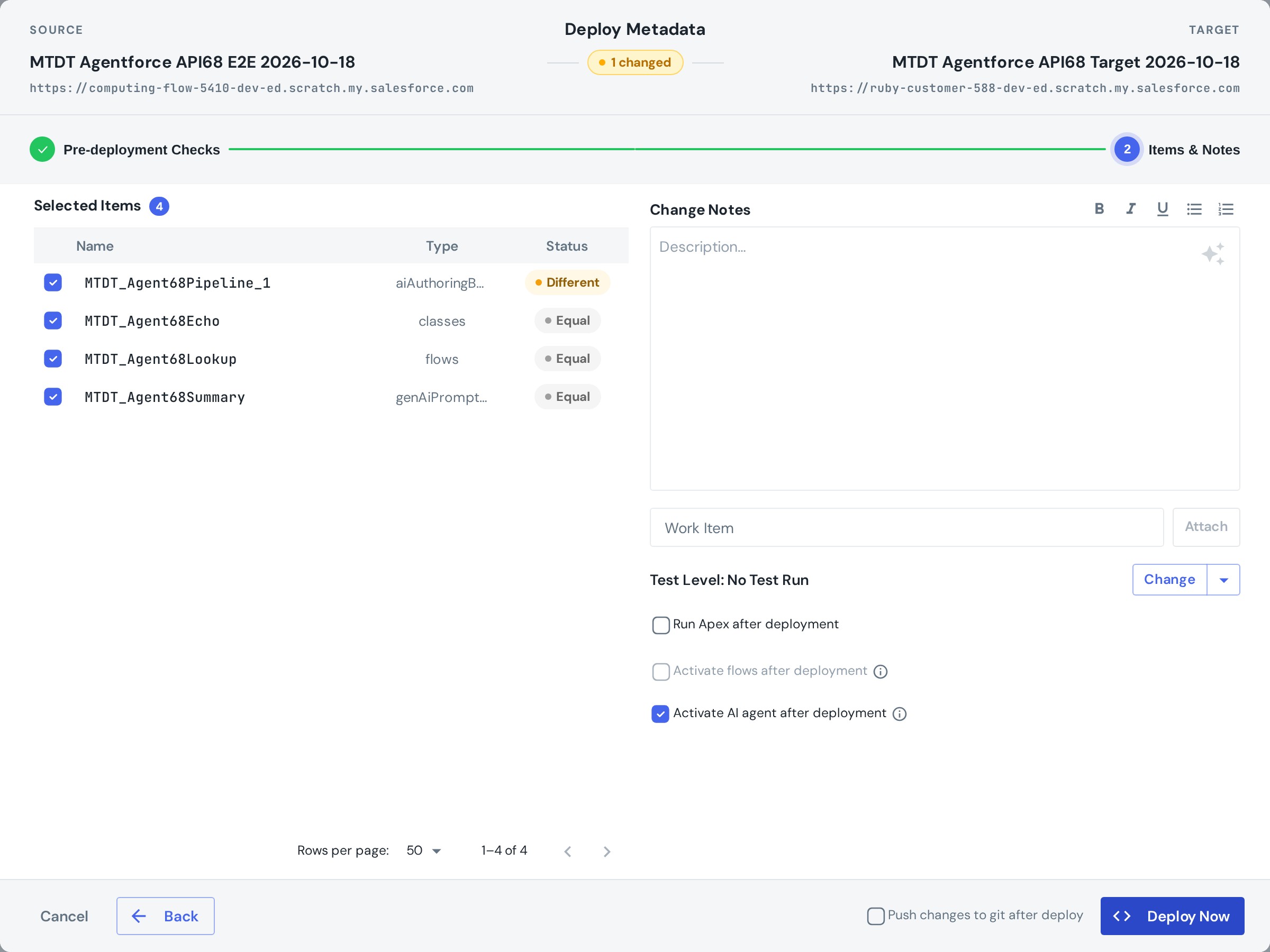
On the Items & Notes step, next to Run Apex after deployment, you'll find Activate AI agent after deployment:
- Off (default): each agent gets a new inactive version, and its authoring bundle is linked to it. The currently active versions keep running.
- On: after the bundles are linked, the new versions are activated. Salesforce keeps one active version per agent, so the new version replaces the one that was active.
What happens during the deployment
- Metadata deployment. The Agent Script is deployed as a draft together with the rest of the selection.
- Publication. Once the metadata deployment succeeds, mtdt.io does the following for each agent:
- checks that the confirmed user still exists and is active;
- compiles the script;
- publishes it as a new version;
- confirms the version was created with the confirmed user.
- Linking. mtdt.io deploys the authoring bundle once more, this time linked to the new version.
- Activation (if turned on). mtdt.io activates each new version and confirms that it is now the only active version of that agent.
Publication and activation run after the metadata deployment. While they run, the deployment shows as in progress.
Validation and Quick Deploy
- Validation checks the metadata package, including the draft Agent Script, and doesn't publish anything. Activate AI agent after deployment is unavailable in validation mode. The result shows Agent publication will run after deployment.
- Quick Deploy of a validation publishes a new inactive version of each agent, using the users confirmed during validation. It doesn't activate the agents. To make a version active, activate it in the target org's Setup, or run a regular deployment with activation turned on.
- Deployments to a Git repository don't publish agents. Publication applies only to Salesforce target orgs.
Read the result
The deployment's history entry shows a separate card for the agents, next to the metadata result.
Publication card:
- AI agents published — inactive, or AI agents published when activation was requested. Each agent is listed with its new version number, for example
Support_Agent — version 4 · Inactive · authoring bundle linked. - AI agent publication failed, with the reason.
- AI agent publication did not finish: mtdt.io couldn't confirm the outcome.

Activation card, when activation was requested:
- AI agents activated, with each agent shown as
version N · Active. - AI agent activation failed, or AI agent activation did not finish.

Agent publication and the metadata deployment have separate results. If the metadata deployed and publication then failed, the deployment still counts as succeeded. The agent card shows the failure, and the deployed metadata stays in the target org.
Notifications
Deployment notifications (email, Slack, and Microsoft Teams) mention the agents only when something went wrong:
- AI agent publication failed: the reason, followed by Review the agent in target Setup.
- AI agents were published but not activated: the reason, followed by Review which agent versions are active in target Setup.
A successful publication or activation adds nothing to the notification.
When publication or activation fails
Common reasons:
| Message | What to do |
|---|---|
Agent Script compilation failed | Fix the script in the source org, then deploy again. |
the confirmed target user changed or is inactive | Activate the user or pick another one in Pre-deployment Checks, then deploy again. |
the active target agent uses another user | The agent in the target org runs as a different user. Confirm that user in Pre-deployment Checks, then deploy again. |
Agentforce authentication failed … Check the target connection and Manage AI Agents permission. | Reconnect the target org, or grant Manage AI Agents to the connected user. |
authoring bundle binding failed | The new version was published, but its bundle wasn't linked. Review the agent in the target org's Setup. |
Agent publication result is unknown … A new version may have been created. | The target org didn't answer clearly (timeout, connection error, or server error). Check the agent's versions in Setup before deploying again. |
Running the deployment again repeats everything: the metadata deployment, then publication of one more new version. If the previous attempt already created a version, the retry adds another one. That's why it pays to check the agent in Setup first.
FAQ
Does deploying an Agent Script change the agent users talk to? Only when Activate AI agent after deployment is on. Without it, the new version is published inactive and the current active version keeps running.
Why do I have to pick a user for each agent? A service agent runs as a dedicated Salesforce user, and the username from the source org usually doesn't exist in the target org. The confirmed user becomes the new version's agent user.
Can I deploy an employee agent this way? No. Publication currently supports only Agent Script service agents.
If agent publication fails, is the metadata deployment rolled back? No. The metadata stays deployed and the deployment counts as succeeded. The agent card and the notification report the publication failure separately.
Related
- Pre-deployment checks: the checks that include AI Agent Readiness.
- Scheduled and Quick Deploy: how Quick Deploy reuses a validation.
- Running Apex after a deployment: the other post-deployment step on Items & Notes.