Running Apex After a Deployment
Some changes aren't finished when the metadata lands. A scheduled job needs re-scheduling, a custom setting needs a value, a new field needs backfilling. mtdt.io can run a block of anonymous Apex on the target org automatically, right after the deployment succeeds — so the post-deploy step happens as part of the release instead of being a manual thing someone has to remember.
Turn it on
In the deploy wizard, open the Items & Notes step and tick Run Apex after deployment. A code box appears — paste the Apex you want to run on the target.
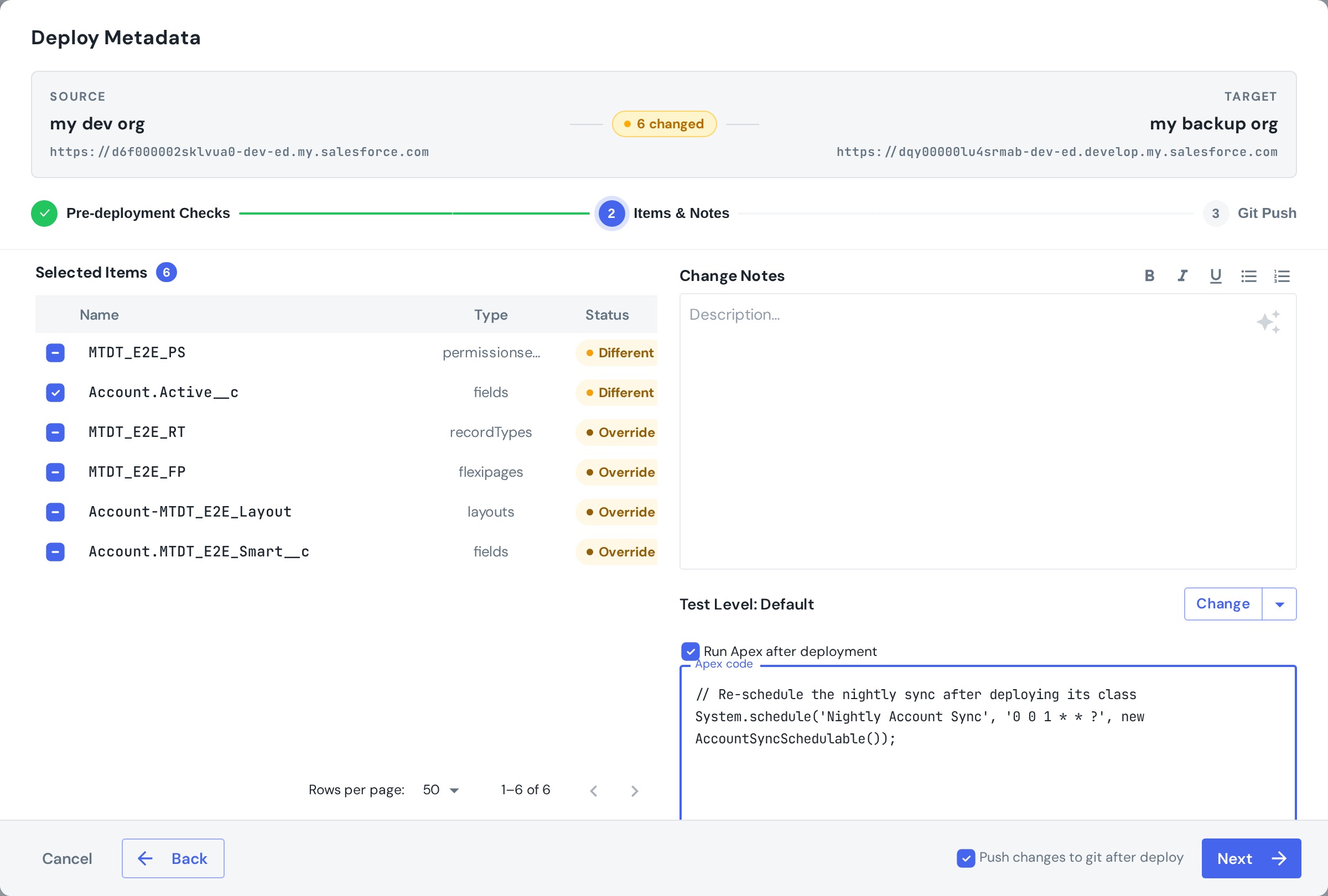
When the deployment finishes successfully, mtdt.io executes that Apex against the target org. The result is recorded on the deployment and shown in Deploy History as a Post-deploy Apex: Success / Failed badge.
When to use it
-
Re-schedule scheduled jobs. Salesforce doesn't deploy running job instances — only the Schedulable class. After deploying the class, re-schedule the job:
System.schedule('Nightly Account Sync', '0 0 1 * * ?', new AccountSyncSchedulable());This pairs directly with the Cron Triggers pre-deployment check, which flags the jobs that need re-creating.
-
Seed configuration. Set custom-setting values, insert reference/default records, or flip a feature flag the release depends on.
-
Backfill or migrate data. Kick off a batch job to populate a new field or recalculate values the change introduces.
-
One-off release steps. Any setup that has to run in the target right after the metadata is in place.
Notes
- The Apex runs as anonymous Apex on the target org (the same execution model as the Developer Console's Execute Anonymous), once, after a successful deploy.
- It's a real execution, so it isn't available in validation-only mode.
- Prefer idempotent scripts — a post-deploy step may run again on a later deployment, so it should be safe to repeat.
For everything that runs before the deploy, see Pre-deployment checks. For the why and when, see running Apex after a Salesforce deployment.