Deploying Scheduled Apex
Deploying a Schedulable class that's already running in the target org tends to stop with:
This schedulable class has jobs pending or in progress.
Salesforce locks a class while it has a scheduled job, so the deploy can't overwrite it. And even when a deploy does go through, the schedule itself never travels — Salesforce deploys the class, not the running job (the CronTrigger). The standard fix is manual: abort the jobs, deploy, then re-schedule them by hand.
mtdt.io handles the jobs inline
On the Deploy (or Validate) wizard's Pre-deployment Checks, the Cron Triggers check finds the scheduled jobs in the target that reference the classes you're deploying, and lets you deal with them right there:
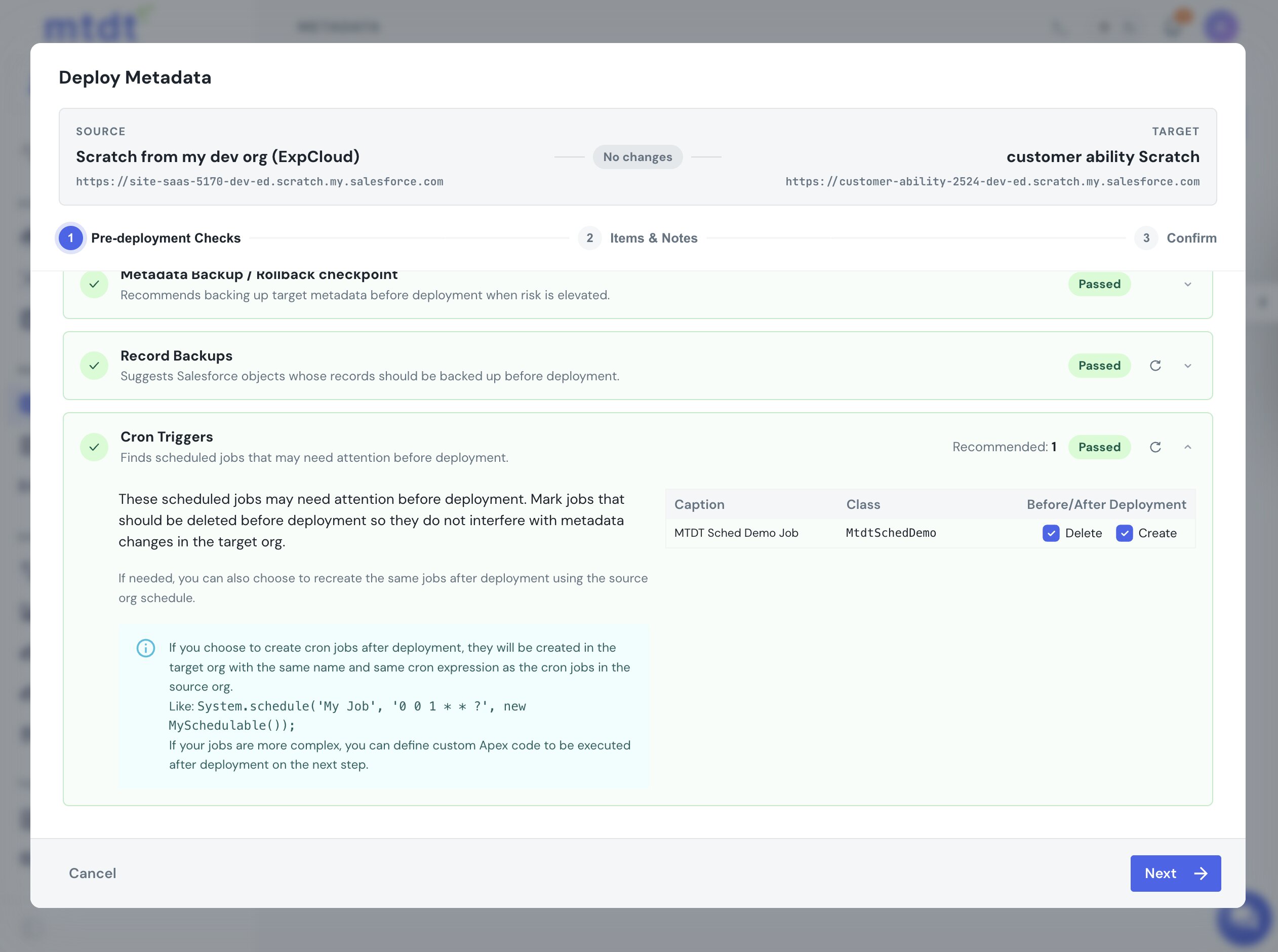
- Delete (before deployment) — aborts the target job so it can't block the class change.
- Create (after deployment) — recreates the same job once the deploy finishes, using the source org's schedule.
Tick both and deploy: mtdt.io aborts the job, deploys the updated class, and re-creates the job — in a single run, with no jobs pending or in progress error and no manual re-scheduling. The job comes back with the same name and cron expression.
Brand-new scheduled classes
If you're deploying a Schedulable class the target has never had, there's no running job to find — the check shows "No related cron jobs found." The class deploys fine, but its schedule still won't come across (Salesforce never deploys job instances). Create it once with Run Apex after deployment:
System.schedule('Nightly Account Sync', '0 0 1 * * ?', new AccountSyncSchedulable());
See Running Apex after a deployment for that step.
Notes
- The same "pending jobs" lock applies to batch and future jobs, not only scheduled ones.
- After a class update, the next scheduled run picks up the new code once the class recompiles.
For everything that runs before a deploy, see Pre-deployment checks. For the why and the full story, see deploying scheduled Apex without breaking the schedule.