Deploy Scheduled Apex Without 'Jobs Pending or in Progress'

You update a Schedulable Apex class, deploy it to an org where it's running, and Salesforce stops you:
This schedulable class has jobs pending or in progress.
The class is locked while it has a scheduled job. And even once you get past that, the schedule doesn't come with it — Salesforce deploys the class, not the running job.
Why scheduled Apex is awkward to deploy
Two separate problems, every time:
- The lock. Salesforce won't let you overwrite a class that has a scheduled (or batch/future) job pending — editing it could change behaviour mid-flight. So a deploy to a live org throws "jobs pending or in progress."
- The schedule doesn't travel.
System.schedulecreates a CronTrigger record — that's data, not metadata. Deploying the class never re-creates the job in the target. You have to schedule it again yourself.
The usual advice is all manual: go to Setup → Scheduled Jobs, abort the jobs, deploy, then run your scheduling script again — or flip the org-wide "Allow deployments… when Apex jobs are pending" setting and hope the job doesn't fire mid-deploy. Most DevOps tools leave this part to you.
How mtdt.io does it in one run
On the Deploy wizard's Pre-deployment Checks, the Cron Triggers check finds the scheduled jobs in the target that reference the classes you're shipping:
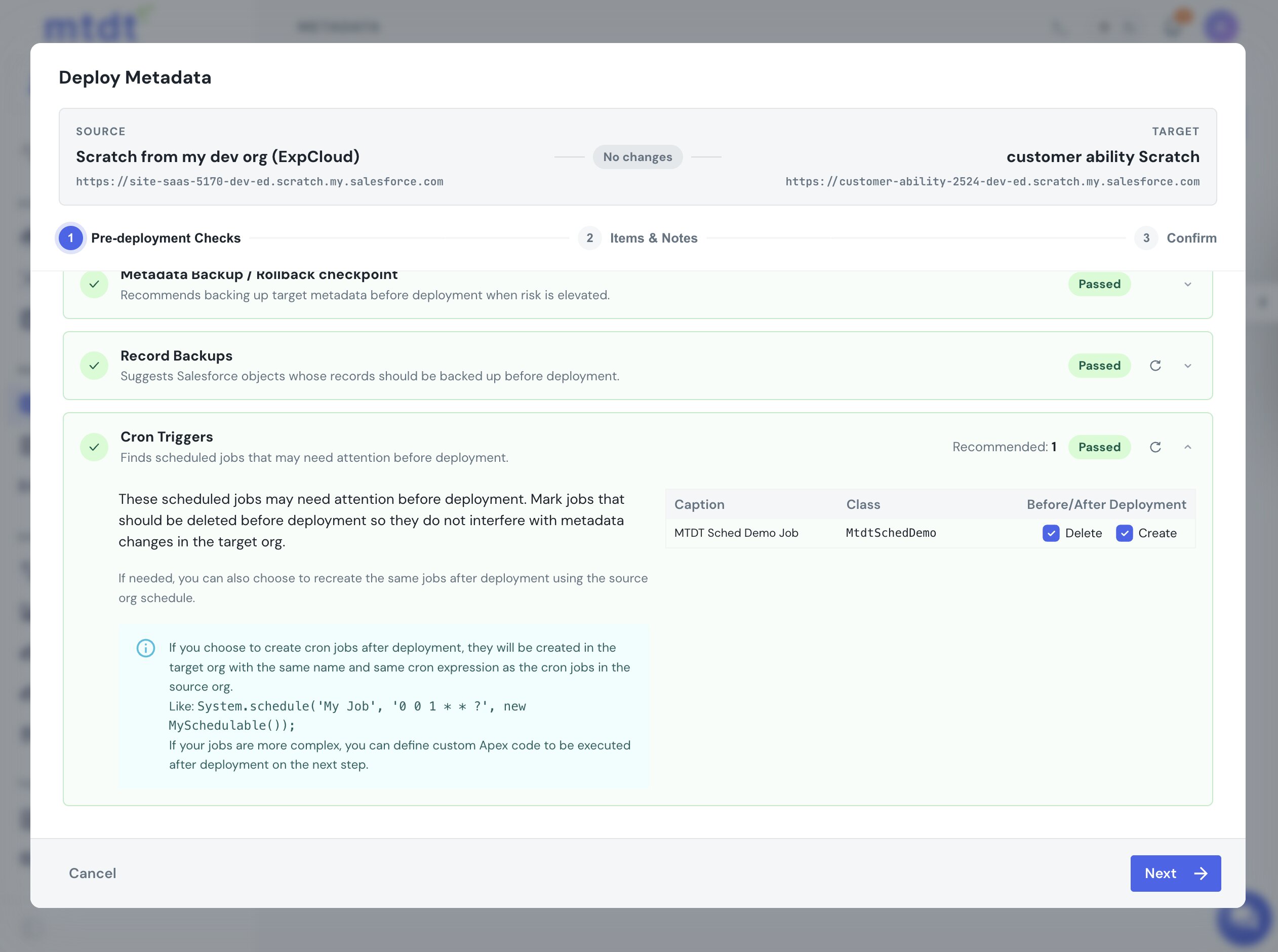
For each job you get two choices:
- Delete before deployment — mtdt.io aborts the target job so it can't block the class change.
- Create after deployment — mtdt re-creates the same job once the deploy finishes, using the source org's schedule.
Tick both, deploy, and that's it: the job is aborted, the updated class lands, and the job is re-scheduled — same name, same cron expression — with no "jobs pending" error and nothing to re-run by hand.
What about a brand-new scheduled class?
If the target has never run the class, there's no job to abort and the check shows "No related cron jobs found." The class deploys, but — as always — its schedule won't come across. Create it once with Run Apex after deployment:
System.schedule('Nightly Account Sync', '0 0 1 * * ?', new AccountSyncSchedulable());
Everyone's manual on that first schedule; mtdt.io at least keeps it in the same wizard.
Good practices
- Let the Cron Triggers check handle live jobs — delete-before + create-after beats aborting and re-scheduling by hand, and it won't trip the pending-jobs lock.
- Use the source schedule as the source of truth — the re-created job matches the org you're promoting from.
- For a first-time schedule, use post-deploy Apex and keep the script idempotent.
See the guide for the step-by-step: Deploying Scheduled Apex.
FAQ
Why does Salesforce block deploying a Schedulable Apex class with "jobs pending or in progress"? Salesforce locks a class from being overwritten while it has a scheduled, batch, or future job pending, because editing it could change behaviour mid-flight. The deploy is rejected until the job is aborted or completes.
Does deploying a Schedulable class also move its schedule to the new org?
No. System.schedule creates a CronTrigger record, which is data, not metadata — deploying the class alone never re-creates the job in the target org. You have to schedule it again separately, unless a tool re-creates it for you.
How does mtdt.io deploy scheduled Apex without the "jobs pending" error? mtdt.io's Pre-deployment Checks include a Cron Triggers check that finds scheduled jobs in the target referencing the classes you're deploying. You can choose "Delete before deployment" to abort the target job so it can't block the class change, and "Create after deployment" to re-create the same job — same name, same cron expression — from the source org's schedule once the deploy finishes.
What happens if the target org has never run the class before?
The Cron Triggers check shows "No related cron jobs found" since there's no job to abort, and the class deploys normally. Its schedule still won't come across automatically — you create it once yourself, for example with System.schedule run via mtdt.io's "Run Apex after deployment" option.
Stop hand-scheduling jobs after every release
Let mtdt.io abort, deploy, and re-create your scheduled jobs in one run.
Log in to mtdt.io and deploy your scheduled Apex.
Was this page helpful?
Let us know how we did