Deploy Salesforce Apex Without Failing the 75% Test Coverage Rule

You push an Apex change to production and the deployment stops:
Average test coverage across all Apex Classes and Triggers is 71%, at least 75% test coverage is required to complete this deployment.
It passed in the sandbox. In production, the org-wide coverage gate — and the rule that one failing test fails the whole deploy — blocks the release. mtdt.io avoids this by recommending exactly which unit tests cover your change, so you deploy with Run Specified Tests — a targeted run — instead of RunAllTests against the whole org.
Why Apex deployments are their own kind of pain
Deploying Apex does more than move files: Salesforce runs tests and enforces coverage in production:
- 75% org-wide coverage, and each trigger needs ≥1% of its own.
- One failed test fails the entire deployment — a single assertion blocks everything.
- The safe-looking option,
RunAllTests, runs every test in the org — slow, and it doesn't tell you which test actually exercises your change. - Coverage drifts sandbox → production;
@isTest(SeeAllData=true)can pass in a sandbox and fail in prod.
So the real questions are: which tests do I need to run for this change, and will I clear 75% — before I touch production?
mtdt.io recommends which tests to run
Add your classes and triggers to a deployment, and on the wizard's Items & Notes step mtdt.io recommends the unit tests that cover them:
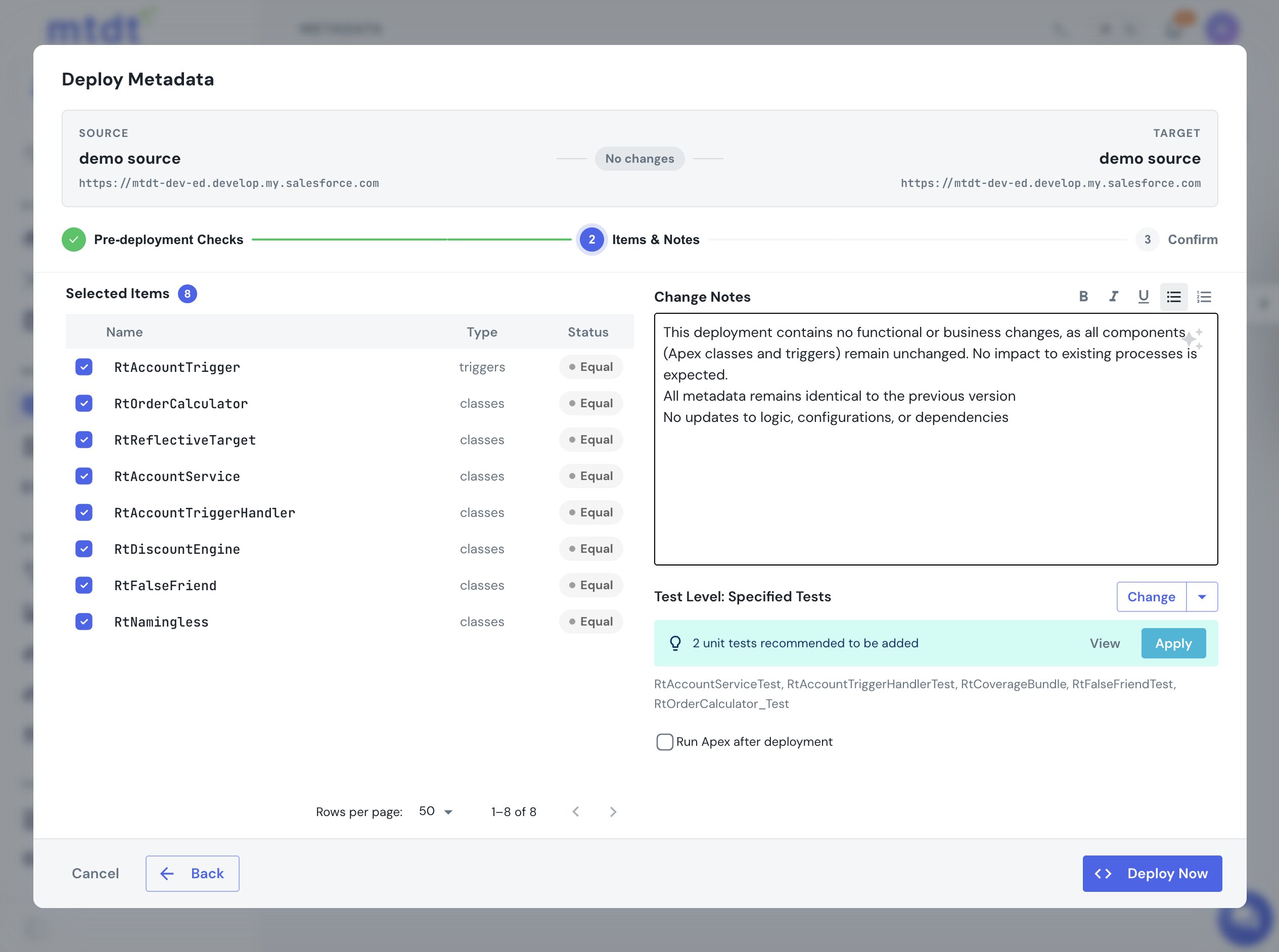
Apply switches the deploy to Run Specified Tests with exactly those tests — a fast, targeted validation instead of running the whole org. It adds to anything you've already selected (your hand-picked tests survive), and you can open the full list to review or edit it.
How it finds them: mtdt works out which of the org's test classes actually exercise the code you're shipping by deeply analyzing the actual metadata structure — including tests for triggers and tests that don't follow the usual SomethingTest naming. You don't maintain a mapping or annotate anything.
The honest part: test selection is best-effort, so for a mandatory-coverage production deploy it's worth a look at the list (or falling back to Run Local Tests). And if a changed class has no matching test at all, mtdt recommends RunLocalTests rather than quietly under-testing.
A targeted run instead of the whole suite
The recommendation is the point: instead of RunAllTests, you ship a RunSpecifiedTests set scoped to what you changed — faster, and focused on the code that actually moved. Run it as a check-only deploy and the per-class coverage and any failures come back from the target, so you see where you stand against the 75% gate before the production run.
Good practices
- Let mtdt.io pick the tests, then review. Targeted
RunSpecifiedTestsis far faster thanRunAllTests— but eyeball the list for a mandatory-coverage release. - Validate against the real target. Coverage drifts between orgs; a check-only run against production-like data is the truth.
- Mind triggers and deletes. Triggers deploy inactive unless their
<status>says otherwise; Apex can't be deleted in prod withoutdestructiveChanges.
See the guide for the step-by-step: Deploying Apex & the 75% Coverage Gate.
FAQ
Why does a Salesforce Apex deployment fail even though it passed in the sandbox? Deploying Apex to production runs tests and enforces org-wide coverage — at least 75%, with each trigger needing at least 1% of its own — and a single failing test fails the entire deployment. Coverage and test results can drift between sandbox and production, so a deploy that passed in a sandbox can still hit the gate in prod.
What's wrong with just running RunAllTests on every deploy?
It runs every test in the org, which is slow and doesn't tell you which test actually exercises your change. mtdt.io recommends the specific unit tests that cover the classes and triggers you're deploying instead, so you can switch to Run Specified Tests for a faster, targeted validation.
How does mtdt.io know which tests cover my change?
It analyzes the org's actual metadata structure to work out which test classes exercise the code you're shipping, including tests for triggers and tests that don't follow the usual SomethingTest naming convention. You don't maintain a mapping or annotate anything yourself.
Is the recommended test list guaranteed to be complete?
No — mtdt.io is explicit that test selection is best-effort, so it's worth reviewing the list for a mandatory-coverage production deploy or falling back to Run Local Tests. If a changed class has no matching test at all, mtdt.io recommends RunLocalTests rather than quietly under-testing.
Does applying the recommended tests remove tests I already picked? No. Applying the recommendation adds to any tests you've already selected — your hand-picked tests survive — and you can still open the full list to review or edit it.
Stop running every test to ship one class
Let mtdt.io recommend the tests your change actually needs — and show you the coverage before go-live.
Log in to mtdt.io and deploy your Apex with confidence.
Was this page helpful?
Let us know how we did