Pre-Deployment Checks: Catch What Breaks a Salesforce Deploy Before It Runs

Most Salesforce deployment failures aren't mysterious. A flow references a field that isn't in the package. A profile change quietly removes access. There's no way to undo it if it goes wrong. These are predictable problems — and yet they usually surface the worst way: after you click Deploy, as a red error or a wave of "I can't see X" tickets.
What if you saw them before? That's what mtdt.io's pre-deployment checks do — run a set of analyzers against your target deployment and flag anything risky while you can still fix it cheaply.
Deployment failure is mostly preventable
The expensive failures share a pattern: the information needed to prevent them existed before the deploy, but nobody surfaced it. A missing dependency is knowable from the metadata. An elevated-risk change is knowable from what you're overwriting. A forgotten profile is knowable from the components you selected.
"Deploy and see what happens" throws that information away and learns it from a failure. Pre-deployment checks turn it into a short, reviewable checklist instead.
The checks mtdt.io runs
Before every deployment, mtdt.io runs a set of checks against the target org and gives each a clear verdict — passed, needs review, or skipped — so you go straight to what matters.
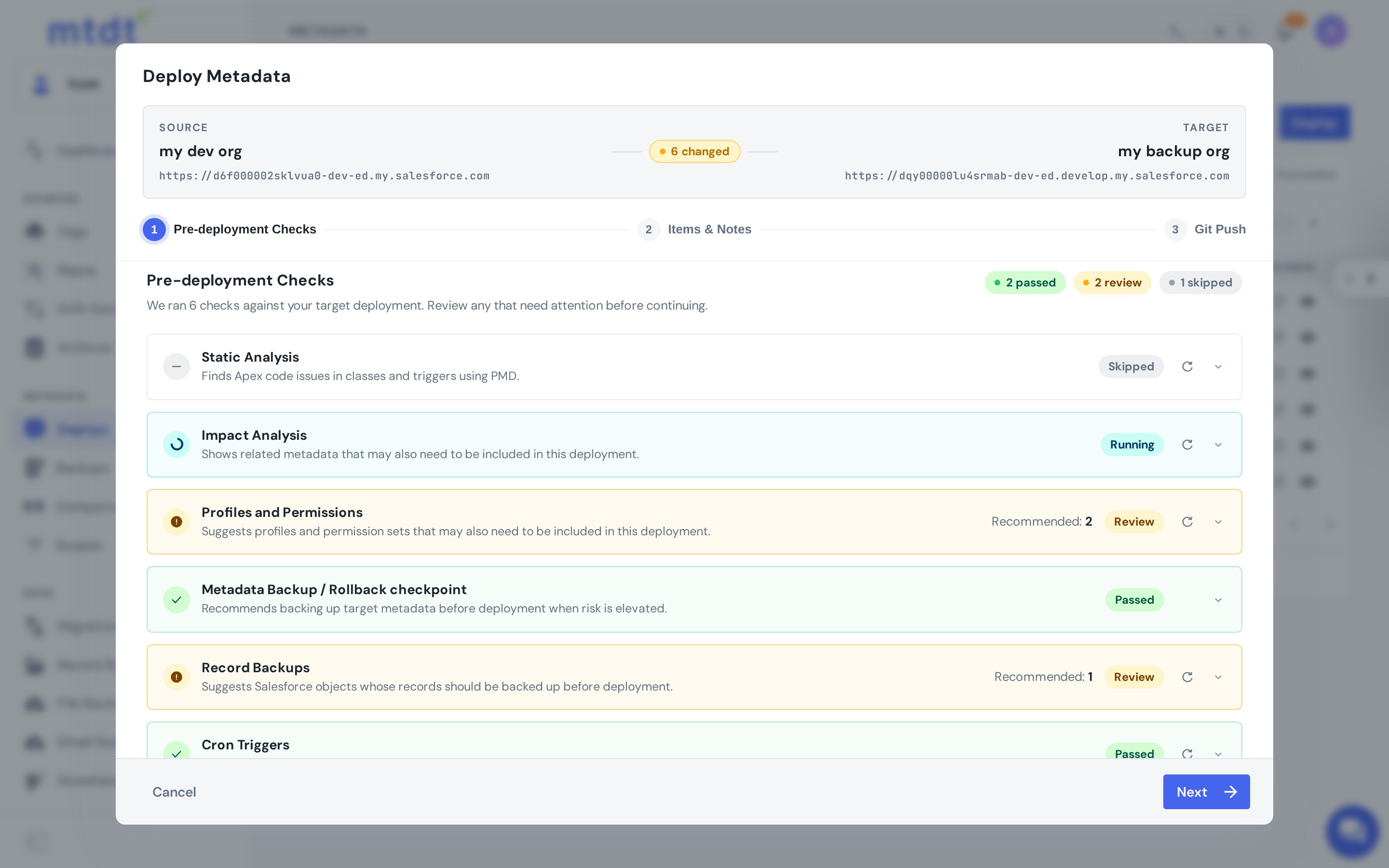
Each check guards against a specific class of problem:
- Impact Analysis — surfaces related metadata that may also need to be included. This is the number-one cause of failed deploys: ship a flow, validation rule, or class without a field or component it depends on, and Salesforce rejects the package (or worse, accepts it and breaks behavior).
- Profiles and Permissions — flags profiles and permission sets that may need to go with your change, so an access update doesn't land half-applied.
- Static Analysis — scans the Apex in your deployment for code issues with PMD (and is skipped when there's no Apex to check). See static code analysis.
- Metadata Backup / Rollback checkpoint — recommends capturing a rollback point before the deploy when the risk is elevated: specifically when the target org is marked important or the deploy includes deletions. One click to undo a bad release.
- Record Backups — suggests Salesforce objects whose records should be backed up before a change that could affect their data, and shows whether a recent backup already covers them.
- Cron Triggers — finds scheduled jobs tied to the deployment and recommends re-creating or removing them, so a release doesn't leave jobs broken or dangling.
How it works in practice
Each check runs automatically when you open the deploy and lands on one of three verdicts. Passed means it ran and found nothing to do. Review means it found something — and what triggers a review is specific to each check: Impact Analysis when related metadata differs between source and target; Profiles and Permissions when the access for a deployed component isn't aligned on the target; Static Analysis when PMD reports findings (and it's Skipped entirely when there's no Apex); Metadata Backup when the target is important or the deploy deletes things; Record Backups when a related object's data could be affected; Cron Triggers when scheduled jobs reference what you're shipping.
A review always comes with a concrete recommendation, usually with a count ("2 profiles recommended", "1 object to back up"). You act on it right there — pull in the missing dependency, include the profile, enable the rollback point — and continue, or deploy as-is if you've decided it's fine. (Change your selection and a check marks itself stale, prompting a refresh so its advice matches what you're actually deploying.) For the full per-check logic, see the pre-deployment checks guide.
The point isn't to block you. It's to make sure that when a deployment does go ahead, it goes ahead on purpose — not because nobody checked.
Why this matters
- Fewer failed deploys — the missing-dependency class of failure is caught before the package is even built.
- No silent access damage — profile/permission risks are surfaced, not discovered by users.
- Always reversible — you're nudged to capture a rollback point on risky changes.
- Faster, calmer releases — a 30-second review beats a production incident and a rollback under pressure.
It's the same idea as a CI gate, but visual and at the moment of deploy — the safety layer that lets you deploy with confidence.
Best practices
- Read the review items before deploying, especially Impact Analysis — including the dependency it names is usually the difference between a clean deploy and a failed one.
- Enable the rollback point whenever the Metadata Backup check flags elevated risk.
- Back up records the check recommends before changes that touch data.
- Treat repeated Static Analysis findings as a signal to fix the code, not to wave it through.
FAQ
What checks does mtdt.io run before a Salesforce deployment? Six: Impact Analysis (related metadata that may need to be included), Profiles and Permissions (access changes that should ship together), Static Analysis (PMD scan of any Apex in the deployment), Metadata Backup / Rollback checkpoint, Record Backups (objects whose data could be affected), and Cron Triggers (scheduled jobs tied to the deployment).
What do the "passed," "review," and "skipped" verdicts mean? Passed means the check ran and found nothing to act on. Review means it found something concrete — for example, related metadata that differs between source and target, or a profile whose access isn't aligned on the target — and comes with a recommendation you can act on directly. Skipped applies when a check doesn't apply, such as Static Analysis when there's no Apex in the deployment.
When does mtdt.io recommend a rollback point before deploying? The Metadata Backup check recommends one when the target org is marked important or the deployment includes deletions — the two situations where an elevated-risk change benefits most from a one-click way to undo it.
Do pre-deployment checks block me from deploying? No. Each review comes with a recommendation — pull in a missing dependency, include a profile, enable the rollback point — but you can also deploy as-is if you've decided the flagged item is fine. The point is to make sure a deployment goes ahead on purpose, not to force a fix.
What happens if I change my selection after a check already ran? The check marks itself stale and prompts a refresh, so its recommendation matches what you're actually deploying rather than a stale selection.
Stop debugging deploys in production
The failure was usually knowable before you clicked Deploy. Let the checks tell you.
Log in to mtdt.io and deploy with pre-deployment checks.
Was this page helpful?
Let us know how we did