Deploy and Back Up Salesforce Metadata to Git — No Scripts

Here's a workflow most Salesforce teams know too well: make a change, deploy it, then remember to retrieve the metadata and commit it to Git so the repo stays current. That last step is the one that slips — and every time it does, your repo and your org drift a little further apart.
It doesn't have to be a separate, forgettable chore. Your deployment can land in Git automatically.
Why your org and your repo drift apart
If Git is your source of truth, it's only true when it's current. The usual ways to keep it current are all manual or fragile:
- Retrieve + commit by hand after every change — easy to forget, easy to do partially.
- A
sfdx+ cron + CI script — works until a new metadata type, a profile quirk, or a Salesforce release breaks it, and now someone owns a brittle script.
The gap between "what's in the org" and "what's in Git" is where bad deployments, failed merges, and untracked hotfixes come from. Here we're closing that gap at the source.
Deploy and commit in one step
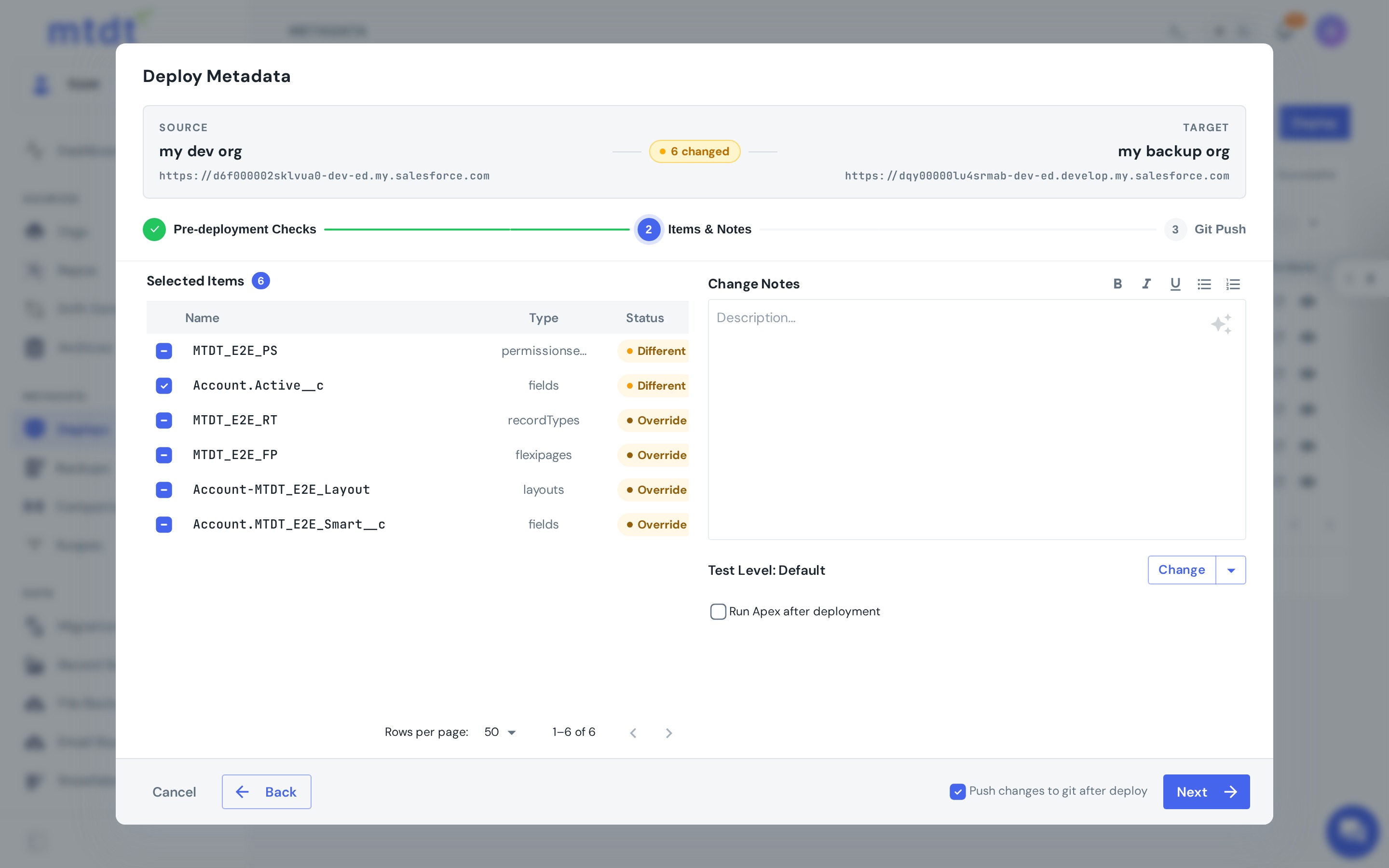
With mtdt.io's push-to-Git, a deployment can also push the deployed metadata to your connected repo — in the same action. You deploy a change, and the exact components you shipped are committed to Git, in source format, with no second step.
The result: your repo reflects your org because you deployed, not because someone remembered to sync it afterward.
Back up metadata to Git on its own
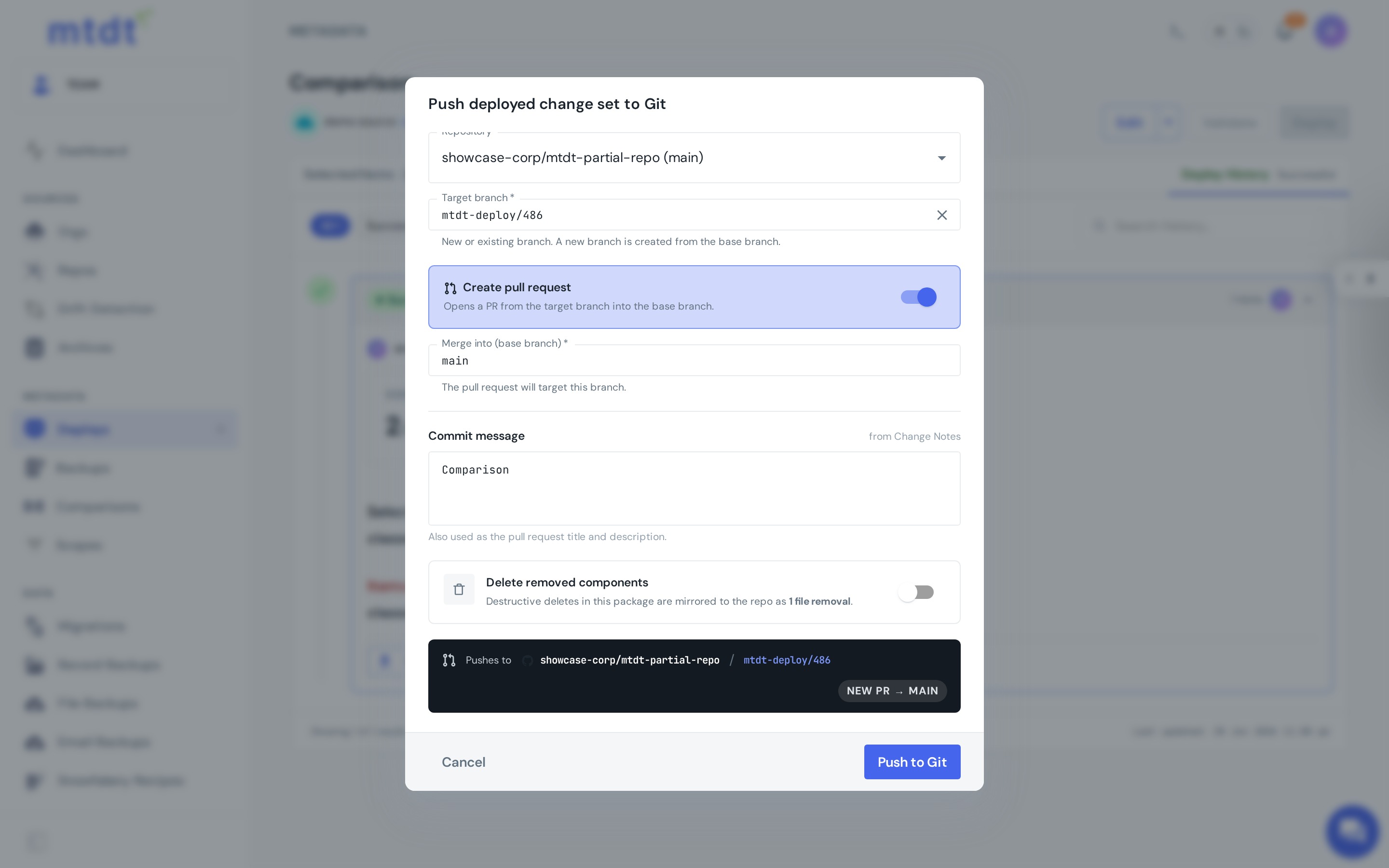
Push-to-Git isn't only for deployments. You can snapshot an org's metadata and push it to a branch as a standalone backup — a complete, source-formatted copy of your configuration, versioned in Git.
Every backup run commits the org's current state to the branch, so your Git mirror stays a living copy rather than a one-time dump — schedule it and the mirror keeps itself current.
Push as a pull request
Sometimes you don't want changes landing straight on a protected branch. mtdt.io can push a metadata set as a pull request instead — so the change goes through normal code review before it's merged. You get the audit trail and the second set of eyes that a direct commit skips.
Backup to Git vs. point-in-time backup
Backup to Git keeps your metadata as a version-controlled source of truth with history and reviewable diffs. It complements scheduled metadata backups (point-in-time snapshots for recovery); most teams want both. For the full breakdown — and how to set it up — see Backing up metadata to a repository.
Together with one-click rollback, that's the backup-and-recovery layer of a complete DevOps stack.
Why Git-as-backup matters
Keeping metadata in Git automatically buys you more than a copy:
- History — see exactly what changed, when, and by whom.
- Diffs — review changes like code, not by eyeballing setup screens.
- A real source of truth — a stable baseline for reviews, comparisons, and releases.
- Recoverability — any past state is a checkout away.
Best practices
- Turn on push-to-Git for your deploys so the repo never falls behind.
- Use the PR option for protected branches to keep review and audit intact.
- Schedule your backups so the Git mirror keeps itself current even for changes made outside mtdt.io.
FAQ
Why does a Salesforce org drift out of sync with its Git repo? Because keeping Git current usually depends on someone remembering to retrieve and commit metadata after every change, or a brittle sfdx-plus-cron script that breaks with a new metadata type or Salesforce release. That gap between what's in the org and what's in Git is where bad deployments, failed merges, and untracked hotfixes come from.
How does mtdt.io keep Git in sync with the org automatically? With push-to-Git, a deployment can push the deployed metadata to your connected repo in the same action — the exact components you shipped are committed to Git, in source format, with no separate step. You can also run push-to-Git on its own as a standalone backup that snapshots an org's current metadata to a branch.
Can I push metadata to Git as a pull request instead of committing directly? Yes. mtdt.io can push a metadata set as a pull request so the change goes through normal code review before it merges, rather than landing straight on a protected branch. That gives you the audit trail and second set of eyes a direct commit would skip.
What's the difference between backing up metadata to Git and a point-in-time metadata backup? Backup to Git keeps metadata as a version-controlled source of truth with history and reviewable diffs. A scheduled point-in-time metadata backup is a separate snapshot mechanism for recovery. They complement each other, and most teams want both.
What do I actually gain from keeping metadata in Git versus just deploying? History (what changed, when, and by whom), diffs you can review like code instead of eyeballing setup screens, a real source of truth for repeatable releases, and recoverability — any past state is a checkout away.
Keep Git and your org in sync — automatically
Stop retrieving and committing by hand. Let every deploy keep your source of truth current.
Log in to mtdt.io and connect a repo to deploy straight into Git.
Was this page helpful?
Let us know how we did