Outgrowing Salesforce DevOps Center: When (and How) to Move On

Salesforce DevOps Center was a genuine leap forward. It dragged teams off change sets, put Git at the center of releases, and made source-driven development approachable for admins and devs alike — for free. If you're using it today, you made a good call.
But there's a pattern almost every growing team runs into: somewhere around the 6–12 month mark, DevOps Center starts to feel less like a platform and more like a ceiling. DevOps Center is a starting point, and outgrowing it is the normal arc for a maturing team.
This post is about how to recognize when you've hit that ceiling, what a full DevOps platform adds, and how to move up without throwing away the Git-based workflow you've already built.
What DevOps Center gets right
Let's be fair before we critique. DevOps Center genuinely nails the fundamentals:
- Git-backed, source-driven releases instead of click-and-pray change sets.
- Work items that map changes to tasks.
- A visual pipeline from sandbox to production.
- And it's free, with no extra licensing.
For a single team shipping to one production org with a simple branching model, that's often enough. The trouble starts when your reality gets bigger than that.
The signals you've outgrown DevOps Center
1. Your version control isn't supported
DevOps Center works with GitHub.com and Bitbucket Cloud (still beta). If your org standardizes on GitLab, Azure DevOps, GitHub Enterprise Server, or self-hosted Git, you're out of luck — and for most enterprises, the VCS isn't negotiable.
2. You have no safety net
DevOps Center has no backup and no rollback. The day a deployment breaks production — or someone hot-fixes prod directly — you'll discover there's no "undo" and no point-in-time copy to restore from.
3. Deployments get slow and conflict-prone at scale
Orgs with thousands of interdependent components, multiple production orgs, or heavy parallel development start to feel DevOps Center's limits in deployment speed and conflict resolution.
4. You need to move data, not just metadata
DevOps Center is metadata-only. The moment you need to migrate CPQ configuration or other config data between orgs, it simply doesn't do that.
5. Compliance starts asking questions
Auditors want compliance-grade audit trails, role-based access control, and enforced approvals. DevOps Center's change tracking wasn't built for that bar.
If three or more of these sound familiar, you haven't outgrown DevOps — you've outgrown DevOps Center.
DevOps Center vs a full DevOps platform
Here's how DevOps Center stacks up against a dedicated platform like mtdt:
| Capability | Salesforce DevOps Center | mtdt.io |
|---|---|---|
| Price | Free | Paid subscription |
| Version control | GitHub.com, Bitbucket Cloud (beta) | GitHub (incl. Enterprise & GitHub App), GitLab, self-hosted Git |
| Selective / partial deploys | Limited | Table View partial overrides + edit-before-deploy |
| Rollback | ✗ | ✓ One-click rollback to a captured point |
| Metadata backup | ✗ | ✓ Scheduled |
| Data & file backup | ✗ | ✓ Records + files |
| Cross-org comparison | ✗ | ✓ Org-to-org & org-vs-backup |
| Data migration (CPQ) | ✗ (metadata only) | ✓ |
| Static code analysis | ✗ | ✓ Apex (PMD) |
| Org health checks | ✗ | ✓ |
| Approvals & RBAC | Basic | ✓ Granular approvals & per-action RBAC |
| Reporting | Limited | ✓ Deployment & monthly reports |
| Built for multiple prod orgs / scale | Limited | ✓ |
DevOps Center isn't bad at any of this — most of it simply isn't in scope for a free starter tool. A platform is where that scope lives.
What moving up actually gets you
Concretely, here's what changes day to day once you're on a full platform:
- A real safety net. Scheduled metadata, data, and file backups, plus one-click rollback to a known-good point when a release goes sideways.
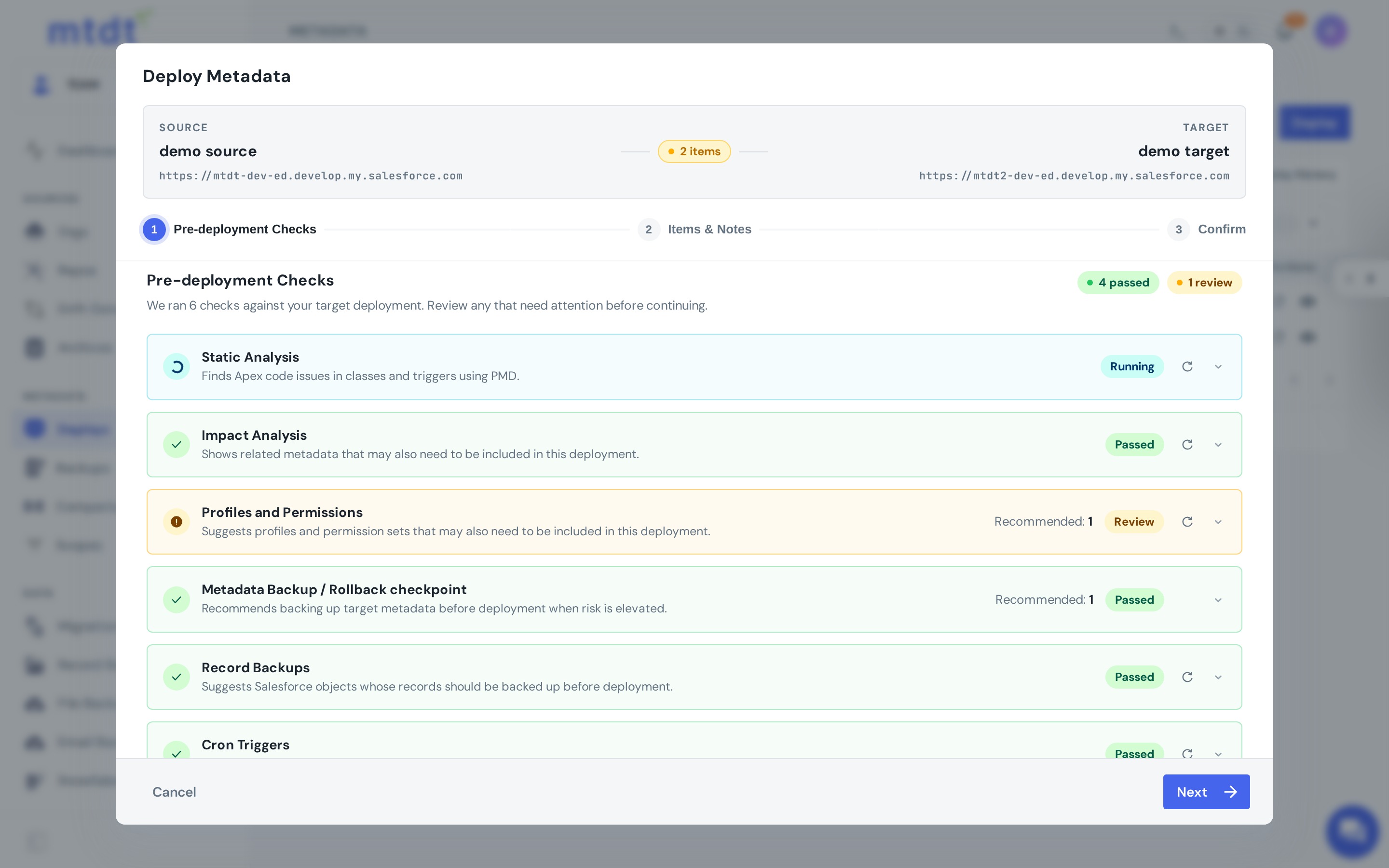
- Proactive guardrails. Static analysis catches Apex problems before they ship.
- Data, not just metadata. Migrate CPQ configuration and other config data between orgs — the thing DevOps Center can't touch.
- Governance that passes an audit. Per-action RBAC, enforced approvals, and reporting you can hand to compliance.
How to migrate without disruption
The good news: because you've been working in Git, moving up isn't a rip-and-replace.
- Keep Git as your source of truth. Your existing repo and branches stay exactly where they are.
- Point the new platform at the same repo. No re-baselining, no re-importing metadata by hand.
- Run in parallel for a sprint. Deploy the same work through both, compare results, and build confidence.
- Cut over. Once the team trusts the new workflow, retire DevOps Center.
Because the source of truth never moves, there's no big-bang migration and no frozen-release window.
So… should you switch?
Stay on DevOps Center if: you're one team, one production org, a simple branch model, on GitHub.com, with no compliance or data-migration needs. It's free and it works.
Move up if: you're juggling multiple orgs, need automation and approvals, can't afford to be without backup and rollback, use a VCS DevOps Center doesn't support, or have to migrate CPQ/config data. Those needs don't go away — they compound.
FAQ
What are the clearest signs a team has outgrown Salesforce DevOps Center? The main signals are: your version control isn't GitHub.com or Bitbucket Cloud, you have no backup or rollback safety net, deployments get slow or conflict-prone at scale, you need to migrate data (like CPQ config) rather than just metadata, or compliance needs audit trails and RBAC that DevOps Center doesn't provide.
Does DevOps Center support GitLab or self-hosted Git? No. DevOps Center works with GitHub.com and Bitbucket Cloud (still in beta). Teams standardized on GitLab, Azure DevOps, GitHub Enterprise Server, or self-hosted Git aren't supported natively.
Does Salesforce DevOps Center have rollback or backup? No — DevOps Center has no backup and no rollback. If a deployment breaks production, there's no point-in-time copy to restore from and no built-in "undo."
Can I migrate from DevOps Center to mtdt.io without a big rip-and-replace? Yes. Since both are Git-based, you keep your existing repo and branches as-is, point mtdt.io at the same repo, run deployments in parallel for a sprint to compare results, and then cut over once the team trusts the new workflow — no re-baselining or frozen-release window required.
Ready to see what's on the other side of the ceiling?
mtdt.io picks up exactly where DevOps Center leaves off — same Git, more power, none of the rip-and-replace.
Log in to mtdt.io and connect your repo.
Related: Salesforce DevOps in 2026: The Complete Stack · Deploy and Back Up Metadata to Git · mtdt.io vs Change Sets
Was this page helpful?
Let us know how we did