Deploy a Salesforce Custom Report Type to Production — Without the Missing-Object Error

You move a custom report type from your sandbox to production, and the deploy fails:
INVALID_CROSS_REFERENCE_KEY: In field: baseObject — no CustomObject named MTDT_RT_Obj__c found
The report type is fine where you built it. In the target, the object it's built on isn't there, and the whole thing stops — nothing lands. The fix is to deploy the report type together with its base object and the custom fields it reports on; mtdt.io reads those dependencies and recommends the missing ones before you deploy, so the reference resolves instead of hard-failing.
Why report types fail on deploy
A custom report type is built on top of an object — its baseObject — and exposes that object's fields as report columns. Both resolve against the target at deploy time. Deploy the report type to an org that doesn't have the base object (or one of the custom fields it shows as a column), and it hard-fails with no CustomObject named … found. The whole deploy stops.
The catch: Salesforce won't warn you. Change sets are famous for it — nothing tells you a report type's base object or fields are missing before you deploy. You find out when it breaks.
The fix
Deploy the report type together with its base object and the custom fields it reports on. The hard part, as always, is knowing what those are before Salesforce tells you the hard way.
How mtdt.io flags what a report type needs
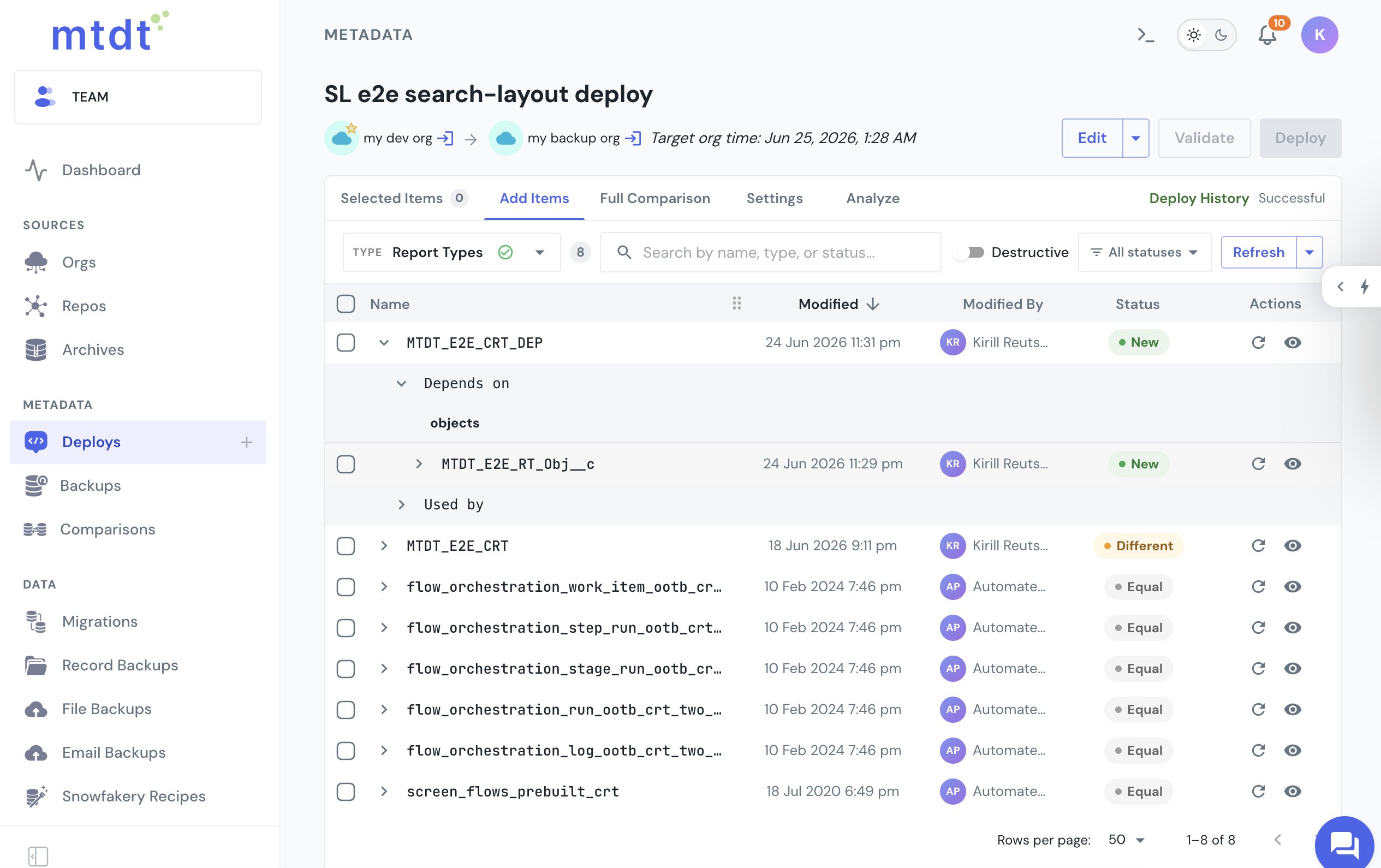
mtdt.io reads a custom report type's dependencies and recommends the ones missing in the target. Add a report type to a deployment, expand it, and its Depends on tree shows the base object — and the custom fields it exposes as columns — each tagged New when the target doesn't have it yet:
The same dependency surfaces in Pre-deployment checks: Impact Analysis recommends the base object before the deploy runs, so you catch it ahead of time.
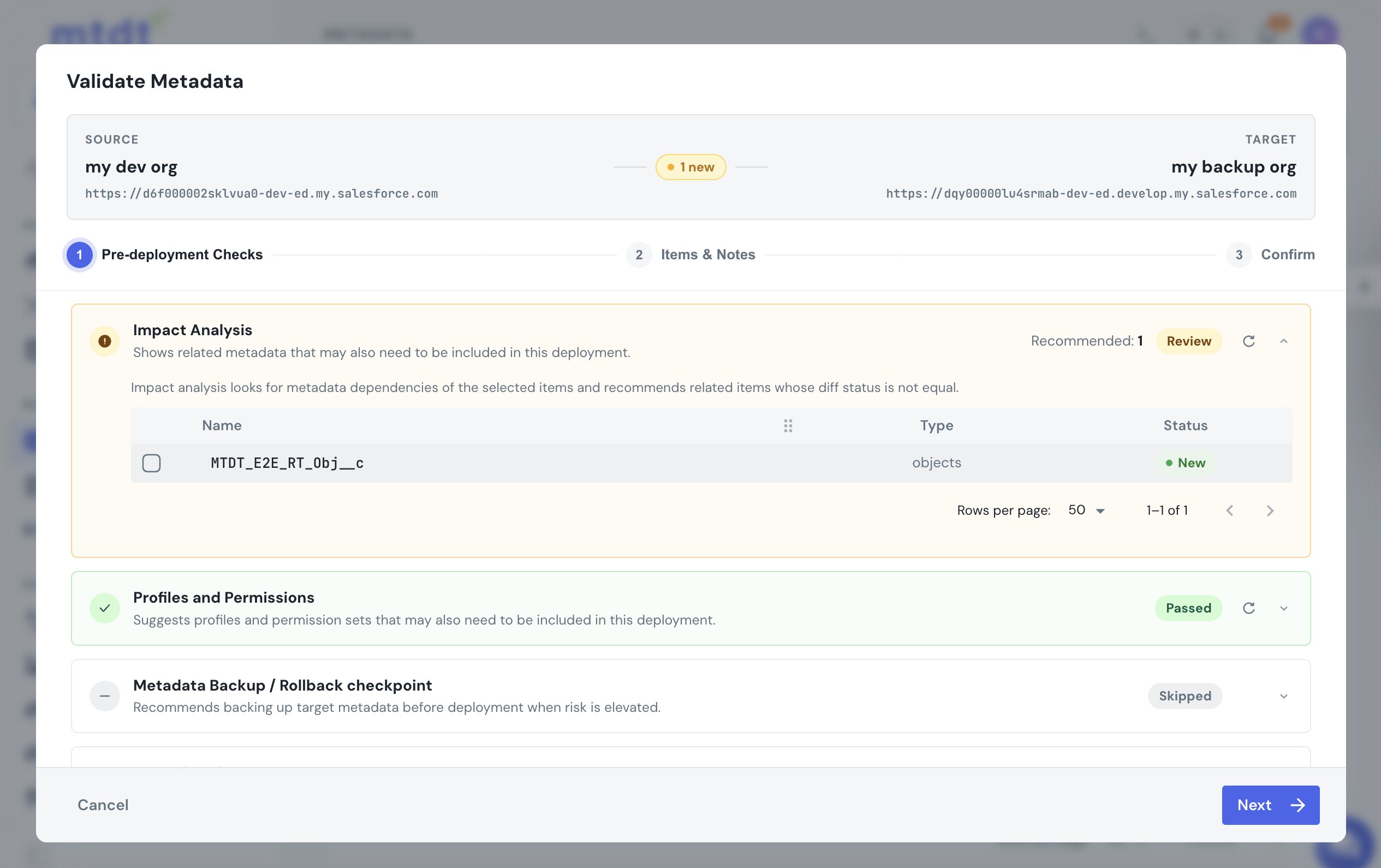
Include it, and the report type and its object deploy together — the reference resolves instead of hard-failing.
This is the gap change sets famously leave to you: Salesforce models no dependencies for report types at all, so without something to fill it, a missing base object is a deploy you only discover by breaking it. For the same recommendation on record types and global value sets, see Deploy Salesforce Record Types Without 'Picklist Value Not Found' and Fix 'Global Value Set Cannot Be Resolved'.
FAQ
Why does deploying a custom report type fail with "no CustomObject named … found"?
A custom report type is built on a base object and exposes that object's fields as report columns, and both resolve against the target org at deploy time. If the base object (or one of the custom fields it reports on) isn't already in the target, the reference can't resolve and the deploy hard-fails with INVALID_CROSS_REFERENCE_KEY.
Does Salesforce warn you before a report type deploy fails this way? No. Change sets don't flag a report type's base object or fields as missing before you deploy — Salesforce models no dependencies for report types at all, so you only find out when the deploy breaks.
How do you fix a missing-base-object error on a report type deploy? Deploy the report type together with its base object and the custom fields it reports on as columns. Once those are included in the same deploy, the reference resolves instead of hard-failing.
How does mtdt.io help with report type dependencies? mtdt.io reads a custom report type's dependencies and recommends the base object and the custom fields it exposes as columns, tagging each one New when the target doesn't have it yet. The same recommendation appears in Impact Analysis during pre-deployment checks, so you catch the gap before the deploy runs.
Stop deploying report types into a brick wall
Add a report type and let mtdt.io flag the object and fields it's built on — so the deploy resolves instead of failing on a missing reference.
Log in to mtdt.io and deploy your report types.
Was this page helpful?
Let us know how we did