Deploy Salesforce Record Types Without 'Picklist Value Not Found'

You add a record type to a deployment, ship it, and Salesforce stops you cold:
Global value set 'Tier__c' in record type 'Partner' on the entity 'Account' cannot be resolved
or the one everyone ends up searching for:
Picklist value: Archived in picklist: RT_Status__c not found
The record type deployed fine in your source org. In the target, it can't find a picklist field — or a value — it relies on.
Why record types break on deploy
A record type does more than label a record. For every picklist on its object, it records which values are available under that record type. Those assignments point at real fields and real values:
- If the field doesn't exist in the target, you get "global value set … cannot be resolved."
- If the field exists but is missing a value the record type assigns, you get "Picklist value: X in picklist: Y not found."
Salesforce resolves those references at deploy time, in the target. So a record type only deploys cleanly when the picklist fields it depends on — with the right values — are already there, or travelling in the same deployment. Deploy the record type by itself and you're betting the target already matches. Often it doesn't.
There's a sharper version of the trap for org-to-org work: retrieve a record type on its own and the Metadata API strips its picklist value assignments — so it can appear to "deploy" while none of the value availability actually transfers. The reliable answer in every case is the same: deploy the record type together with its picklist fields.
The fix: deploy the record type with its fields
That's exactly what mtdt.io builds for you. Add the record type to a deployment and it shows what the record type depends on, then recommends the picklist fields you need to include:
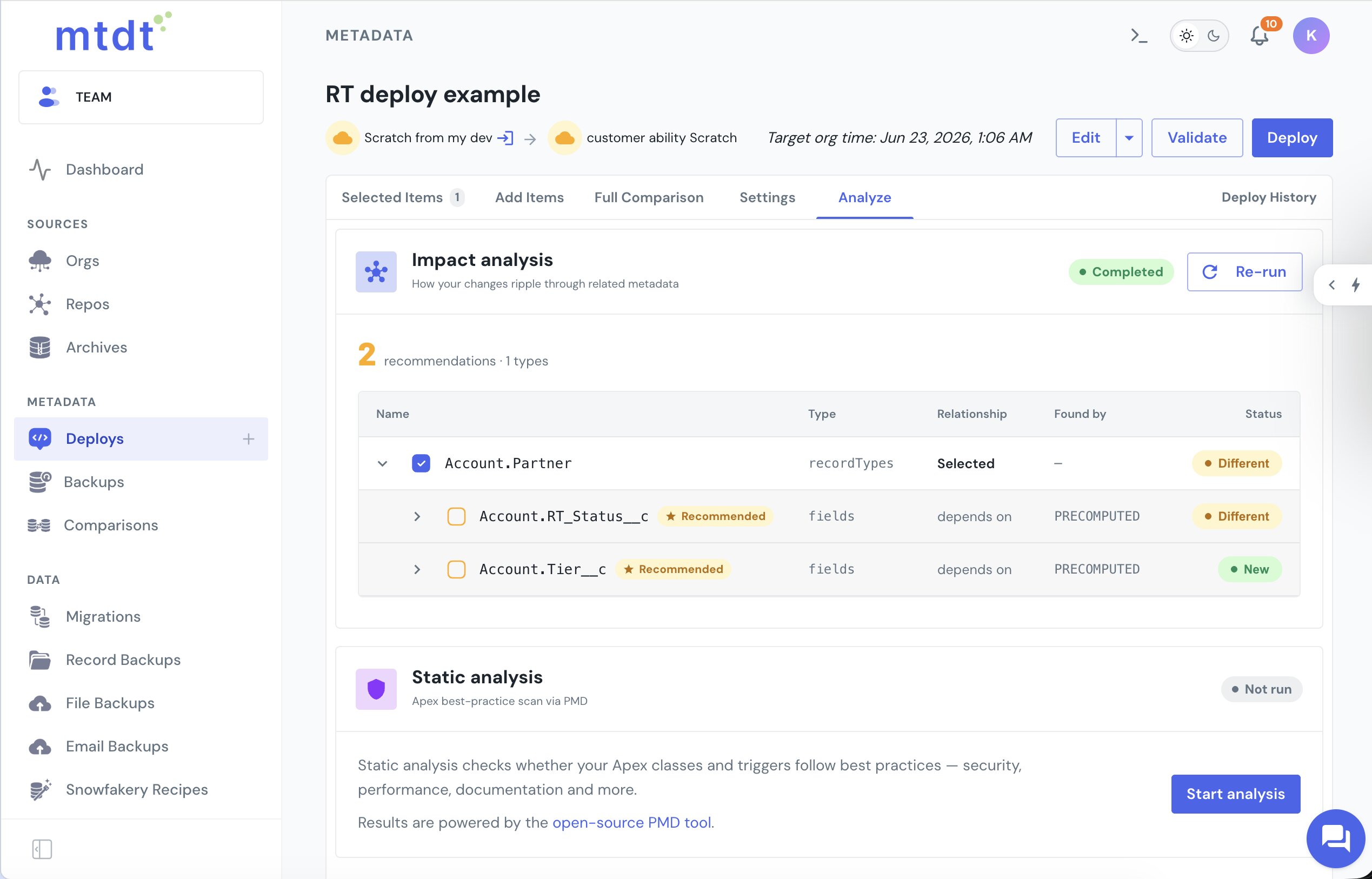
Each recommendation carries its status against the target:
Tier__c— New: the field doesn't exist in the target yet.RT_Status__c— Different: it exists, but the target is missing theArchivedvalue the record type uses.
Tick them, and the record type and its fields deploy as one consistent unit. The field carries its full value set, the record type's assignments resolve, and the "cannot be resolved" error never happens.
The detail naive tools miss
Most of the pain here is value-level: the target has the field but not one value the record type needs. A comparison based on last modified date can call those two fields "the same." mtdt.io compares the metadata itself, so RT_Status__c shows as Different purely because Archived is missing — and that value rides along when you deploy the field.
Good practices
- Deploy the record type with its picklist fields, not on its own — let the dependency recommendations build the bundle for you.
- Mind restricted picklists. Adding values is additive and safe; for anything bigger, take mtdt.io's offer to back up the object's records and keep a rollback checkpoint.
See the guide for the step-by-step: Deploying Record Types.
FAQ
What causes "Picklist value: X in picklist: Y not found" when deploying a record type? A record type records which picklist values are available under it, and those assignments point at real fields and values. If the target org's picklist field exists but is missing a value the record type assigns, Salesforce rejects the deploy with this error at deploy time.
What does "Global value set cannot be resolved" mean for a record type deploy? It means the picklist field itself doesn't exist yet in the target org. The record type's value assignments reference a field that isn't there, so Salesforce can't resolve them.
Why does a record type sometimes "deploy" without actually carrying its picklist values? Retrieving a record type on its own strips its picklist value assignments via the Metadata API, so the file can look like a clean deploy while none of the value availability actually transfers. Deploying the record type together with its picklist fields is the reliable fix.
How does mtdt.io prevent these record type deploy errors?
When you add a record type to a deployment, mtdt.io shows what it depends on and recommends the picklist fields it needs, marking each as New (missing in target) or Different (missing a specific value like Archived). Selecting them bundles the record type and its fields into one consistent deploy.
How does mtdt.io detect a missing picklist value that a last-modified-date comparison would miss?
mtdt.io compares the metadata itself rather than modification timestamps, so a field showing as Different is flagged purely because a specific value the record type needs — such as Archived — is absent, and that value is included when you deploy the field.
Stop chasing "picklist value not found"
Let mtdt.io bundle the fields your record types depend on and deploy them in one clean step.
Log in to mtdt.io and deploy your record types.
Was this page helpful?
Let us know how we did