Fix 'Global Value Set Cannot Be Resolved' on Salesforce Deploy

You deploy a picklist field that's worked for months, and the target org rejects it:
Global value set 'Account_Tier' cannot be resolved
The field is fine in your source org. The values are right there. But the moment you push it to another org, the deploy fails on a value set it can't find. That's because a Global Value Set is its own separate metadata component — the field only references it by name, and it doesn't ride along with the field automatically. The fix is to deploy the field together with its GlobalValueSet, which is what mtdt.io does by recommending the value set as a dependency whenever it's missing in the target.
Why the value set can't be resolved
The clue is in the wording: global value set. A Global Value Set is its own metadata component — a single, reusable list of picklist values that many fields (and record types) share. A picklist field bound to one doesn't carry the values itself; it just references the value set by name:
<valueSet>
    <valueSetName>Account_Tier</valueSetName>
</valueSet>
Salesforce resolves that reference at deploy time, in the target. If the Account_Tier value set isn't already there — and isn't travelling in the same deployment — there's nothing to resolve, and the deploy stops.
That's what makes it sneaky: the values live in a separate component from the field that uses them. Deploy the field (or its object) on its own and you're betting the target already has the value set. Often it doesn't — especially the first time a new shared value set reaches a downstream org.
It only happens with Global value sets. A field with its own inline, restricted value set carries those values with it, so there's nothing external to resolve.
The fix: deploy the field with its Global Value Set
Include the GlobalValueSet component in the deployment, alongside the field that uses it. With both in the package, the reference resolves and the error never fires. If the value set already exists in the target and matches, the field deploys clean on its own — but the safe move is to send them together whenever the set is new or changed.
The usual trip-up: people add the field (or the whole object) to a deployment and forget the value set is a separate component that doesn't ride along automatically. The Metadata API won't guess it for you.
How mtdt.io flags the value set for you
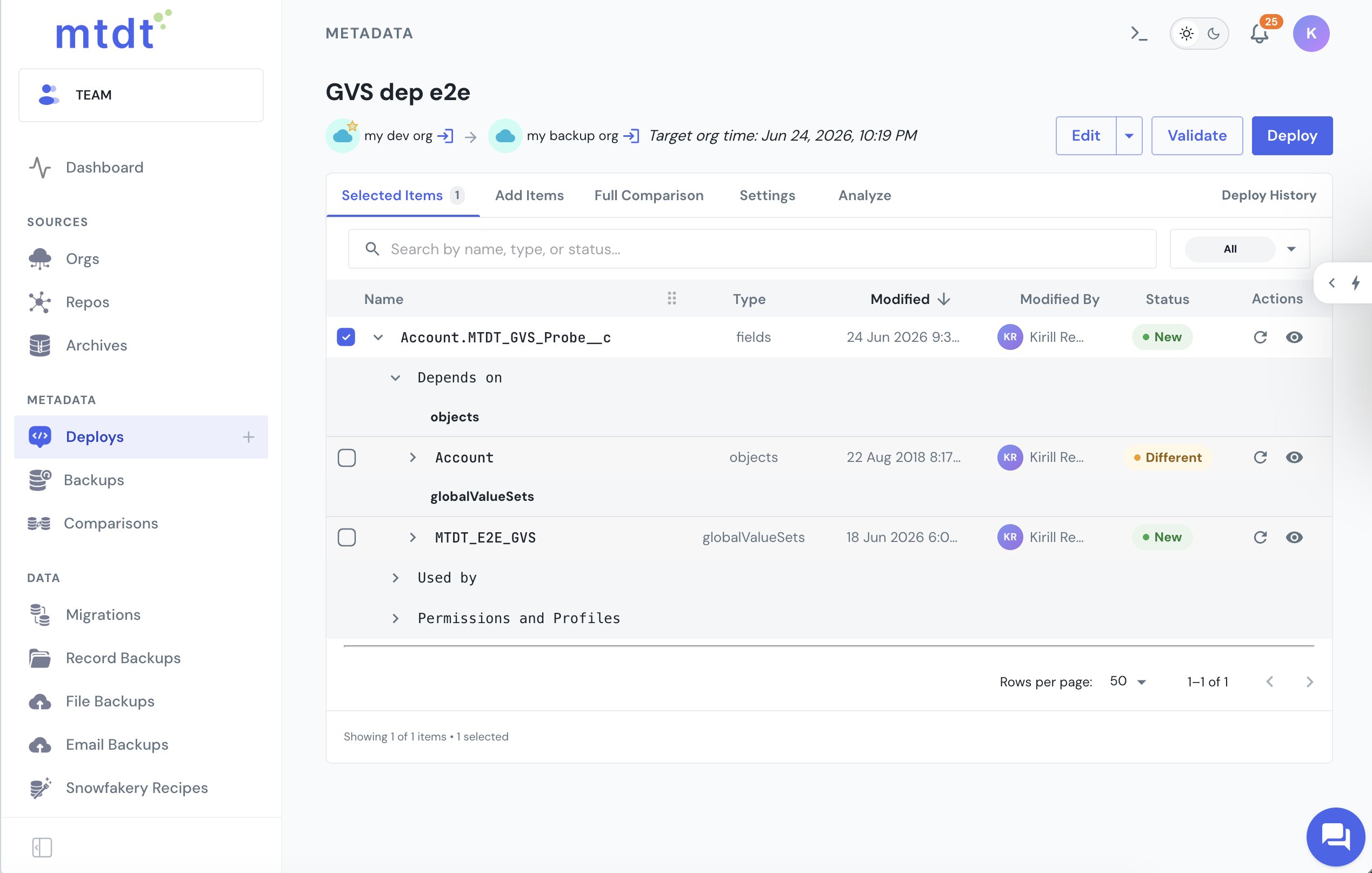
Add a field that's bound to a Global Value Set, and mtdt.io reads that reference as a dependency. Expand the field and the value set shows up under Depends on, next to the object it lives on:
The same dependency surfaces in Pre-deployment checks: Impact Analysis recommends the GlobalValueSet and tags it New when the target doesn't have it yet — so you catch the gap before the deploy hits it.
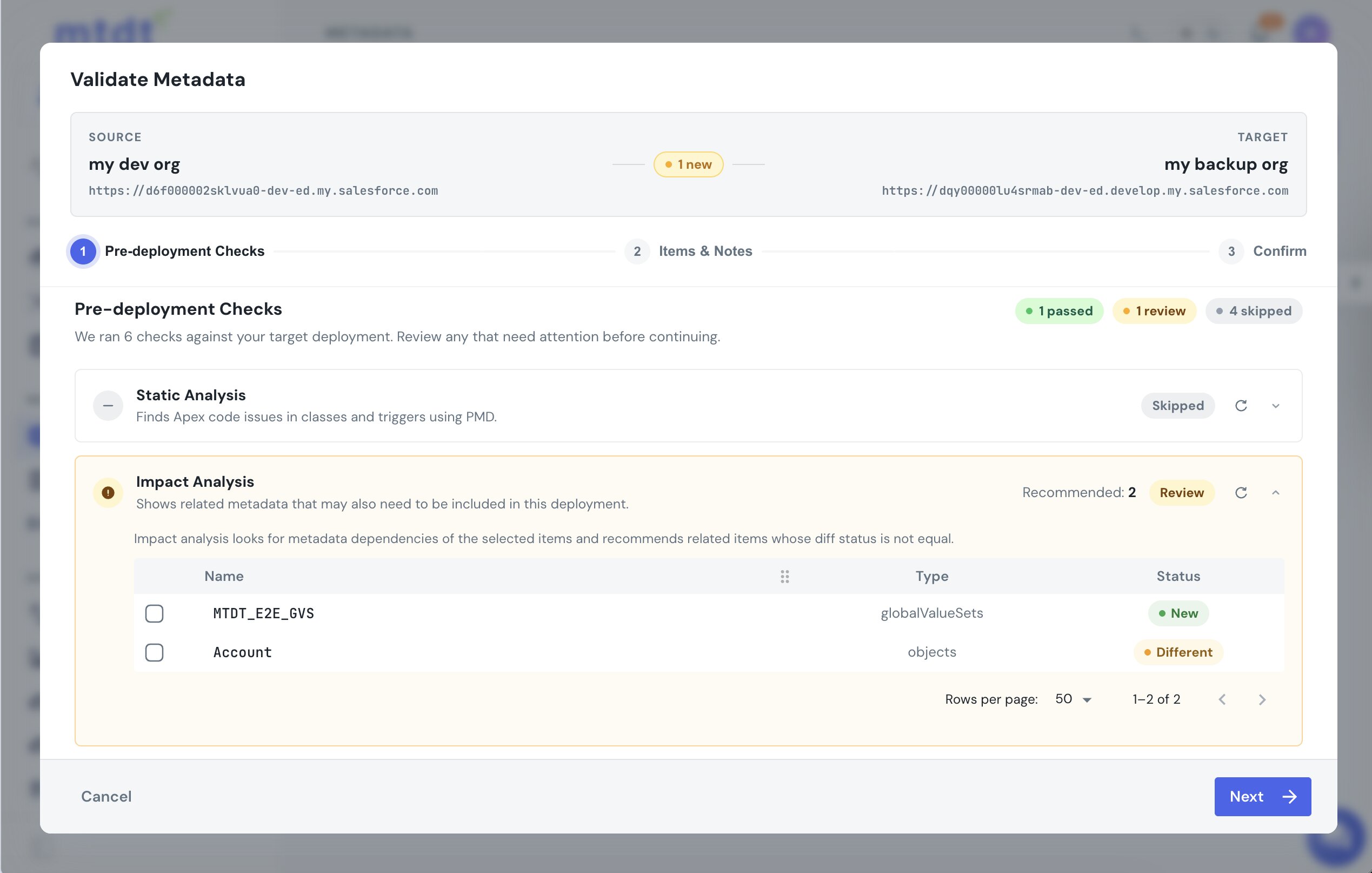
Include it, and the field and its value set deploy as one unit — the reference resolves in the target instead of failing.
That shared nature is worth watching: a single Global Value Set sits behind many fields, so one missing or changed set can break several field deploys at once. Bundling the set with the fields keeps every reference pointing at the same source of truth, and lets you ship a value-set change once, to every field that depends on it.
For the record-type flavour of the same dependency trap, see Deploy Salesforce Record Types Without 'Picklist Value Not Found'. To ship only changed values into a shared set without overwriting the target's, see Safe Field-Level Deployments.
FAQ
Why does Salesforce say a global value set cannot be resolved?
A picklist field bound to a Global Value Set doesn't store the values itself — it only references the value set by name (<valueSetName>). Salesforce resolves that reference at deploy time, and if the named value set isn't already in the target org or traveling in the same deployment, there's nothing to resolve, so the deploy fails.
Does this happen with all picklist fields? No — only fields bound to a Global Value Set. A field with its own inline, restricted value set carries those values with it, so there's nothing external to resolve and no separate component to miss.
How do I fix "Global value set cannot be resolved"?
Include the GlobalValueSet component in the same deployment as the field that references it. Once both are in the package, the reference resolves in the target. If the value set already exists there and matches, the field can deploy on its own — but sending them together is the safe default whenever the set is new or changed.
How does mtdt.io help with this error? mtdt.io reads a picklist field's Global Value Set reference as a dependency and shows it under Depends on when you expand the field. The same dependency surfaces in Impact Analysis during pre-deployment checks, tagged New when the target doesn't have it yet, so you can add it to the deployment before the error hits.
Can one Global Value Set break more than one field's deploy? Yes. A single Global Value Set is often shared by many fields (and record types), so one missing or changed set can break several field deploys at once. Bundling the set with the fields that use it keeps every reference pointing at the same source of truth.
Stop chasing "cannot be resolved"
Deploy each picklist field together with the Global Value Set it depends on, and the reference resolves on the first try.
Log in to mtdt.io and deploy your value sets.
Was this page helpful?
Let us know how we did