The Best Way to Deploy Profiles in Salesforce — Without Wiping Permissions

Ask how to deploy a Salesforce profile — the System Administrator profile especially — and you'll get a chorus of warnings: it wipes permissions, it comes over empty, it strips your settings. The fear is earned. The Metadata API reads a profile as a single all-or-nothing document, so the way you deploy it decides whether you ship a clean change or a mass lockout — and the safest way is to scope the profile to only the components you're deploying, so anything you didn't include is never touched on the target.
Why profile deploys go wrong
A profile carries hundreds of settings — field-level security, object permissions, Apex class and Visualforce access, tab and app visibility, record-type visibility, page-layout assignments, login IP ranges, login hours, and user permissions. Because the Metadata API treats all of it as one document, four classic failures follow:
- Omitted means removed. Retrieve a profile narrowly, deploy it over a populated target, and the settings your source didn't include get cleared — the mass-lockout story behind "never deploy the Admin profile."
- FLS won't travel without its field. Field-level security for a field deploys only when that field is in the same deployment. Ship the profile alone and a new field's FLS quietly fails to apply.
- Change sets strip settings. Profiles in a change set arrive with only the parts tied to the components in the set, so assignments and settings appear to vanish.
- Environment settings get overwritten. The source's login IP ranges and page-layout assignments replace the target's — harmless between matching orgs, dangerous from a sandbox into production.
Two ways to deploy a profile
A profile deploys in mtdt.io one of two ways, and both leave the target's other settings untouched.
Select the whole profile, and mtdt builds it on the fly. mtdt assembles the profile it deploys from the components in the same deployment: it carries the profile's field permissions, object permissions, Apex class access, tab and app visibility, and page access — but only for the fields, objects, classes, tabs, apps, and pages you're deploying alongside it. A setting for anything you're not deploying never enters the XML, so Salesforce's per-entry upsert leaves it untouched on the target. Record-type visibility and page-layout assignments aren't pulled in automatically either, so those stay on the target too.
The second way is the per-permission panel — open the profile and pick exact rows (covered just below).
Either way, the result is keep-target by default. Deploy a profile (or a profile plus one field) and the permissions for everything you didn't include stay exactly as they were:
| A setting you didn't include in the deploy | Source | Target before | Target after |
|---|---|---|---|
| Field-level security on another field | read/write | none | none (kept) |
| Object permission on another object | read/write | none | none (kept) |
| Apex class access | enabled | none | none (kept) |
| Page-layout assignment | Layout A | Layout B | Layout B (kept) |
That closes the omitted-means-removed trap, and it's why a field's field-level security travels together with the field — the same scoping idea covered in Safe Field-Level Deployments: Ship Only What Changed.
The other way: deploy permission by permission
The second way is to open the profile in a per-permission panel and pick exact rows. mtdt.io shows every setting in the profile as its own row, the source value beside the target value: the source column is read-only, and each row has a target toggle. Leave a row untouched and the target keeps its value; toggle it and that single setting deploys.
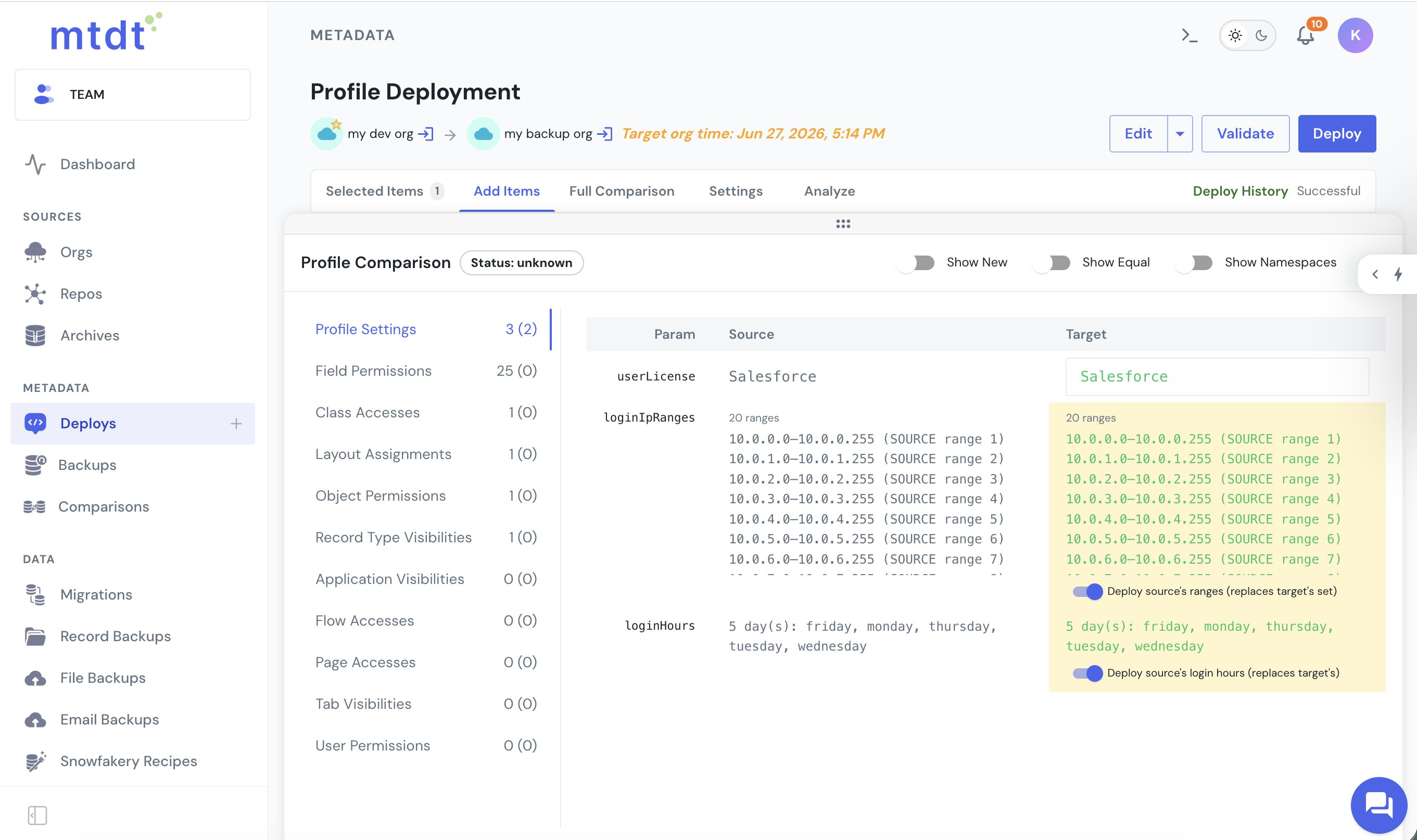
You pick exactly what ships — specific field permissions, object permissions, record-type visibility, Apex class access, and a Profile Settings section for login IP ranges and login hours — and everything you don't toggle stays as it is on the target. So a one-permission change carries nothing else along with it, and reviewing the profile and choosing what to deploy happen in the same place — none of the change-set "the profile came over empty" surprise.
Choose what a straight profile deploy carries
Deploy a profile without picking individual rows and mtdt.io still scopes it to the components in the deployment — but a profile also holds settings tied to no single component (login IP ranges, login hours, user permissions), and a radio in the deploy step decides whether those ride along:
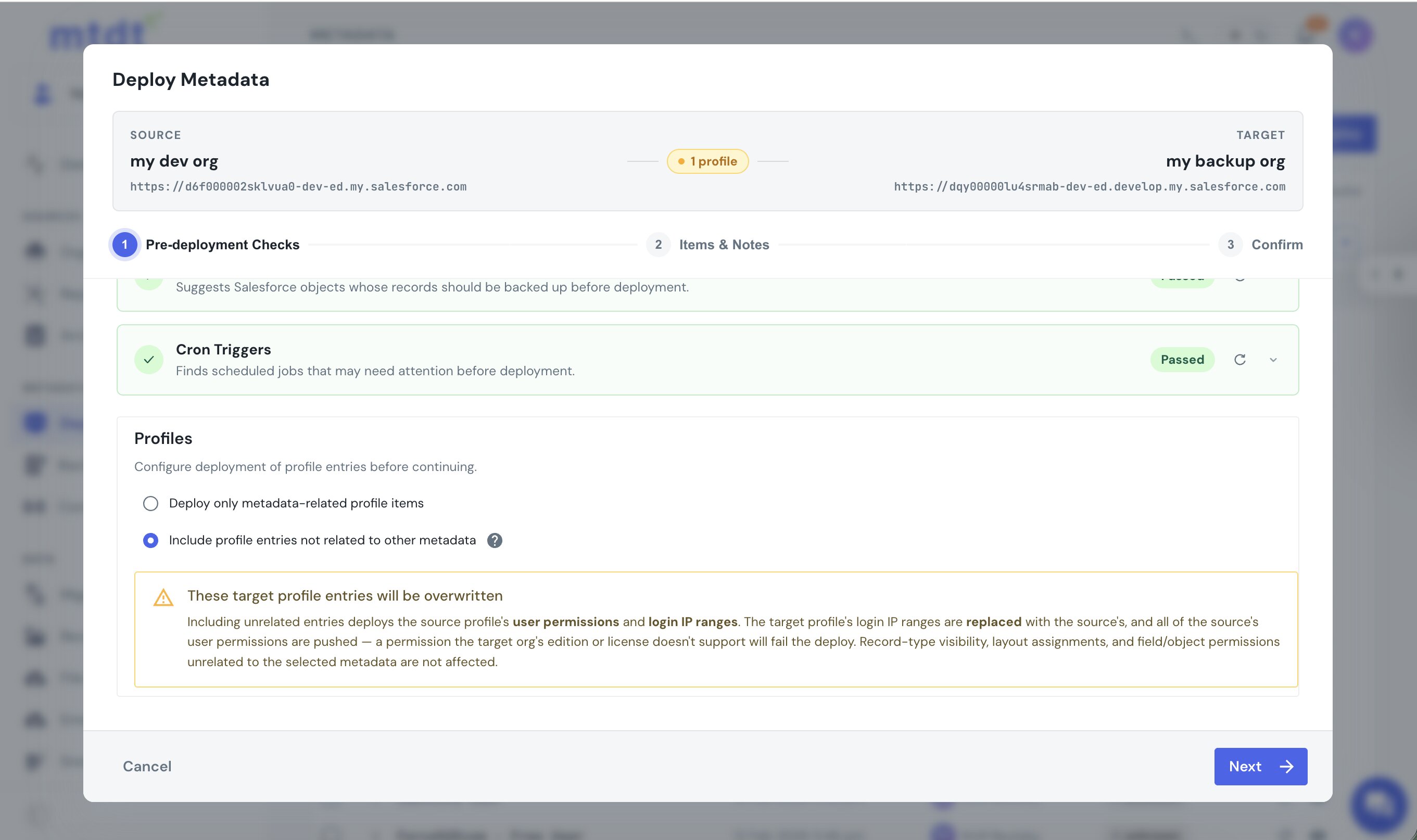
- Deploy only metadata-related profile items keeps the profile scoped. The target's login IP ranges and user permissions stay as they are.
- Include profile entries not related to other metadata carries the source's login IP ranges and all of its user permissions onto the target — for when the orgs should match — with a warning that it replaces the target's login allow-list and pushes every source permission.
Login hours stay on the target unless you deploy them deliberately. The choice keeps environment-specific settings under your control, so a sandbox-to-production deploy doesn't silently rewrite production's IP allow-list.
Pre-deployment checks built for profiles
Before a profile ships, mtdt.io runs a panel of checks aimed at the exact ways profile deploys fail:
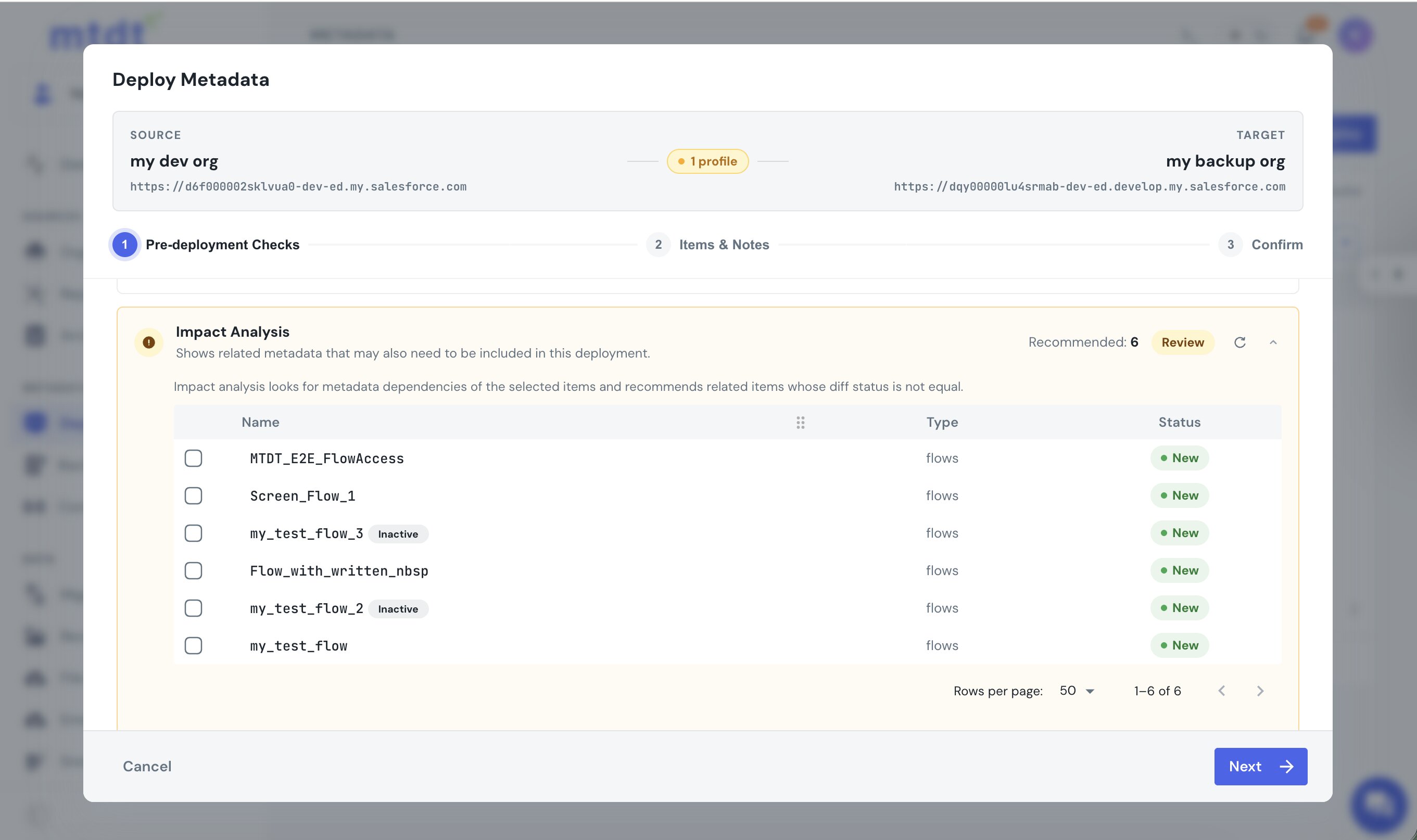
- Impact Analysis recommends the dependent metadata a profile needs — the flows it grants access to, for instance — each with a checkbox to include in the deploy.
- Profiles & Permissions runs both directions: for a field, object, or class you're deploying, it recommends the profiles and permission sets that grant access to it, so the grant travels; and when you carry user permissions, it names any that the target org's edition or license doesn't support, ahead of the cryptic
Unknown user permissionerror Salesforce would otherwise throw.
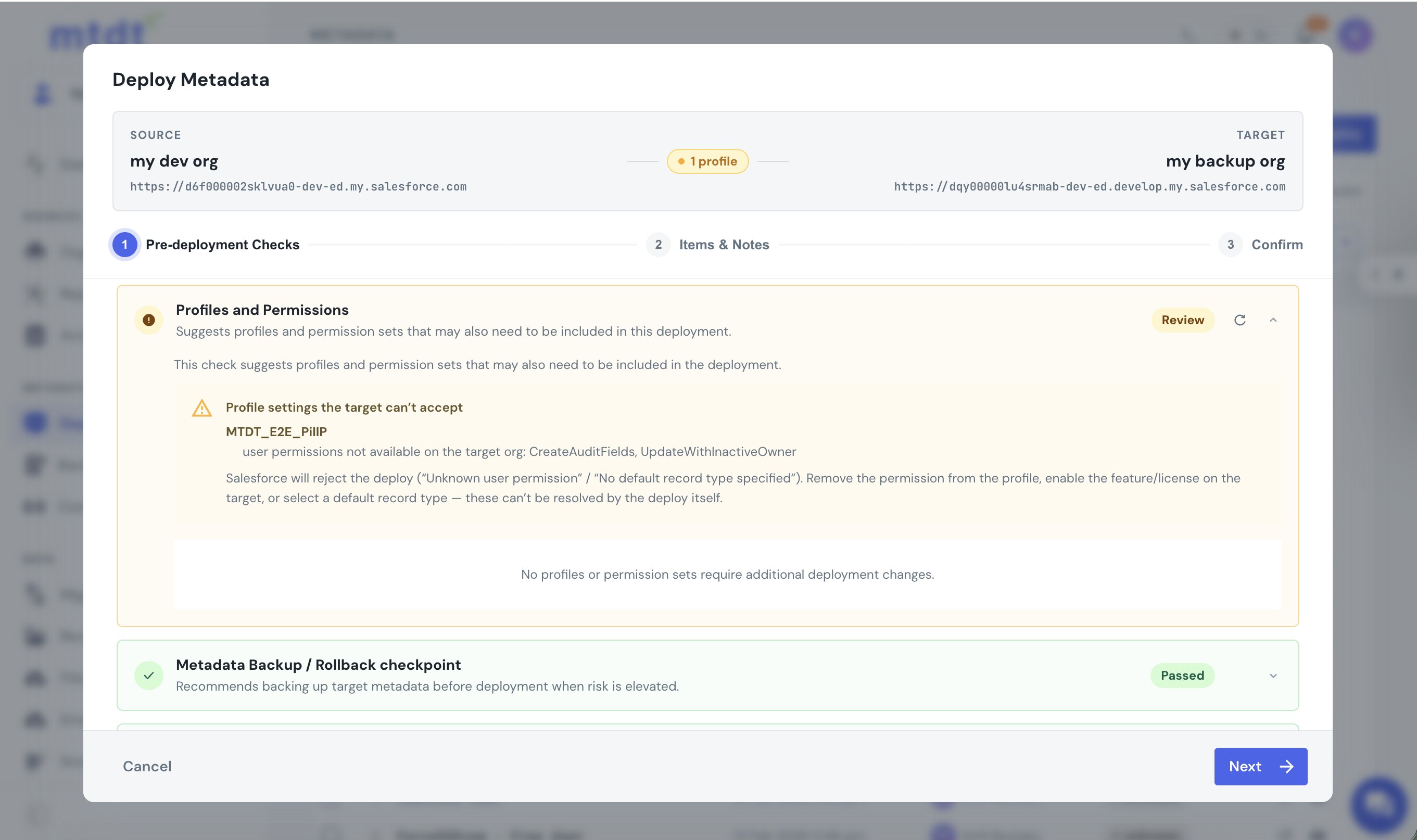
These are specific recommendations tied to what you're shipping. (Plain check-only validation is native to Salesforce; this panel goes to the dependencies and compatibility a profile deploy actually trips on.) The full panel is covered in Pre-Deployment Checks: Catch What Breaks a Salesforce Deploy Before It Runs.
What to watch
Owning the edges: when you choose Include profile entries not related to other metadata (or deploy login settings deliberately), you're replacing the target's login IP ranges and pushing the source's user permissions, and a permission the target's edition or license doesn't support will fail the deploy. mtdt.io warns before that happens, and keeping a profile scoped to its metadata avoids it altogether. A metadata backup and rollback checkpoint sit in the pre-deploy checks, so a profile deploy stays recoverable — see One-Click Rollback.
FAQ
Why does deploying a Salesforce profile wipe permissions? Because the Metadata API reads a profile as a single all-or-nothing document — if a setting is omitted from what you retrieve and deploy, Salesforce clears it on the target. That's the "omitted means removed" trap behind the mass-lockout stories around deploying the System Administrator profile.
Do field-level security settings deploy with the profile alone? No — field-level security for a field only deploys when that field is included in the same deployment as the profile. Ship the profile by itself and a new field's FLS quietly fails to apply; mtdt.io avoids this because it scopes the profile it builds to the fields, objects, classes, tabs, apps, and pages you're actually deploying alongside it.
How does mtdt.io avoid overwriting a target profile's other settings? It builds the profile it deploys from the components in the same deployment, so a setting for anything you're not deploying never enters the XML and Salesforce's per-entry upsert leaves it untouched on the target. You can also open the profile in a per-permission panel and pick exact rows, where any row you leave untouched keeps the target's existing value.
Will a profile deploy overwrite my target org's login IP ranges? Only if you choose to. mtdt.io's deploy step has a radio between "Deploy only metadata-related profile items" (login IP ranges and user permissions stay as they are on the target) and "Include profile entries not related to other metadata" (the source's login IP ranges and user permissions replace the target's) — with a warning shown on the second option.
Deploy profiles without the lockout risk
Let mtdt.io build the profile from what you're actually deploying, review and deploy it permission by permission, and flag the permissions a target can't take — so a profile deploy ships the change you meant and nothing else.
Log in to mtdt.io and deploy your profiles.
Was this page helpful?
Let us know how we did