Run Apex After a Salesforce Deployment: Automate the Last Mile of a Release

You deploy the metadata, the release goes green — and then someone opens the Developer Console on the target org to run "that one script": re-schedule the nightly job, set a custom-setting value, kick off a backfill. It's a manual step, it's easy to forget, and forgetting it means the deploy looked successful but the org isn't actually finished.
mtdt.io closes that gap: it can run a block of anonymous Apex on the target org automatically, the moment a deployment succeeds.
Why deployments have a "last mile"
Salesforce deployments move metadata. But plenty of release steps aren't metadata:
- A Schedulable class deploys fine, but the scheduled job that runs it doesn't — Salesforce doesn't deploy running job instances. You have to re-schedule it.
- A new feature reads a custom setting or custom metadata value that has to be set in the target.
- A new field needs a backfill — a batch job to populate it from existing data.
- A release depends on flipping a feature flag or inserting reference data.
None of that happens by deploying components. Today it's usually a checklist item: "after deploying, log into the target and run X." mtdt.io turns that into part of the deployment itself.
How it works
In the deploy wizard's Items & Notes step, enable Run Apex after deployment and paste your script:
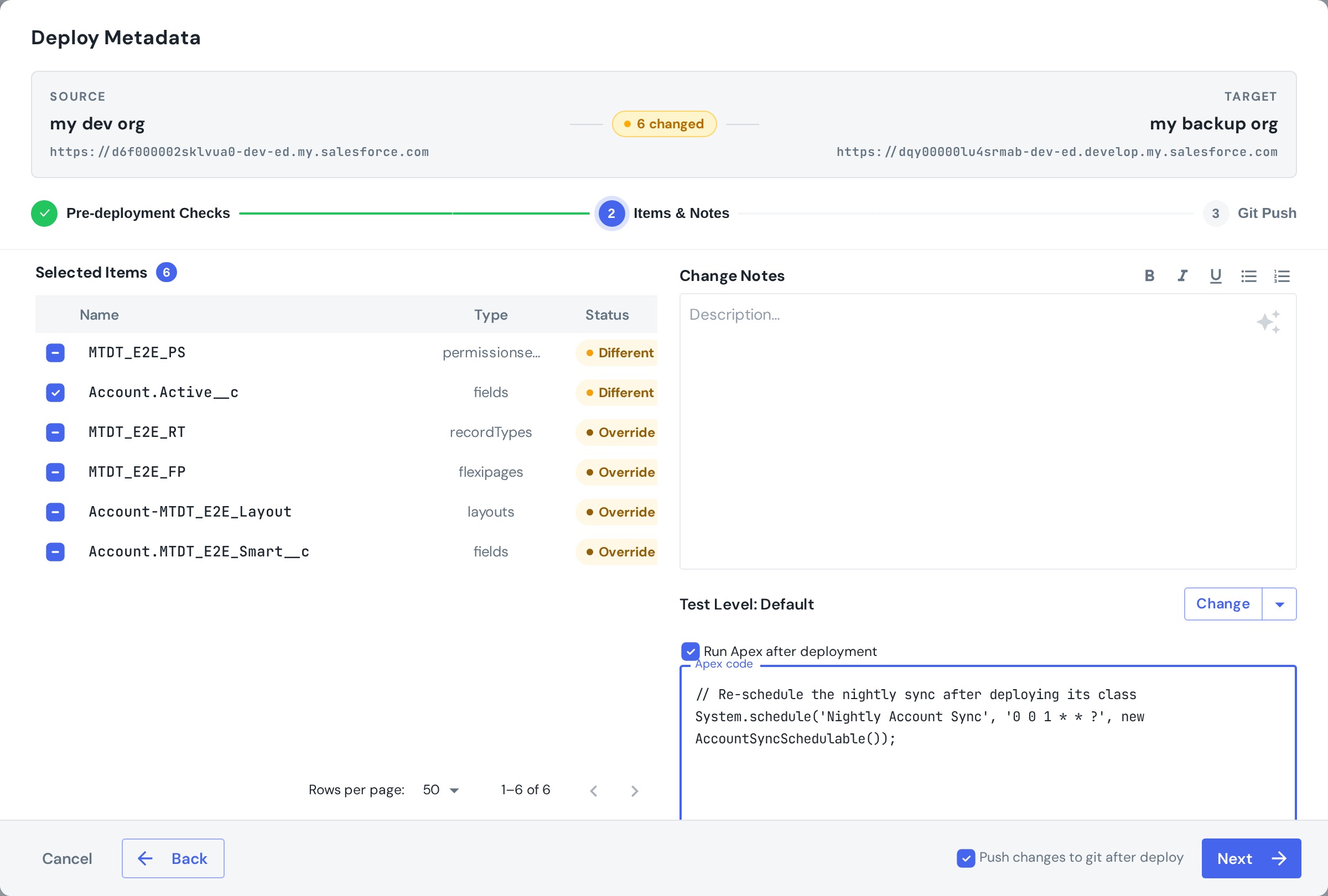
When the deployment finishes successfully, mtdt.io executes that Apex against the target org as anonymous Apex, and records the outcome — you'll see a Post-deploy Apex: Success / Failed badge in Deploy History, so you know the last mile actually ran.
The classic case: re-scheduling jobs
The most common use is re-creating a scheduled job after deploying its class:
System.schedule('Nightly Account Sync', '0 0 1 * * ?', new AccountSyncSchedulable());
This pairs neatly with pre-deployment checks: the Cron Triggers check flags the jobs that need re-creating before you deploy, and post-deploy Apex re-creates them after — the two ends of the same problem.
Other things teams automate this way
- Seed configuration — custom-setting values, default records, feature flags the release needs.
- Backfill / migrate — enqueue a batch job to populate a new field or recalculate values.
- Activation steps — anything that has to run in the target once the metadata is in place.
Good practices
- Keep it idempotent. A post-deploy script can run again on a later deployment, so write it to be safe to repeat.
- Keep it small. It's the finishing touch to a release, not a migration framework — for heavy data work, have it enqueue a batch job rather than do everything inline.
- Check the badge. The deploy can succeed while the script fails; the Deploy History badge tells you which.
It's a real execution, so it runs only on an actual deploy — not in validation-only mode.
See the guide for the step-by-step: Running Apex After a Deployment.
FAQ
Why doesn't a Salesforce deployment finish the whole release by itself? Deployments move metadata, but some release steps aren't metadata at all — a Schedulable class deploys fine but the scheduled job that runs it doesn't, because Salesforce doesn't deploy running job instances. Custom setting values, backfills, and feature flags also need to be set in the target after the metadata lands.
How do I get mtdt.io to run Apex after a deployment? In the deploy wizard's Items & Notes step, enable "Run Apex after deployment" and paste your script. When the deployment finishes successfully, mtdt.io executes that Apex against the target org as anonymous Apex.
How do I know if the post-deploy Apex actually ran? mtdt.io records the outcome and shows a "Post-deploy Apex: Success / Failed" badge in Deploy History, so a green deployment doesn't hide a failed last-mile script.
Does post-deploy Apex run during a validation-only (check-only) deploy? No. It's a real execution, so it only runs on an actual deploy, not in validation-only mode.
What's the most common thing teams use post-deploy Apex for?
Re-scheduling a job after deploying its Schedulable class — for example calling System.schedule(...) on the target org. It pairs with the Cron Triggers pre-deployment check, which flags jobs that need re-creating before the deploy so post-deploy Apex can re-create them after.
Stop ending releases with a manual script
Make the last mile part of the deployment.
Log in to mtdt.io and automate your post-deploy Apex.
Was this page helpful?
Let us know how we did