Why a Lightning Component Bundle Fails to Deploy — and What It Depends On

You deploy a Lightning web component that's run fine in your sandbox for weeks, and the target org rejects the bundle. The component itself didn't change. In the target, something it leans on — an Apex method, a field, a child component — isn't there, and the deploy fails on it. That's because a bundle is a thin shell that imports things like Apex controllers, fields, child components, static resources, labels, and message channels, and Salesforce resolves every one of those references against the target at deploy time. The fix is to deploy the bundle together with everything it depends on, which is what mtdt.io's Impact Analysis flags for you before the deploy runs.
Why bundles fail on deploy
A Lightning component — LWC or Aura — is rarely self-contained. The bundle (its .js / .html / .xml files) is a thin shell that imports the things it actually uses:
- an Apex controller —
@salesforce/apex/MyController.method - fields and objects —
@salesforce/schema/Account.Tier__c - child components —
<c-child> - static resources —
@salesforce/resourceUrl/... - custom labels —
@salesforce/label/c.... - message channels —
@salesforce/messageChannel/...
Salesforce resolves every one of those references against the target at deploy time. Deploy the bundle on its own, and if any of them is missing in the target — a controller you forgot, a field that hasn't shipped yet — the bundle fails.
There's a second, simpler cause: an incomplete bundle. A bundle is a folder of files that has to travel together. Ship a partial bundle — some files, not all — and it won't compile in the target.
The fix
Deploy the bundle with everything it depends on, and as a complete unit. The hard part is knowing what those dependencies are: one component can import a dozen things, and Salesforce won't list them for you before the deploy fails.
How mtdt.io flags the dependencies
mtdt.io reads a bundle's dependencies and recommends the ones missing in the target. Add a Lightning component to a deployment, and Impact Analysis flags everything it leans on — the Apex controller it calls, the fields it reads, the child components it renders, the static resources, labels, and message channels it imports — each tagged New when the target doesn't have it yet:
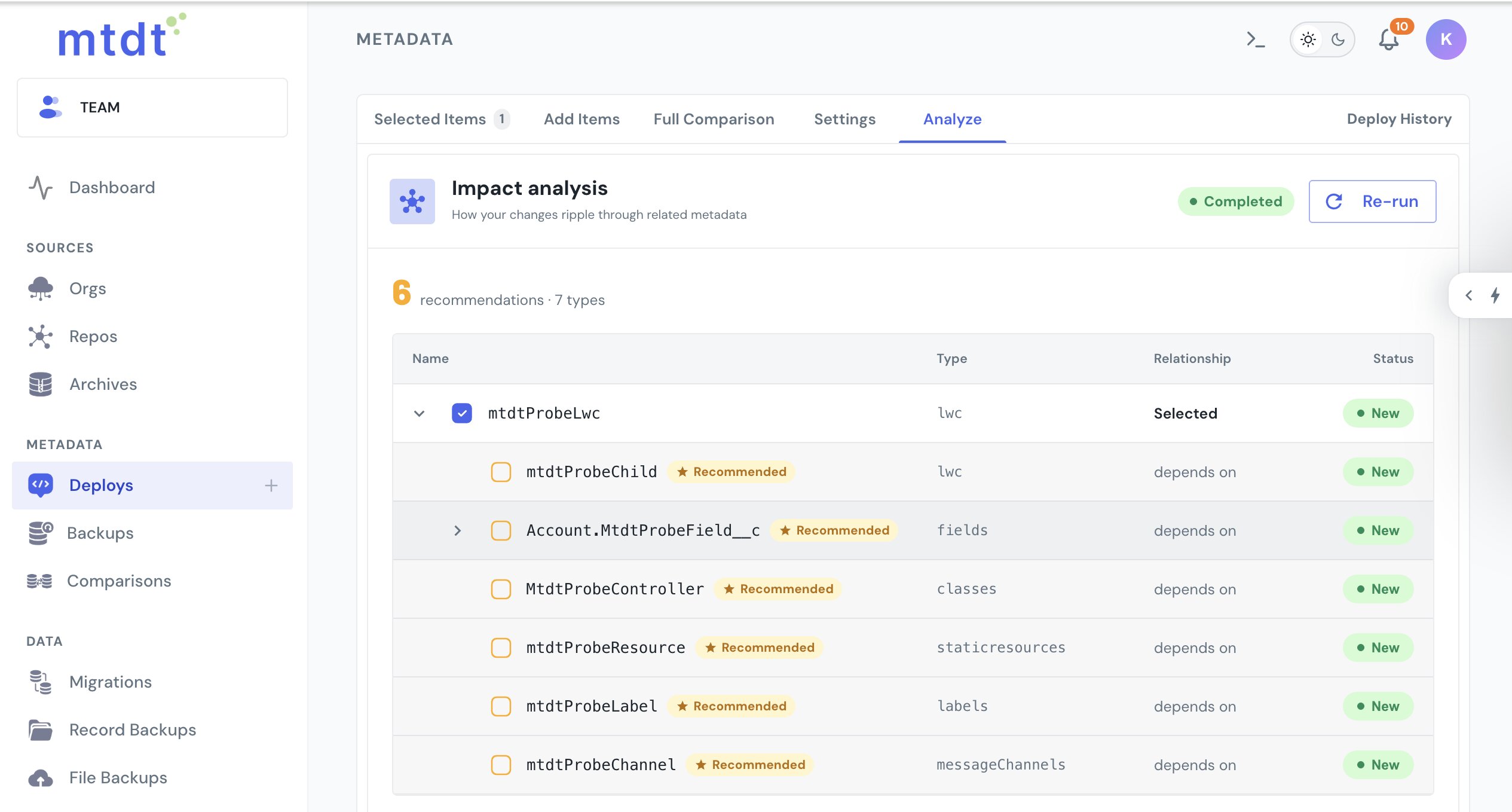
Include them, and the bundle and its dependencies deploy together, so every reference resolves rather than failing one at a time.
And the bundle always travels whole. A Lightning component is the smallest unit you select — mtdt ships the entire bundle folder, never a stray file — so the "incomplete bundle" failure can't happen by accident.
For another non-Apex deploy that quietly pulls in something extra, see Deploying Salesforce Static Resources Without the Binary Headache.
FAQ
Why does a Lightning component bundle fail to deploy? A bundle is a thin shell that imports things it actually uses — an Apex controller, fields and objects, child components, static resources, custom labels, and message channels. Salesforce resolves every one of those references against the target org at deploy time, so if any is missing there, the bundle deploy fails, even though the component itself hasn't changed.
What can cause an "incomplete bundle" failure? A bundle is a folder of files that has to travel together. If only some of those files ship — not the complete set — the bundle won't compile in the target. mtdt.io avoids this because a Lightning component is the smallest unit you can select: it always ships the entire bundle folder, never a stray file.
What dependencies does an LWC or Aura bundle typically have?
Up to six kinds: an Apex controller it calls, fields and objects it reads via @salesforce/schema, child components it renders, static resources, custom labels, and message channels it imports. Any of these can be missing in the target and cause the deploy to fail.
How does mtdt.io help a Lightning component deploy cleanly? mtdt.io reads a bundle's dependencies and, through Impact Analysis, recommends the ones missing in the target — tagging each as New when the target doesn't have it. Add the recommended dependencies to the deployment and the bundle and everything it needs deploy together, so references resolve instead of failing one at a time.
Stop guessing what your component needs
Add a Lightning component to a deployment and let mtdt.io bundle the controller, fields, and components it depends on — so the deploy resolves on the first try.
Log in to mtdt.io and deploy your components.
Was this page helpful?
Let us know how we did