Salesforce Deployment Approvals: Separation of Duties for Your Release Process

The fastest way to break production is to let everyone deploy to it. As a team grows, "anyone can push anything, anytime" stops being agility and starts being risk. What you want instead is separation of duties: people propose changes, and a smaller set of trusted reviewers sign them off.
mtdt.io's deployment approvals build that directly into the deploy flow — role-based, enforced at the moment of deploy, with extra protection for your most important orgs.
Deployment approvals are part of team governance — they rely on team roles, members, and reviewers. They only apply when you're working in a team (the Team plan), not in a personal workspace.
Approvals = role-based separation of duties
In Team Settings → Roles & permissions, each role carries a set of per-action permissions for deployments. The relevant ones are:
- Deploy — can run a deployment directly.
- Deploy Important — can deploy to orgs marked important (e.g. production).
- Request Approve — can submit a deployment for someone else to approve.
- Approve — can approve (or reject) a deployment someone requested.
- plus Validate, View, and the usual add/edit/delete.
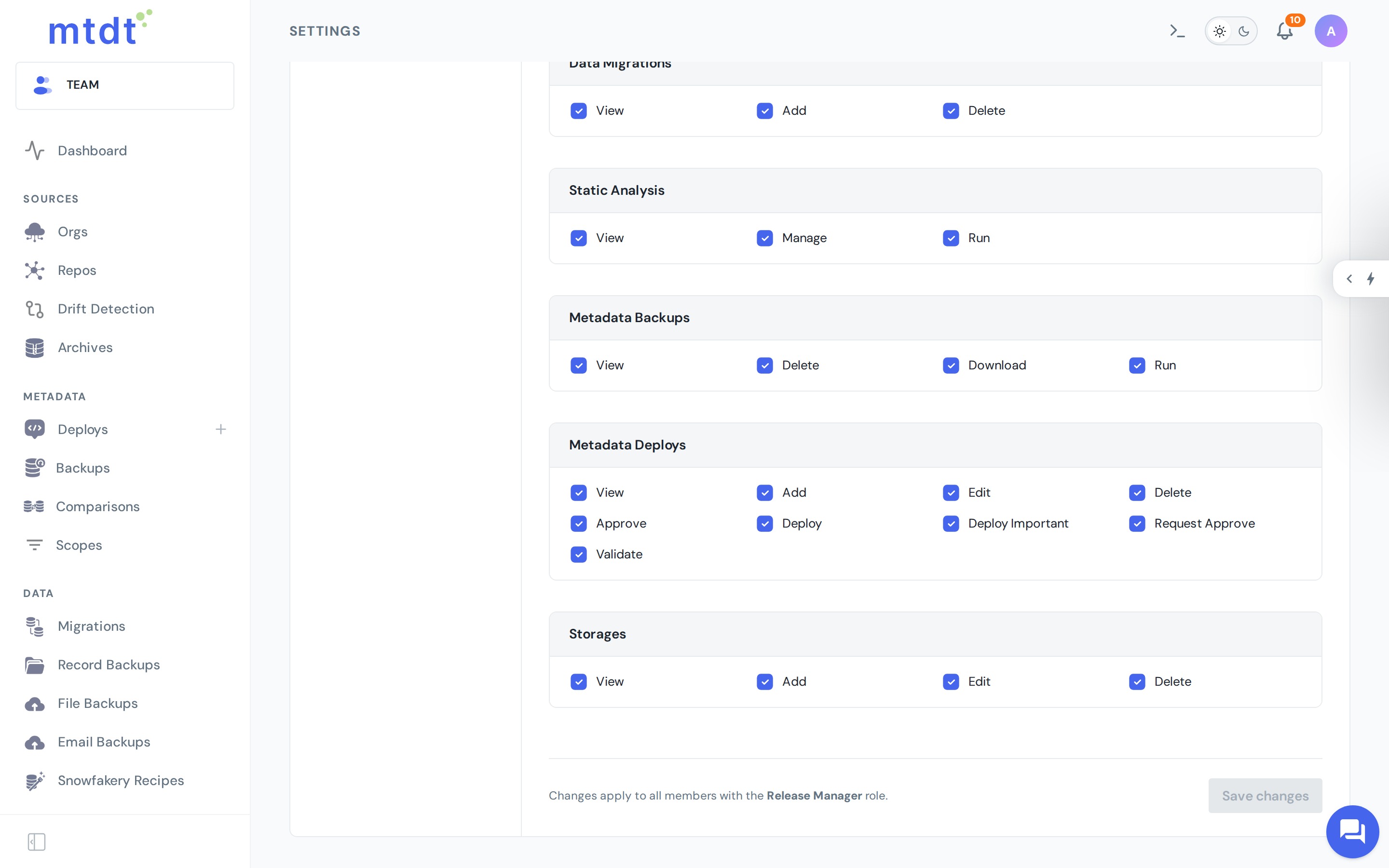
You assign roles to members, and the deploy flow adapts to what each person is allowed to do.
How it works in practice
The deploy screen reads the user's permissions and changes its primary action accordingly:
- A member who can deploy directly sees Deploy and ships.
- A member who can't deploy directly but can request approval sees Request Approval. Submitting puts the deployment into a Pending Approval state instead of running it.
- A member with Approve sees the pending deployment and can Approve (it then deploys) or reject it.
Approvers are notified the moment a request comes in — over Slack, email, or your connected team-space — so nothing sits waiting unseen. Every request, approval, and rejection is recorded in Audit and Logs.
Extra protection for important orgs
Approvals get sharper when you mark an org as important. Deploying to an important org requires the separate Deploy Important permission — so you can let people deploy freely to sandboxes while still forcing a review for production, even if they're otherwise trusted to deploy.
That's the combination most teams want:
Move fast in lower environments. Require sign-off for production.
When you'd use it
- Regulated industries — finance, healthcare, public sector, where change control is mandatory.
- Production protection — make every production deploy a reviewed, deliberate act.
- Growing teams — let new or junior members contribute deployments without handing them the keys to prod.
- Change management — a clean audit trail of who requested and who approved each release.
Best practices
- Give most people Deploy but not Deploy Important — sandboxes are open, production needs sign-off.
- Keep the approver group small and senior — a Release Manager role is a good fit.
- Wire up notifications so approvals don't become a bottleneck.
- Use pre-deployment checks alongside approvals — the reviewer approves a change the checks have already vetted.
For the step-by-step — setting up roles, requesting, and approving — see the guide: Deployment Approvals.
FAQ
What are mtdt.io's deployment approvals? A role-based separation of duties built into the deploy flow: some team members can deploy directly, others can only submit a deployment for approval, and a designated approver reviews and either approves or rejects it. It's a team-plan feature that relies on team roles, members, and reviewers, and it only applies inside a team workspace, not a personal one.
What permissions control who can deploy and who can approve? Deploy (run a deployment directly), Deploy Important (deploy to orgs marked important, like production), Request Approve (submit a deployment for someone else to approve), and Approve (approve or reject a submitted deployment) — plus the usual Validate, View, and add/edit/delete permissions, all set per role in Team Settings → Roles & permissions.
How does marking an org as "important" change the approval flow? Deploying to an important org requires the separate Deploy Important permission. That lets you allow free deployment to sandboxes while still forcing a review for production, even for people who are otherwise trusted to deploy elsewhere.
How do approvers know a deployment is waiting on them? They're notified the moment a request comes in, over Slack, email, or your connected team-space, so requests don't sit unseen. Every request, approval, and rejection is recorded in Audit and Logs for a full trail of who requested and who approved each release.
Who should typically hold the Approve permission? A small, senior group — a Release Manager role is a good fit. The recommended pattern is to give most team members Deploy but not Deploy Important, so sandboxes stay open for fast iteration while production always requires sign-off from that smaller approver group.
Make production a reviewed decision
Deploy fast where it's safe, require a second set of eyes where it counts.
Log in to mtdt.io and set up deployment approvals for your team.
Was this page helpful?
Let us know how we did