Why Your Salesforce Deployment Is Waiting: One Org, One Deploy at a Time

You start a deployment and it just sits there — no error, no progress, only a spinner. Or, on a busy org, it comes back after a long delay with a cryptic LIMIT_EXCEEDED. The usual reason: something else is already deploying to that org, and Salesforce runs only one deployment at a time.
One deploy at a time, per org
Salesforce serializes metadata deployments per org. Start two at once — say your deploy and an inbound change set — and they don't both run. The platform queues the second behind the first and runs them one after another. From your side that looks like an unexplained wait: the deploy is "in progress" but nothing happens, because it's sitting in line.
Under heavier contention the wait turns into a failure — a deploy that keeps retrying against a busy org eventually returns LIMIT_EXCEEDED: ... exceeded its maximum retry limit.
There's also a lookalike error people search for: This container has a save in progress with deploymentId=…. That one comes from the Developer Console / Tooling save path (the MetadataContainer API), a separate surface from the file-based deploys that change sets, SFDX, and DevOps tools use — those queue, or eventually hit LIMIT_EXCEEDED, rather than printing that exact line. Same root cause underneath: the org's single deploy slot is taken.
Why this catches teams out
Most deployment tools serialize only their own jobs. They'll stop you from running two of their deploys at once, but they have no idea a change set is uploading, or that a teammate just pushed from SFDX, or that another DevOps tool is mid-deploy. So they submit onto a busy org anyway, and you're back to the silent queue or the LIMIT_EXCEEDED failure — with nothing telling you what's blocking you.
How mtdt.io waits for the org
mtdt.io asks the org directly, before every deploy, whether anything is already deploying — from any source. It queries Salesforce's DeployRequest records, which list every in-flight deployment regardless of who started it. If the slot is taken, it waits and tells you exactly what's holding the line:
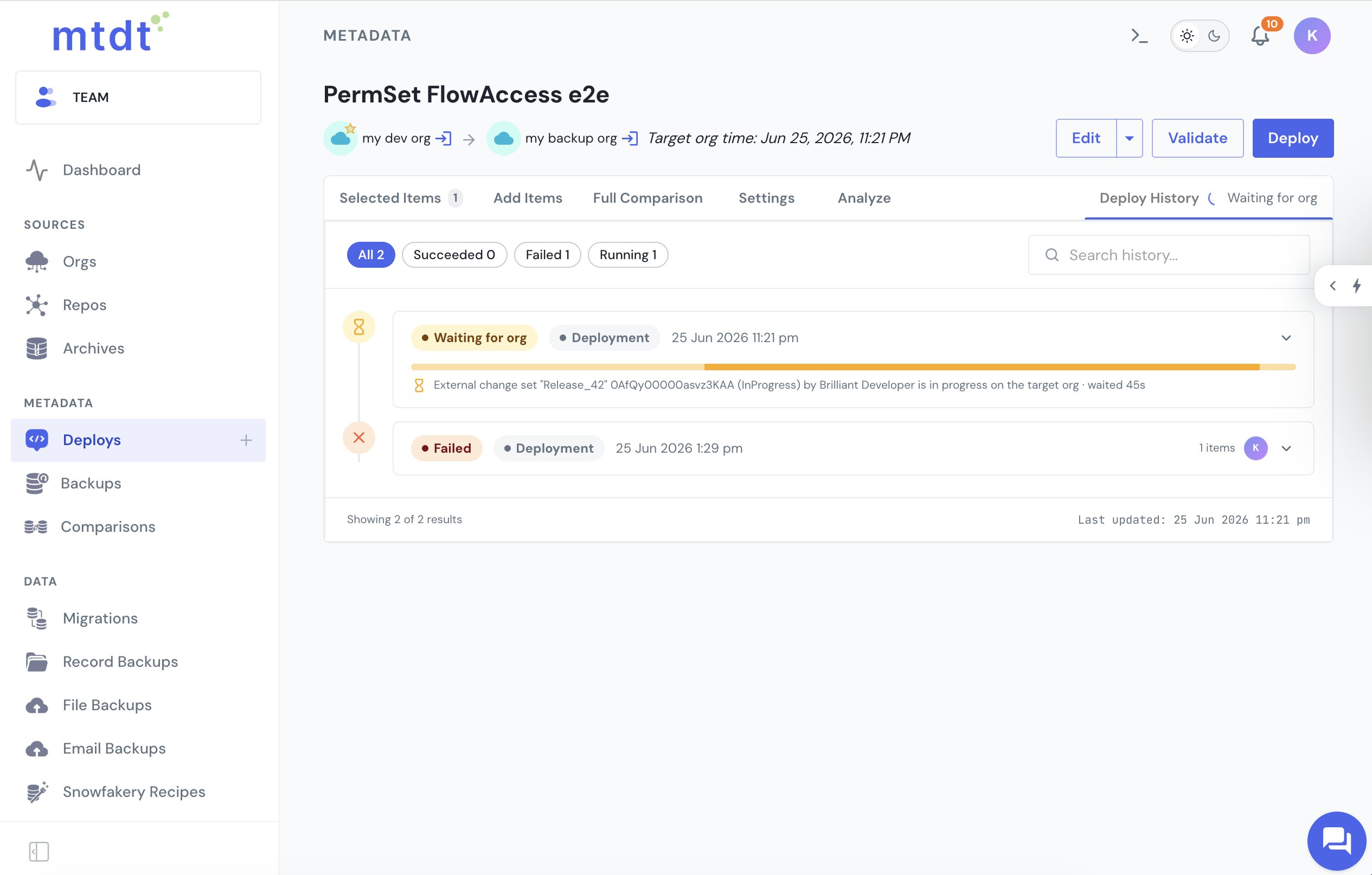
The moment the org is free, your deploy proceeds. Because the check reads DeployRequest, it also sees deploys started outside mtdt — a change set, an SFDX push, Workbench, another tool — so your deployment doesn't silently queue behind them or trip the concurrent-deploy limit. The wait is time-bounded so it never hangs, and if a deploy slips in between the check and submission, mtdt waits that one out too instead of failing.
mtdt serializes its own deploys per org as well, so two of your own deployments never collide. And the same Deploy History view shows when a deploy is waiting because a backup is running first — the safety snapshot mtdt takes before it touches the org.
FAQ
Why does my Salesforce deployment just sit there with no progress? Salesforce serializes metadata deployments per org — only one runs at a time. If something else (a change set, an SFDX push, a teammate's deploy) is already deploying to that org, the platform queues yours behind it, which looks like an unexplained wait with no error and no progress.
What causes a Salesforce LIMIT_EXCEEDED error on deploy?
Under heavier contention, a deploy that keeps retrying against a busy org can exceed its maximum retry limit and fail with LIMIT_EXCEEDED: ... exceeded its maximum retry limit. The underlying cause is the same as the silent queue — the org's single deploy slot is already taken.
Is "This container has a save in progress" the same issue?
It's related but comes from a different surface: the Developer Console / Tooling save path (the MetadataContainer API), not the file-based deploys used by change sets, SFDX, or DevOps tools. File-based deploys queue or hit LIMIT_EXCEEDED instead of printing that exact message, but the root cause in both cases is that the org's single deploy slot is taken.
Why do most deployment tools miss this problem?
Most tools only serialize their own jobs — they stop you from running two of their own deploys at once, but they have no visibility into a change set uploading, a teammate's SFDX push, or another DevOps tool mid-deploy. They submit onto a busy org anyway, leaving you with a silent queue or a LIMIT_EXCEEDED failure and no indication of what's blocking you.
How does mtdt.io avoid this problem?
mtdt.io checks the org's DeployRequest records before every deploy — which list every in-flight deployment regardless of who started it — and waits if the slot is taken, showing exactly what's holding the line. It also serializes its own deploys per org, and the wait is time-bounded so it never hangs indefinitely.
Stop deploying onto a busy org
Let mtdt.io check the org and wait for any in-flight deploy to clear — yours, your team's, or another tool's — so your deployment doesn't queue blind or hit the concurrent-deploy limit.
Log in to mtdt.io and deploy without the collision.
Related: Why Salesforce Deployments Fail · One-Click Rollback
Was this page helpful?
Let us know how we did