Fix 'Record Type ID Isn't Valid for User' When Migrating Records Between Salesforce Orgs

You migrate records — accounts, cases, CPQ configuration — from one org to another, and Salesforce throws back every row with the same error:
INVALID_CROSS_REFERENCE_KEY: Record Type ID: this ID value isn't valid for the user: 012d2000009YkJOAA0
The records were fine in the source. Their record type IDs are the problem, for one of two reasons: the ID is org-specific and doesn't exist in the target, or the target record type exists but isn't assigned to the user running the migration. The fix is to remap each record's RecordTypeId to the target org's equivalent by Developer Name, and make sure the loading user has that record type assigned — mtdt.io does the remapping automatically and flags any assignment you still need to grant.
Why the Record Type ID is "not valid"
Two independent causes produce the identical message:
- Record type IDs are org-specific. A
RecordTypeIdis an 18-character ID that exists only in the org it came from. Copy a record'sRecordTypeIdverbatim into another org and that ID isn't there — Salesforce rejects the record. - The running user's profile must have the record type assigned. Even when the target has the right record type, if the user performing the migration doesn't have it assigned, the insert fails with "isn't valid for the user." And Modify All Data does not grant record-type access — the surprise that costs people the most time.
The manual fixes
Teams work around it three ways:
- Map the IDs by Developer Name. Look up each source record type's DeveloperName, find the matching type in the target, and swap the ID before loading. Correct, but tedious and easy to get wrong at scale.
- Drop the
RecordTypeIdfield. Leave it out and Salesforce applies the user's default — acceptable only when the record type doesn't matter. - Assign the record type to the user. For the "not valid for the user" half, add the type to the loading user's profile or permission set.
How mtdt.io handles it
mtdt.io does the first fix automatically and surfaces the third.
- It remaps record types by name. When a record carries a
RecordTypeId, mtdt matches the source type to the target by object + Developer Name — the key that's stable across orgs — and swaps in the target's ID before the record is written. Records land with the right record type, with no manual ID mapping and noINVALID_CROSS_REFERENCE_KEY. - It flags the ones your user still needs. For a record type that's missing in the target, or present but not assigned to the deploying user, mtdt warns you before the load — naming the type and the object, and telling you to assign it (because Modify All Data won't):
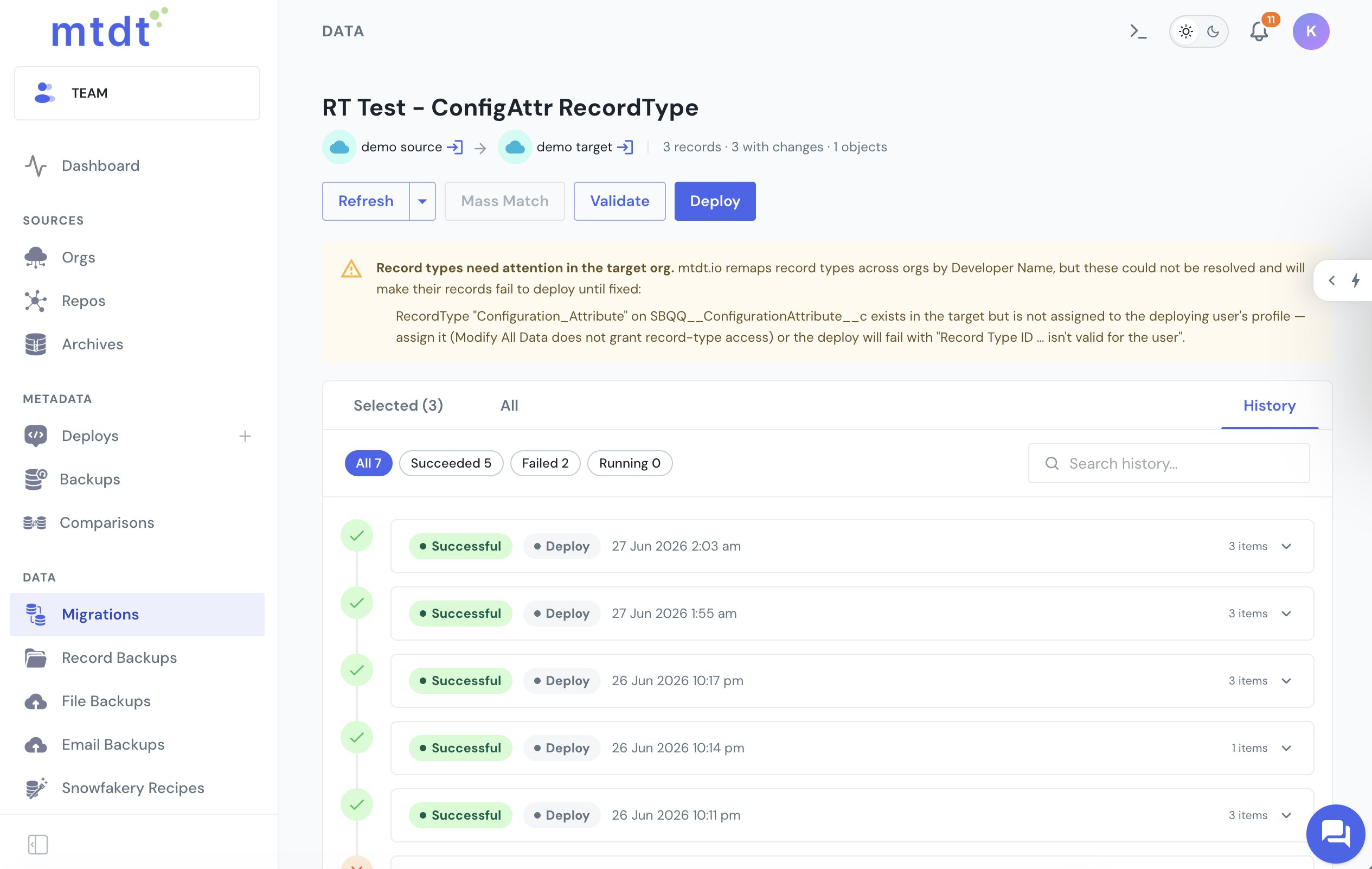
That leaves you only the step Salesforce won't let any tool do on your behalf: granting the record type to the user.
It works for any object with record types — standard, custom, and the CPQ configuration records mtdt migrates out of the box. Deploying the record types themselves (the metadata) is a separate step — see Deploy Salesforce Record Types Without 'Picklist Value Not Found'.
FAQ
Why does Salesforce reject migrated records with "Record Type ID … isn't valid for the user"?
Two independent causes produce this same error: the RecordTypeId is an org-specific 18-character ID that doesn't exist in the target org, or the record type exists in the target but isn't assigned to the profile or permission set of the user performing the migration.
Does Modify All Data grant access to a record type? No. Modify All Data does not grant record-type access — the user performing the migration still needs the record type explicitly assigned via their profile or a permission set, even with that broad a permission.
How do you fix a record type ID mismatch when migrating records between orgs?
Map each source record type to its target equivalent by Developer Name — the identifier that's stable across orgs — and swap in the target's ID before loading. Dropping the RecordTypeId field entirely is a fallback that works only when the record type doesn't matter, since Salesforce then applies the user's default.
How does mtdt.io handle record type IDs during data migration? mtdt.io matches each source record's record type to the target by object and Developer Name, and swaps in the target's ID automatically before the record is written — no manual ID mapping required. For a record type that's missing in the target or not assigned to the deploying user, it warns you before the load and names the type and object involved.
Migrate records across orgs without the Record Type ID error
Let mtdt.io remap your record types by name and tell you exactly what your integration user still needs — so cross-org record migration just lands.
Log in to mtdt.io and migrate your data.
Was this page helpful?
Let us know how we did