Deploy Edited Search Layouts in Salesforce — Without Redeploying the Whole Object

You edit a search layout — the columns shown in search results, lookup dialogs, and filters — and then try to move it to another org. Salesforce makes it oddly hard: there's no standalone "Search Layout" to deploy, and if you push just the layout, the Metadata API rejects it. That's because a search layout lives inside the object's metadata rather than as its own component, so Salesforce normally forces you to redeploy the whole object just to move one layout change. mtdt.io fixes this by decomposing the object into separate, selectable items, so the search layout deploys on its own without touching the rest of the object.
Why search layouts are awkward to deploy
A search layout has no metadata component of its own. It lives inside the object — CustomObject.<searchLayouts> — next to the object's label, sharing model, fields, and everything else. Salesforce won't accept an object that contains only a search layout; try it and you get:
Must specify a non-empty label for the CustomObject
So the layout can't travel alone — the object has to come with it. That leaves the two awkward fallbacks people usually reach for:
- Redeploy the whole object, every field included — slow, and it drags along whatever else differs between the orgs.
- Hand-carve a
package.xmlto isolate the object — fiddly and easy to get wrong.
And there's a quieter risk. Push the object to move one search layout, and you can silently overwrite the target's description, sharing model, or Lightning page assignments (actionOverrides) — org-specific values you never meant to touch.
The fix: ship just the search-layout change
mtdt.io decomposes the object into separate, selectable items. Fields, record types, list views — and the search layout itself — each become their own row, so you pick the search layout on its own and deploy it. The object's fields, description, sharing model, and Lightning page assignments stay exactly where they are in the target: no whole-object redeploy, no collateral overwrite.
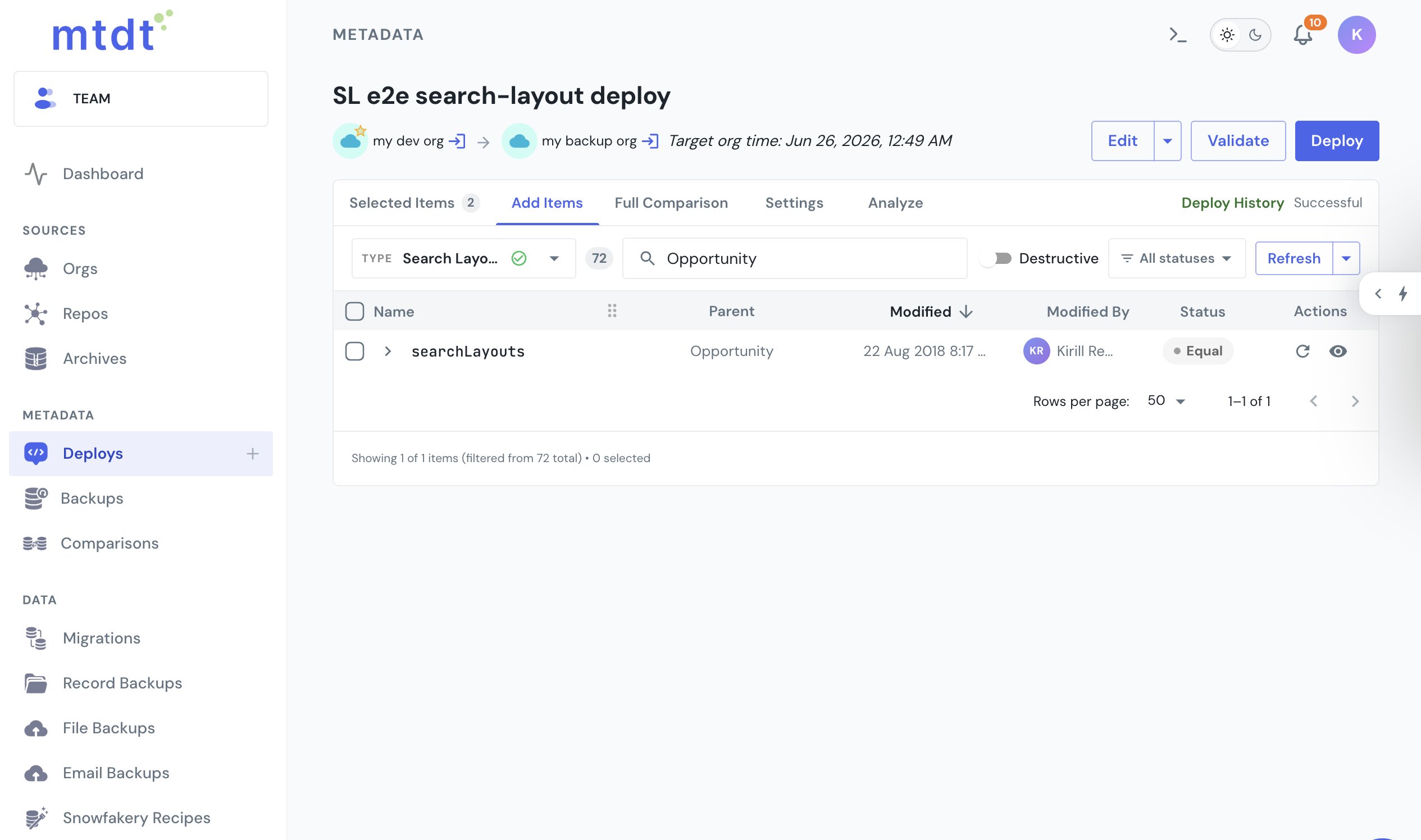
A search layout also points at fields — the columns it shows in search results and lookup dialogs. Deploy it to an org that's missing one of those fields and Salesforce fails it with no CustomField named … found, with nothing to warn you up front. mtdt reads the search layout's field references and recommends the missing ones in Impact Analysis before you deploy, so the layout and the columns it needs land together:
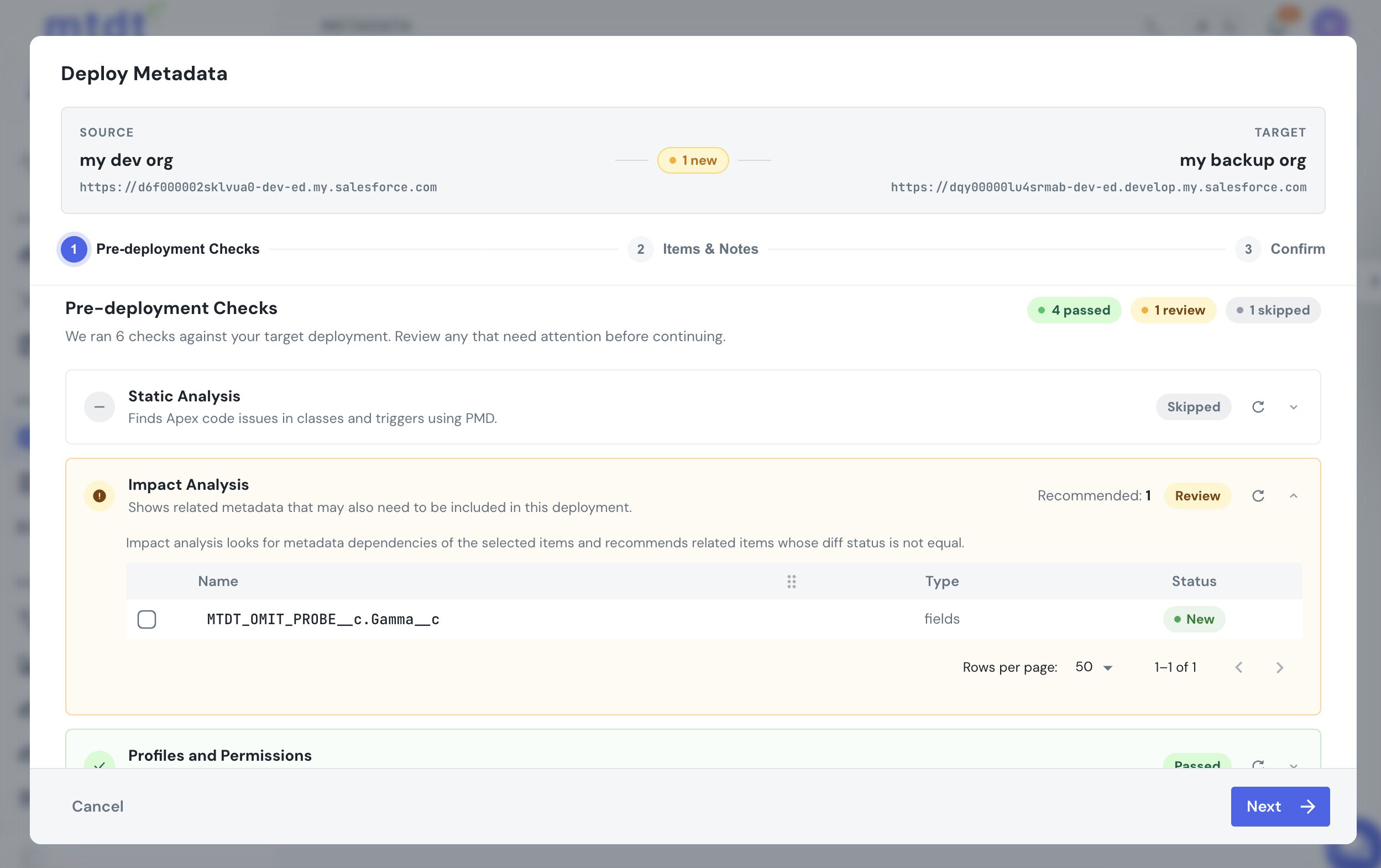
This is the same dependency Salesforce doesn't model for record types, global value sets, and report types — mtdt recommends each one. See Deploy Salesforce Record Types Without 'Picklist Value Not Found' and Deploy a Custom Report Type to Production.
FAQ
Why can't I deploy just a search layout in Salesforce?
A search layout has no metadata component of its own — it lives inside CustomObject.<searchLayouts>, alongside the object's label, sharing model, fields, and everything else. Salesforce rejects an object package that contains only a search layout with "Must specify a non-empty label for the CustomObject," so the layout can't travel without the object it belongs to.
What's the risk of redeploying the whole object just to move a search layout?
Redeploying the whole object is slow, and it can silently overwrite target-org values you never meant to touch — the object's description, sharing model, or Lightning page assignments (actionOverrides) — since those all travel inside the same object component.
Why does a search layout deploy fail with "no CustomField named … found"? A search layout references fields — the columns it shows in search results and lookup dialogs. If the target org is missing one of those fields, Salesforce fails the deploy with that error, and nothing warns you beforehand unless the tool you're using checks field references ahead of time.
How does mtdt.io deploy a search layout without redeploying the whole object? mtdt.io decomposes the object into separate, selectable items — fields, record types, list views, and the search layout each become their own row — so you can pick and deploy just the search layout. The object's other properties, like description, sharing model, and Lightning page assignments, stay exactly as they are in the target.
Does mtdt.io catch missing fields before a search layout deploy fails? Yes. mtdt.io reads the search layout's field references and recommends any fields missing in the target through Impact Analysis, before you deploy — so the layout and the columns it needs land together instead of failing on a missing field.
Ship search layout changes cleanly
Edit a search layout and deploy exactly that — the columns you changed, none of the object properties you didn't.
Log in to mtdt.io and deploy your search layouts.
Was this page helpful?
Let us know how we did