Deploy Page Layout Assignments in Salesforce — Without Redeploying the Whole Profile

You want to push one change — a profile should use a different page layout for an object — from one org to the next, ideally across many orgs at once. The short answer: no, you don't need to deploy the whole profile. A page layout assignment is a single entry on the profile (<layoutAssignments>), and the Metadata API upserts a profile per element, so a profile containing just that one assignment deploys fine and leaves the rest of the target profile untouched. That still leaves the questions every admin automating this runs into: will it wipe my other assignments? Do I need the layout and the record types too?
The short answer: deploy just the assignment
A page layout assignment is a single entry on the profile — which layout that profile sees for an object, optionally per record type. The Metadata API upserts a profile per element, so a profile that contains only the assignment you're changing deploys fine and leaves the rest of the target profile exactly as it was. The minimal metadata is literally this:
<Profile xmlns="http://soap.sforce.com/2006/04/metadata">
  <layoutAssignments>
    <layout>Account-Custom Account Layout</layout>
  </layoutAssignments>
</Profile>
Two things trip people up:
- You don't need to bundle the object or the record types. A profile with just
<layoutAssignments>works, and everything else on the target profile stays put. (The most-viewed StackExchange question on this turned out to be the asker checking Setup in the wrong org — the minimal deploy was working the whole time.) - The assigned layout must already exist on the target. Reference a layout the target doesn't have and the deploy fails with
no Layout named X found. A per-record-type assignment needs the record type on the target too.
The fiddly part, when you're rolling an assignment out across many orgs, is hand-authoring that minimal profile and remembering the "layout must exist" rule for every target.
How mtdt.io does it
With mtdt.io there's no XML to hand-write. Open the profile's comparison panel, go to the Layout Assignments section, and you get a per-(object, record type) table — the source layout beside the target's. Tick the assignment you want to take from source:
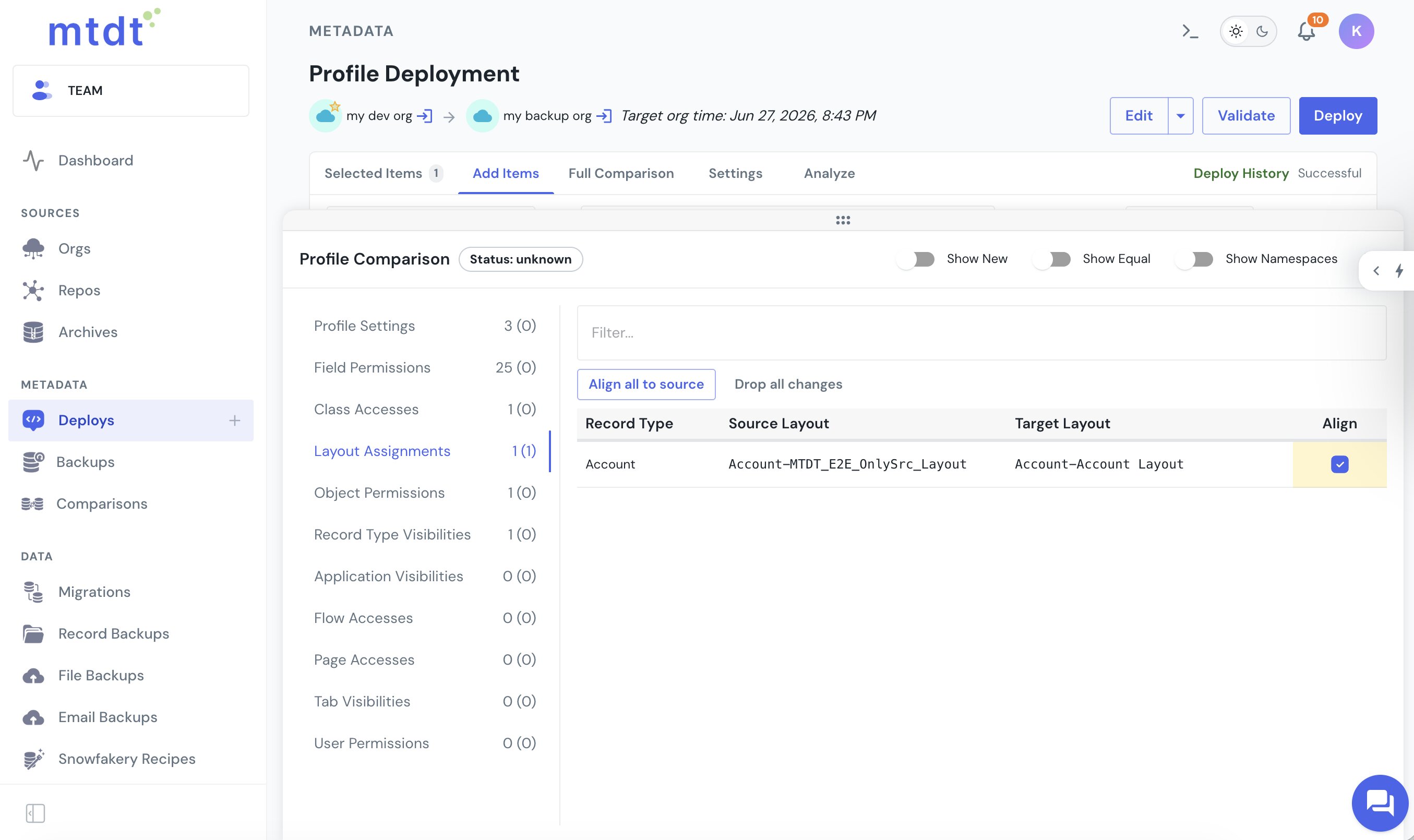
On deploy, mtdt builds the minimal profile for you — only the assignments you ticked — and the rest of the target profile is left as-is. Object-default assignments and per-record-type assignments both deploy this way.
The rest of the profile stays put
This is the property the StackExchange asker was after: a layout-assignment deploy is surgical. Ship the assignment and the profile's field-level security, object permissions, record-type visibility, and login settings on the target are all untouched — only the assignment changes. That makes it safe to automate the same one-line change across a fleet of orgs.
It flags a layout the target doesn't have
The one hard rule — the assigned layout must exist on the target — is where no Layout named X found comes from. mtdt's Impact Analysis reads the assignments in the profile and recommends the referenced page layout, so a layout that's new to the target shows up as an item to include in the same deploy:
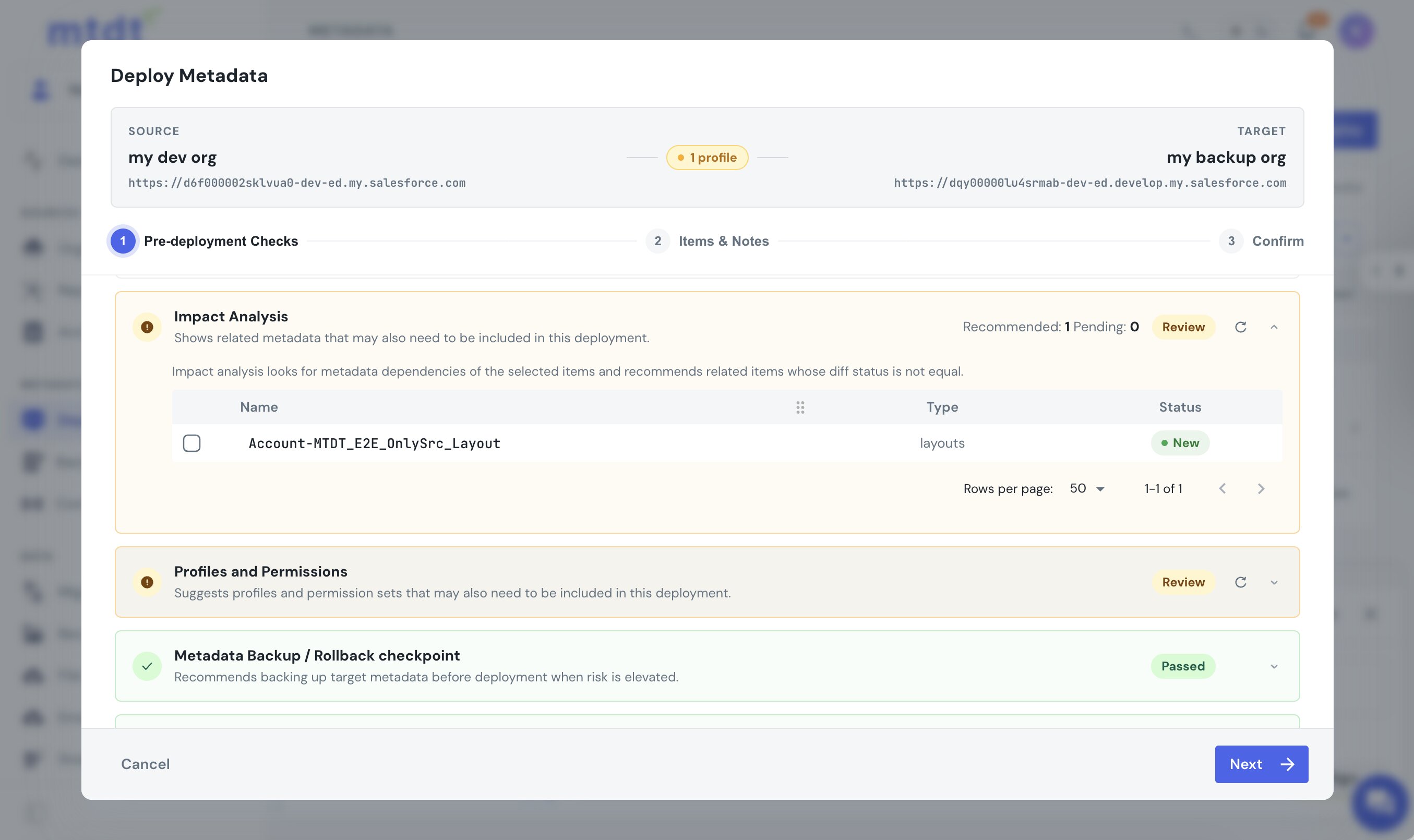
Include it in the same deploy and the cryptic error never fires. Salesforce's own dependency graph doesn't track which layouts a profile assigns, so this recommendation is mtdt's.
You can't accidentally wipe assignments either
There's a known trap on the other side: deploy a profile that's missing its <layoutAssignments> and Salesforce reads it as "remove them," leaving assignments at Not Assigned (Salesforce Help). mtdt's default profile deploy sidesteps it — it builds a scoped profile from the components you're deploying and never emits a <layoutAssignments> section unless you choose to, so the target's assignments are preserved by default. The full model is in The Best Way to Deploy Profiles in Salesforce.
For Lightning page (FlexiPage) assignments — a different mechanism entirely — see Deploy FlexiPage Assignments in Salesforce.
FAQ
Do I need to deploy the whole profile to change a page layout assignment?
No. A page layout assignment is a single entry on the profile's <layoutAssignments>, and the Metadata API upserts a profile per element — so a profile containing just that one assignment deploys fine and leaves everything else on the target profile untouched. mtdt.io builds that minimal profile for you from the assignment you tick in its Layout Assignments table.
Will deploying a layout assignment wipe my other profile settings? No, as long as the deployed profile only carries the assignment. Field-level security, object permissions, record-type visibility, and login settings on the target profile are untouched by a scoped layout-assignment deploy — only the assignment itself changes.
Why does a layout assignment deploy fail with "no Layout named X found"? Because the assigned page layout has to already exist on the target org, and Salesforce rejects the deploy if it doesn't. mtdt.io's Impact Analysis reads the assignments in the profile and recommends the referenced layout as a New item to include, since Salesforce's own dependency graph doesn't track which layouts a profile assigns.
Can a profile deploy accidentally remove existing layout assignments?
Yes, under Salesforce's own rule — deploy a profile that's missing its <layoutAssignments> section and Salesforce reads that as "remove them," leaving assignments at Not Assigned. mtdt.io's default profile deploy avoids this because it builds a scoped profile from the components you're deploying and never emits a <layoutAssignments> section unless you explicitly choose to.
Do I need to deploy the record types along with a per-record-type layout assignment? Yes, if the assignment is per record type — the record type has to already exist on the target, the same way the layout does. Bundling the object or record types isn't required for the assignment itself, but a per-record-type assignment specifically needs its record type on the target.
Roll out a layout assignment across orgs, cleanly
Let mtdt.io build the minimal profile, deploy only the assignment you changed, recommend the layout the target needs, and leave the rest of the profile exactly as it was.
Log in to mtdt.io and deploy your layout assignments.
Was this page helpful?
Let us know how we did