Fix 'Unknown user permission: SendExternalEmailAvailable' on a Salesforce Deploy

You deploy a profile or permission set to another org and Salesforce throws it straight back:
Unknown user permission: SendExternalEmailAvailable
The profile is valid and the permission is real; the target org simply doesn't recognize the name. That's because the permission only exists in an org once the feature behind it is turned on — here, SendExternalEmailAvailable needs Email Deliverability set to "All emails" — and the same cause is behind every "Unknown user permission" error.
Why the permission is "unknown"
A user permission like SendExternalEmailAvailable exists in an org only when the feature behind it is turned on. SendExternalEmailAvailable (the "Send Email" permission) is gated on the org's Email Deliverability setting: when the Access level is "System email only" or "No access" — the default in many sandboxes and scratch orgs — the permission isn't available, and the org doesn't recognize the name. Deploy a profile that grants it and the Metadata API rejects the whole file with Unknown user permission: SendExternalEmailAvailable.
This is a whole class of errors. The same thing happens with permissions gated on other org settings:
CreateAuditFields— needs Set Audit Fields upon Record CreationUpdateWithInactiveOwner— needs Update Records with Inactive Owners- any permission tied to a license or feature the target edition lacks
In each case the source org has the feature on and the target doesn't, so a permission that's valid in the source is an unknown name in the target.
The two manual fixes
Teams resolve it two ways:
- Turn on the feature in the target. For
SendExternalEmailAvailable, go to Setup → Email → Deliverability and set Access level to All emails. Once the feature is on, the org recognizes the permission and the deploy goes through. Each gated permission has its own setting. - Remove the permission from the metadata. Strip the
<userPermissions>entry for that permission out of the profile or permission set before deploying. This fits when the target genuinely shouldn't have the permission, at the cost of hand-editing XML and remembering to keep it out.
Both share one snag: you learn which permission is the problem only after a failed deploy, decode the name, fix it, and redeploy.
How mtdt.io catches it first
With mtdt.io the unsupported permissions are named before you deploy. When a deploy carries a profile's or permission set's user permissions, the Profiles & Permissions pre-deployment check compares the granted permissions against what the target org actually supports, and flags every one the target can't accept:
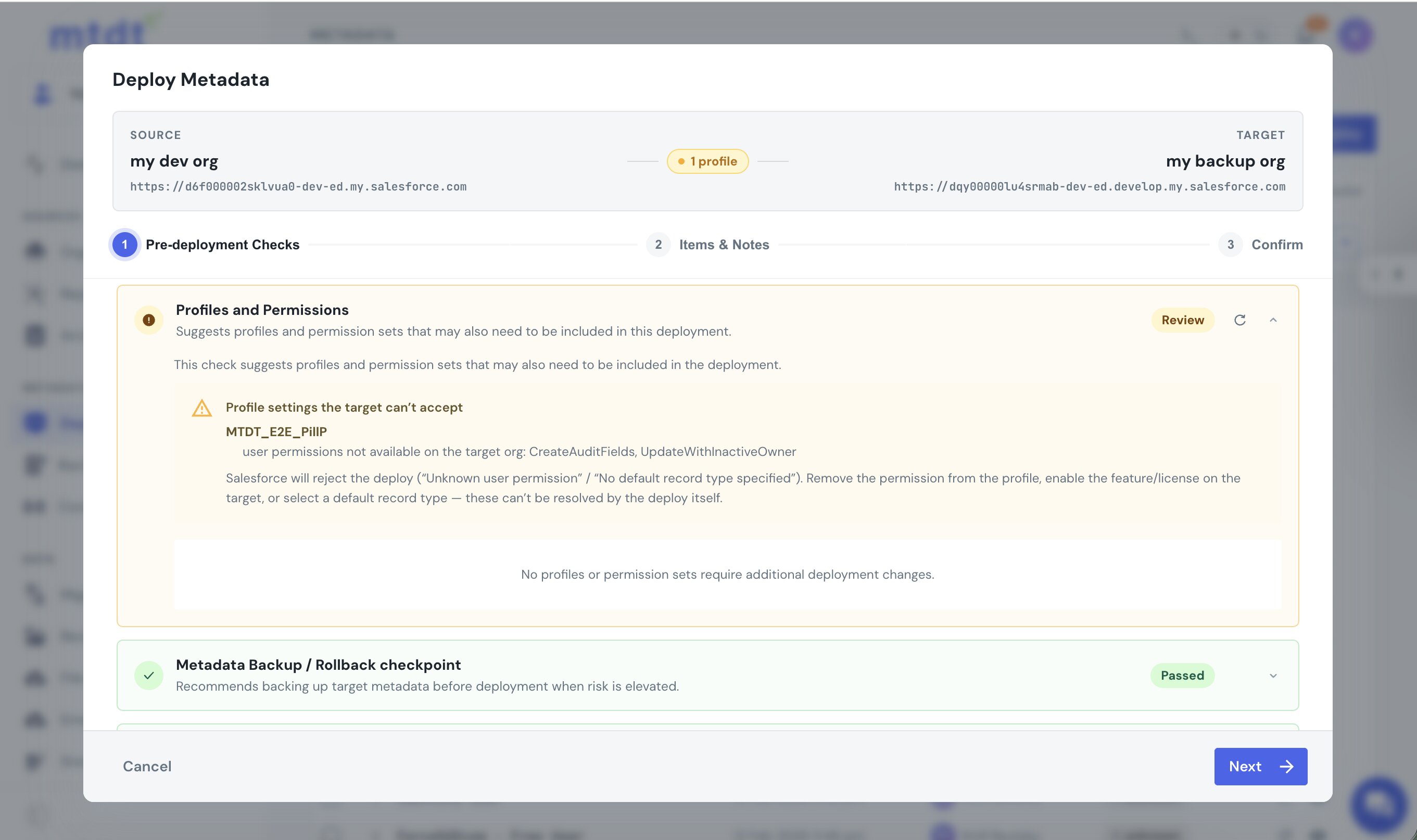
So the problem surfaces up front: the profile named, the unsupported permissions listed, and the choice in your hands — turn the feature on in the target, or drop the permission from this deploy. No red deploy and cryptic one-liner to reverse-engineer.
mtdt reads the target's available permissions from its live schema, so the check reflects that exact org: a sandbox with email deliverability off flags SendExternalEmailAvailable; an org without the audit-fields feature flags CreateAuditFields. These org-wide permissions ride along only when you choose to include them, which is part of the larger picture — The Best Way to Deploy Profiles in Salesforce.
FAQ
Why does Salesforce say a user permission is "unknown" when the profile is valid?
Because that permission only exists in an org once the feature behind it is turned on — SendExternalEmailAvailable, for example, is gated on the org's Email Deliverability setting. When the feature is off, as it is by default in many sandboxes and scratch orgs, the org doesn't recognize the permission's name and the Metadata API rejects the whole file.
How do I fix "Unknown user permission: SendExternalEmailAvailable"?
Either turn on the gating feature in the target org — for this permission, set Setup → Email → Deliverability's Access level to "All emails" — or strip the <userPermissions> entry for that permission out of the profile or permission set before deploying. The first fix is right when the target org should have the feature; the second is right when it genuinely shouldn't.
Are other user permissions gated the same way?
Yes — CreateAuditFields needs Set Audit Fields upon Record Creation turned on, UpdateWithInactiveOwner needs Update Records with Inactive Owners turned on, and any permission tied to a license or feature the target edition lacks will fail the same way. It's the same root cause every time: a permission valid in the source org is an unrecognized name in the target.
Can I find out which permissions will fail before I deploy? Yes — mtdt.io's Profiles & Permissions pre-deployment check compares the permissions a profile or permission set grants against what the target org's live schema actually supports, and names every permission the target can't accept before the deploy runs, instead of after a failed one.
Stop decoding "Unknown user permission" after the fact
Let mtdt.io name the permissions your target org can't accept before the deploy runs — so you fix the feature or drop the permission up front.
Log in to mtdt.io and deploy your profiles.
Was this page helpful?
Let us know how we did