Deploying Workflows That Reference Person Account Record Types in Salesforce

Take a workflow that references a Person Account record type and move it to another org. Sometimes it deploys cleanly; sometimes Salesforce rejects it outright. The deciding factor is how the workflow uses the record type: a rule's entry criteria that filter on the record type deploy without issue, while a field update that tries to set the record type is rejected by Salesforce itself, regardless of the tool you deploy with.
Why Person Accounts are different
A Person Account is an Account record with a special person-account record type. Person Accounts are an org-level feature that has to be enabled, and their record types live on the Account object — through the Metadata API they surface as Account.PersonAccount, with no namespace of their own. Once Person Accounts are on, every PA-enabled org auto-creates that record type.
Rule criteria deploy clean
A workflow rule whose entry criteria filter on a Person Account record type — Account.RecordTypeId equals "Person Account" — moves between orgs without trouble. The criterion is stored by name, not by a hardcoded ID, so it's portable: the target just needs the same record type, which a PA-enabled org already has. The rule lands active, its criterion intact.
Field updates: Salesforce blocks them
A workflow field update that sets RecordTypeId to a person-account record type is a different story, and the wall here is Salesforce's own. Try to create one and Salesforce rejects it — no RecordType named Account.PersonAccount found — even though the record type plainly exists. The identical field update pointed at a business record type works, which proves it's the person type that's blocked.
The reason is a documented platform rule. Salesforce's docs state that switching an account's record type between a business and a person account "must use the API" — UI-based automation can't do it. A workflow field update is declarative automation, so Salesforce won't even let you define one that sets a person-account record type.
The workaround: key Person-Account automation off the record type with a rule's entry criteria (which deploys cleanly), and assign the person record type through record creation or the data layer instead.
How mtdt.io helps
The deploy itself is standard Metadata API. Where it bites is the target: a Person-Account workflow only lands if the target already has the record type it references, and Salesforce's error for a missing one is cryptic — no CustomField named Account.RecordTypeId found.
mtdt.io turns that into up-front guidance. Its Impact Analysis reads the workflow's rule criteria and field updates and recommends the record types they reference, so you include them in the same deploy. It also knows the Person-Account quirk: because Salesforce doesn't return person-account record types through the Metadata API, mtdt flags the Account.PersonAccount reference with exactly what to do — enable Person Accounts on the target org so the record type exists there — instead of leaving you to decode a cryptic field error after the deploy fails.
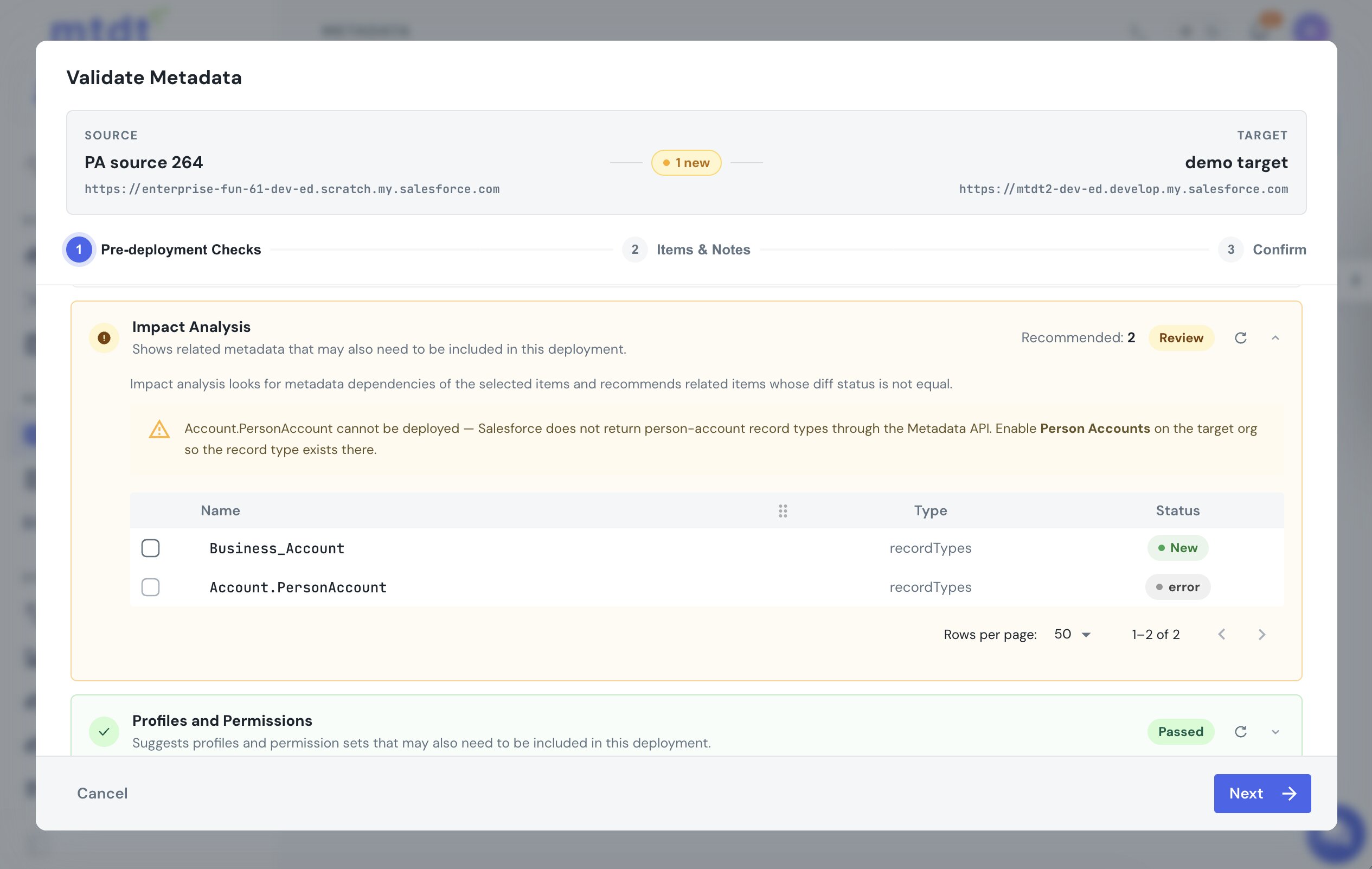
That's the same dependency Salesforce doesn't model for search layouts and report types — mtdt recommends each one. See Deploy Salesforce Record Types Without 'Picklist Value Not Found'.
FAQ
Why does a workflow field update that sets a Person Account record type fail to deploy?
Salesforce itself blocks it. Trying to create a field update that sets RecordTypeId to a person-account record type is rejected with no RecordType named Account.PersonAccount found, even though the record type exists — the same field update pointed at a business record type works, so it's specifically the person-account case Salesforce disallows for declarative automation.
Why does a workflow rule criterion on a Person Account record type deploy fine? Because the criterion is stored by name, not by a hardcoded ID, so it's portable between orgs. As long as the target org has Person Accounts enabled — which auto-creates the person-account record type — the rule deploys and lands active with its criterion intact.
What's the workaround for the Person Account field-update restriction? Key Person-Account automation off a rule's entry criteria, which deploys cleanly, and assign the person record type through record creation or the data layer instead of a declarative field update.
Why doesn't the Person Account record type show up through the Metadata API?
Salesforce doesn't return person-account record types through the Metadata API at all, even though they exist once Person Accounts are enabled on the org. That's what makes the deploy error cryptic — you see no CustomField named Account.RecordTypeId found instead of anything that names the actual missing record type.
How does mtdt.io help with Person Account workflow deploys?
mtdt.io's Impact Analysis reads a workflow's rule criteria and field updates and recommends the record types they reference, so you include them in the same deploy. For the Person Account case specifically, it flags the Account.PersonAccount reference with the actual fix — enable Person Accounts on the target org — instead of leaving you to decode Salesforce's cryptic field error.
Deploy Person-Account automation without the surprises
Let mtdt.io ship your workflow rules with the record types they depend on — and keep you off the field-update dead-end Salesforce won't allow.
Log in to mtdt.io and deploy your workflows.
Was this page helpful?
Let us know how we did