Deploy FlexiPage Assignments in Salesforce: What Moves Between Orgs (and What Doesn't)

You build a Lightning page — a FlexiPage — assign it as the record page for an object, deploy it to the next org, and it doesn't show up. The page is there; the assignment isn't. Or you try to move the assignment and the deploy hard-fails instead. The behavior looks random until you see the cause: Salesforce stores a Lightning page assignment separately from the page, across two different metadata types depending on how the page is scoped. Nearly every assignment does deploy through the Metadata API — org defaults on the object, app/profile/record-type activations on the Custom App — as long as you deploy it from the right container; the one exception is a record-type-specific assignment with no app or profile, which has no metadata field to carry it.
Where Lightning page assignments live
The FlexiPage — the page itself — is one metadata component. Assigning it is stored elsewhere, in one of two places:
- Org default — the record page an object shows by default — lives as an
actionOverridesentry on the object (type=Flexipage, plus the page's API name). - App, profile, and record-type activations — App Builder's Activation screen, where you scope a page to a specific app, profile, or record type — live on the Custom App (
CustomApplication), asactionOverridesandprofileActionOverrides.
A single Lightning page can be referenced from the object and from one or more apps, and none of those references is the page itself.
What actually deploys (almost all of it)
This part is widely misreported, so to be precise:
| Assignment | Lives on | Deploys? |
|---|---|---|
| Org default (all apps, all profiles) | the object | ✅ |
| App default (one app) | the Custom App | ✅ |
| App + profile | the Custom App | ✅ |
| App + profile + record type | the Custom App | ✅ |
| Record type with no app or profile | — | ❌ |
Nearly every assignment moves through the Metadata API — you just have to deploy it from the right container. App and profile activations come with the Custom App, which is why deploying the page and the object often isn't enough on its own. The one case that genuinely can't move is a record-type-specific assignment with no app and no profile: there's no metadata field to express it, so you recreate that one by hand.
The trap: the page and its assignment travel separately
Because the page and the assignment are different components, the two failure modes are mirror images:
- Deploy the page without its container and the page lands — assigned to nothing. The deploy reports success, and you spend an hour wondering why production still shows the old layout.
- Deploy the container without the page and Salesforce hard-fails:
MTDT_OMIT_RP_A does not exist or is not a valid override for action View.
There's a quieter risk on the object side too. The org-default assignment is one line inside the object's actionOverrides. Push the object for any unrelated change and that line goes with it, replacing whatever page the target's admin had assigned — with nothing in a raw diff to draw your eye to it.
How mtdt.io keeps the page and its assignment together
mtdt.io closes both halves of the split:
- Impact Analysis recommends the page — from wherever it's referenced. Whether the FlexiPage is pointed at by an object's org-default or by a Custom App's activation, mtdt recommends it as a dependency, so the page travels in the same deploy as the assignment and never lands on nothing.
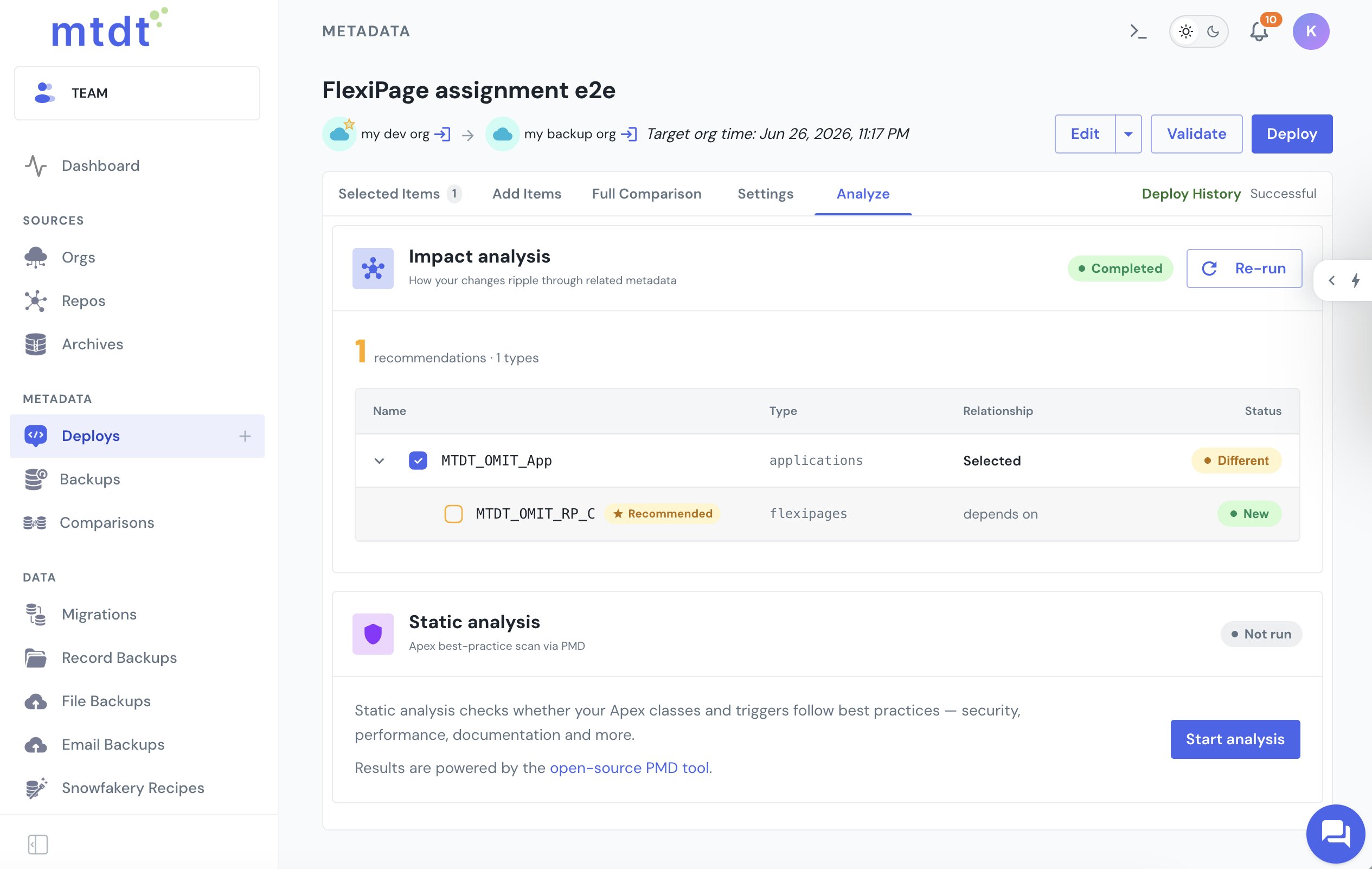
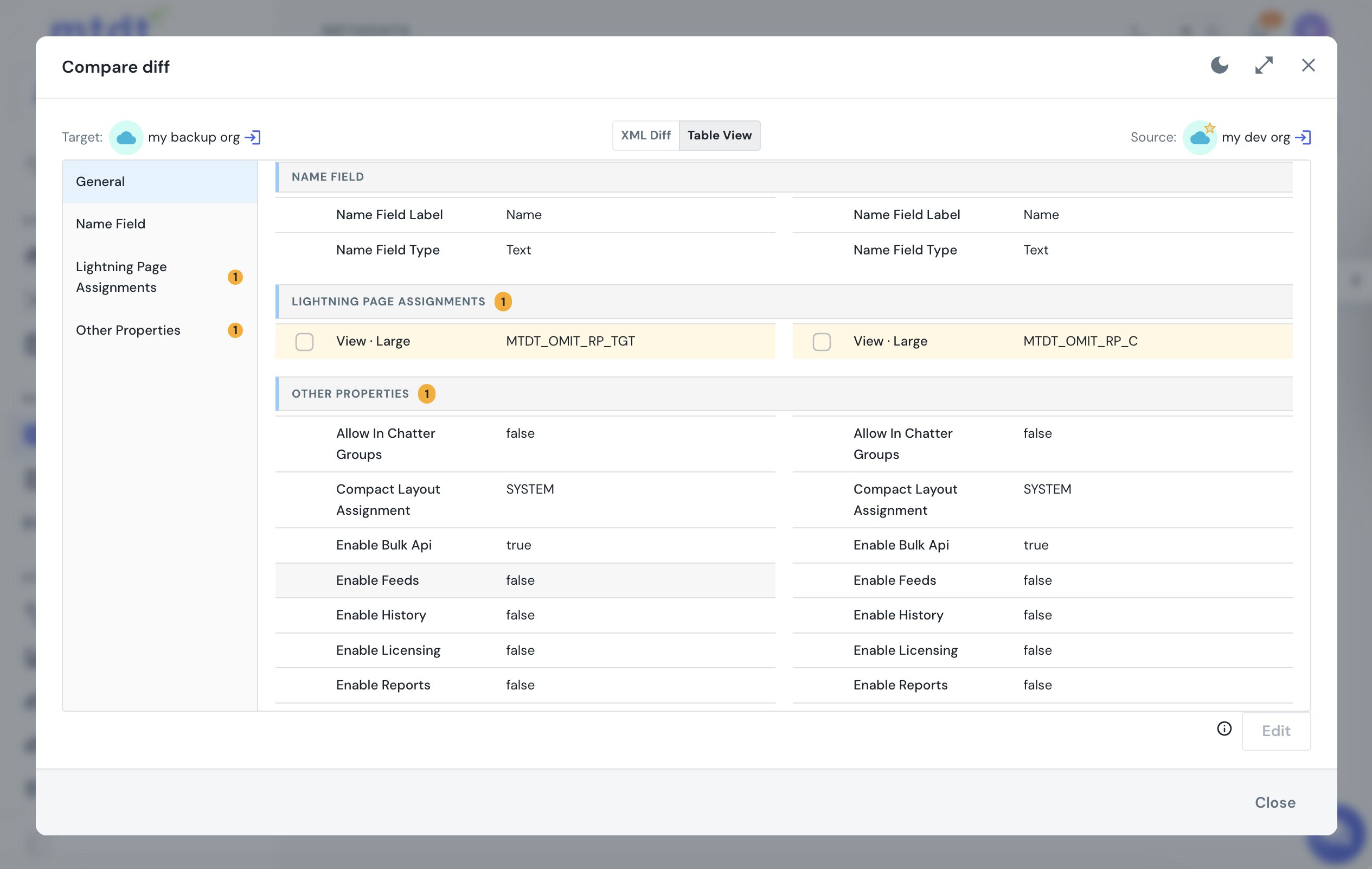
- The structured diff shows the org-default assignment as its own row. In the Table View, the object's Lightning page assignment is broken out as a selectable row — the page on the source beside the page on the target — so a changed assignment is visible even when nothing else about the object differs. You keep the target's page or take the source's, per slot, and pushing an object never silently overwrites the target's record page.
This is the same dependency Salesforce doesn't model for record types and search layouts, and mtdt models it here too. See Deploy Edited Search Layouts Without Redeploying the Whole Object.
FAQ
Why does a Lightning page assignment not deploy with the FlexiPage?
Because Salesforce stores the assignment separately from the page itself, across two metadata types. The org-default assignment lives as an actionOverrides entry on the object, while app, profile, and record-type activations live on the CustomApplication — deploy the page alone and it lands, but assigned to nothing.
Do FlexiPage assignments deploy through the Metadata API? Almost all of them do. Org defaults, app defaults, and app+profile or app+profile+record-type activations all deploy — you just have to deploy them from the right container (the object or the Custom App). The one exception is a record-type-specific assignment with no app and no profile, which has no metadata field to express it and can't be moved through the API.
Why does deploying a Custom App sometimes hard-fail with an "invalid override for action View" error?
This happens when the container (Custom App) is deployed without the FlexiPage it references. Salesforce throws does not exist or is not a valid override for action View because the activation points at a page that isn't in the deploy.
Why did pushing an object change someone else's Lightning page assignment?
The org-default assignment is one line inside the object's actionOverrides. Pushing the object for any unrelated change carries that line along, which can silently overwrite the target's assigned page since a raw diff doesn't call it out.
Can you deploy a Lightning page assignment on a standard object like Account or Case?
Yes. An old answer that it's impossible for standard objects is stale — it's worked for years. Because you can't create a standard object, the deploy is a merge: ship a minimal CustomObject file carrying just the object's <label> and its <actionOverrides type="Flexipage"> block, and Salesforce merges the org-default page assignment onto the existing Account, Case, Contact, or Opportunity. The page has to exist on the target first, or the deploy hard-fails with the same does not exist or is not a valid override for action View error. mtdt.io handles standard objects exactly as it does custom ones — the FlexiPage is recommended as a dependency and the assignment shows as its own Table View row.
How does mtdt.io prevent a FlexiPage from landing unassigned? mtdt.io's Impact Analysis recommends the FlexiPage as a dependency wherever it's referenced — from an object's org-default or a Custom App's activation — so the page travels in the same deploy as the assignment. Its Table View also breaks out the org-default assignment as its own selectable row, showing the source page beside the target page, so you can see and control the assignment instead of it changing silently.
Move your Lightning pages and their assignments together
Let mtdt.io recommend the FlexiPage every assignment depends on — from the object or the Custom App — and show you each assignment change before it lands, so your pages show up exactly where you meant them to.
Log in to mtdt.io and deploy your Lightning pages.
Was this page helpful?
Let us know how we did