Why Salesforce CPQ Breaks When You Move It Between Orgs — and How to Migrate It Cleanly

You migrated your CPQ configuration to the new org. The product rules don't fire. The price rules point at nothing. Half the product options seem to have vanished — and nothing errored. The records are just sitting there, quietly not working.
Because Salesforce CPQ configuration isn't metadata. It's data — and data carries Salesforce IDs that are different in every org.
Why CPQ breaks when you move it
CPQ (the SBQQ package) stores its configuration as records: product rules, price rules, discount schedules, configuration attributes, and a deep web of lookups between them. Move those records the naive way — export with Data Loader, import into the target — and three things go wrong:
- IDs aren't portable. Every lookup — a price rule pointing at a product, an option pointing at its feature — carries a source Id that doesn't exist in the target. The import "succeeds," but the references point nowhere, so the rules silently do nothing.
- Order matters. Insert a child before its parent across the ~15–20 related SBQQ objects and you hit
REQUIRED_FIELD_MISSINGorFIELD_INTEGRITY_EXCEPTION. - Re-running duplicates. Run the load a second time and you get two of every rule.
And it's really two migrations in one: the metadata (objects and fields) and the data (the records). Miss a field on the target and the import drops values — or fails outright.
The usual workaround is a tour of tools: change sets for the metadata, Data Loader for the data, spreadsheets to reconcile IDs by hand. It's slow, and a single missed reference breaks a rule you won't notice until a quote comes out wrong.
How mtdt.io migrates CPQ
mtdt.io treats CPQ as what it is — a connected graph of records — and moves the whole thing coherently.
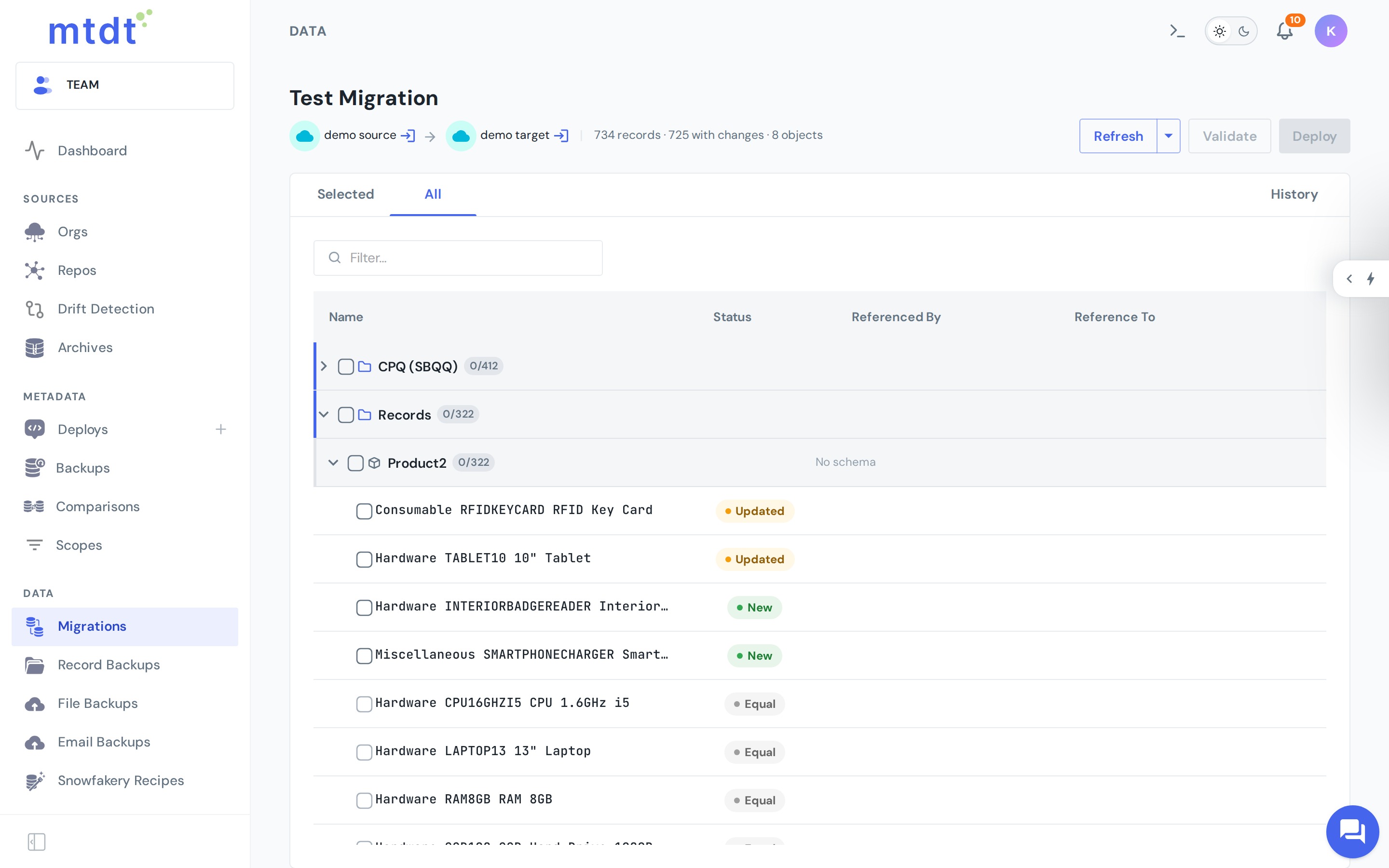
It loads in dependency order. mtdt knows the SBQQ object model, so parents land before children and nothing trips the ordering errors.
It remaps the references. As records land in the target, mtdt rewrites every lookup from the source Id to the matching target record — so a price rule that pointed at a product in the source points at the same product in the target, not a dead Id. Your references resolve instead of dangling.
It brings the fields the data needs. If the target is missing a custom field the configuration relies on, mtdt can deploy that field — and its profile field-level security — before writing the data, so the records have somewhere to land with no separate metadata deployment first.
It previews before it writes. Run Validate and mtdt shows you exactly what will be inserted versus matched, changing nothing in the target. Before a real deploy it also takes a downloadable backup of the records it's about to touch.
Re-running, and records that already exist
Re-run the same migration and mtdt.io updates rather than duplicates — it remembers how each source record maps to the one it created in the target. So you can iterate freely: tweak the source, migrate again.
What about a record that already exists in the target independently — created by hand, or loaded before mtdt was in the picture? Salesforce gave it a different Id, so nothing lines up on its own. Use Match to pair it with its source counterpart; from then on the migration updates that record instead of inserting a duplicate.
Good practices
- Rehearse in a sandbox, and Validate before every real deploy — read the insert-vs-match summary first.
- Match before you migrate when the target already has equivalent records, so you update instead of duplicating.
- Keep both orgs on compatible CPQ package versions to avoid field-level mismatches.
- Migrate large configurations in a quiet window — the process is subject to Salesforce API limits.
CPQ isn't going anywhere — end-of-sale isn't end-of-support — so moving its configuration cleanly is still very much a real job. mtdt.io makes it one guided flow instead of a multi-tool scramble.
For the step-by-step, see Migrating Salesforce CPQ Data.
FAQ
Why does Salesforce CPQ configuration break when I move it between orgs? CPQ stores its configuration — product rules, price rules, discount schedules — as data records, not metadata. Those records carry Salesforce IDs that only exist in the source org, so a naive copy leaves lookups pointing at nothing in the target. The import can "succeed" while the rules silently stop firing.
Can I just export CPQ records with Data Loader and import them into the new org?
You can try, but three things go wrong: IDs don't remap so lookups dangle, the ~15–20 related SBQQ objects must load in dependency order or you hit REQUIRED_FIELD_MISSING/FIELD_INTEGRITY_EXCEPTION, and re-running the load duplicates every record instead of updating it.
How does mtdt.io migrate CPQ configuration correctly? mtdt.io loads the SBQQ object graph in dependency order, remaps every lookup from the source Id to the matching target record, and can deploy any missing custom fields (with field-level security) the data relies on before writing it. It also lets you run Validate to preview inserts versus matches, and takes a downloadable backup before a real deploy.
What happens if I re-run the same CPQ migration? mtdt.io remembers how each source record maps to the target record it created, so a re-run updates those records instead of duplicating them. That lets you tweak the source and migrate again without cleanup.
What if a target record already exists independently, created by hand or before mtdt.io was used? Use mtdt.io's Match feature to pair it with its source counterpart. Once matched, the migration updates that record on future runs instead of inserting a duplicate.
Move your CPQ config without breaking it
Log in to mtdt.io, point it at your source and target orgs, and let mtdt.io migrate the whole SBQQ graph — references intact.
Was this page helpful?
Let us know how we did