Introducing the Comparison Feature in mtdt.io

See exactly what changed between your Salesforce orgs — instantly.
When you manage multiple Salesforce orgs, keeping them in sync can feel like chasing shadows.
Sandboxes evolve. Production changes. Someone tweaks a permission in one environment and forgets to push it to another.
Over time, you start wondering: what’s actually different between these orgs?
That question is now easy to answer.
mtdt.io introduces a faster, smarter way to compare metadata between orgs — the new Comparison feature.
Why We Built It
Teams using mtdt.io often work with several environments — development, QA, UAT, and production — sometimes even across regions or business units.
But metadata drift happens quietly. Fields change, triggers diverge, profiles don’t match, and before long, deployments become risky guesswork.
The new Comparison feature gives you visibility before you act — a clear, structured view of how two orgs differ.
No manual exports. No file diff tools. No surprises in your deployment logs.
How It Works
You start by selecting two orgs from your workspace — for example, Sandbox and Production.
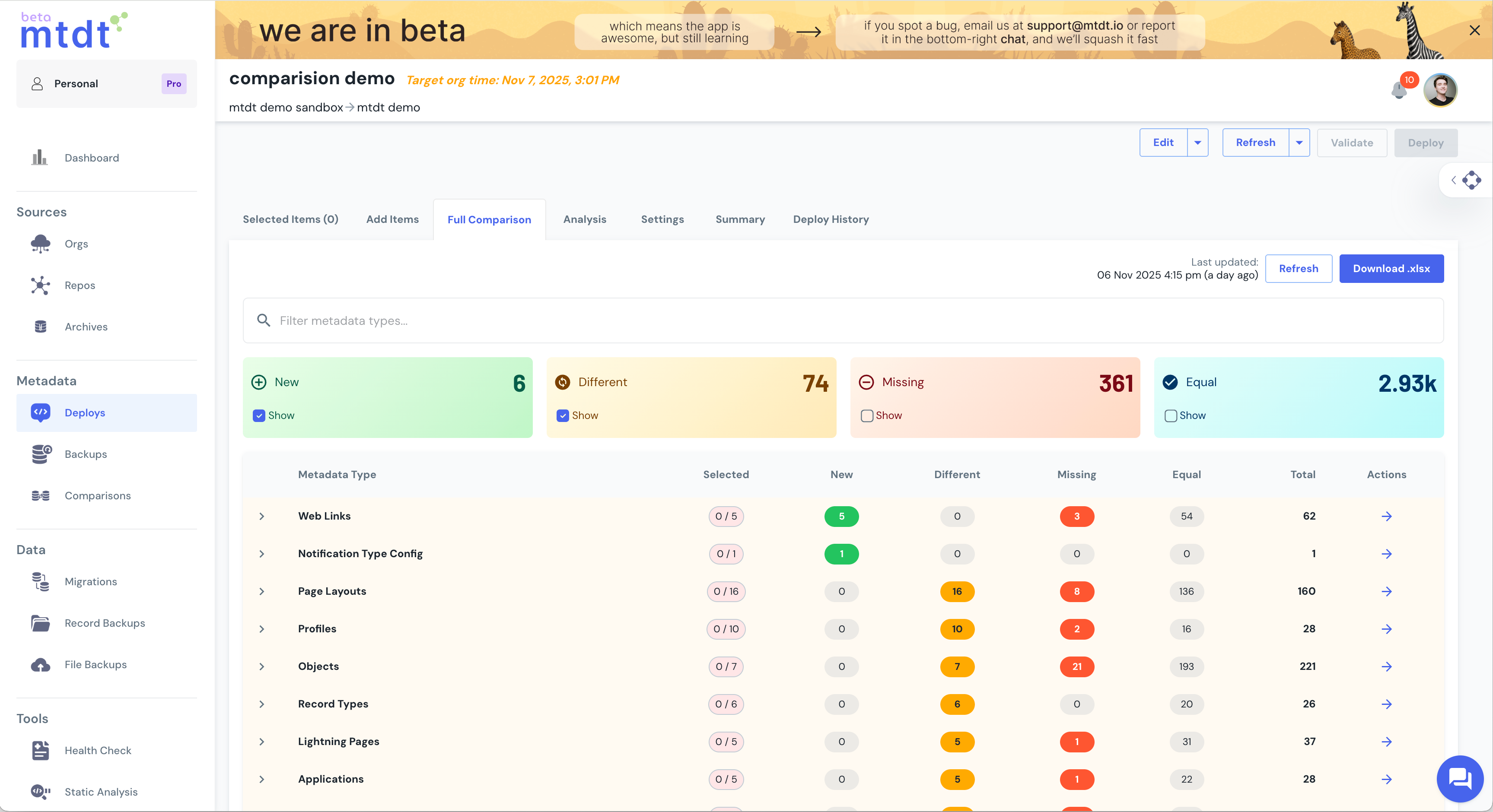
mtdt.io then fetches metadata from both, analyses every component, and presents a categorized summary of differences.
Each component is grouped by type — Apex Classes, Custom Objects, Flows, Layouts, Profiles, and more — showing exactly:
- What exists in Org A but not in Org B
- What’s new in Org B that isn’t in Org A
- What’s changed between matching components
- What’s identical across both orgs
From there, you can drill into each difference to view the exact changes, or take action directly: deploy, align, or archive snapshots for audit purposes.
Designed for Everyday Use
Comparison isn’t just for large-scale audits — it’s built for the everyday workflows of Salesforce teams.
- Before a deployment – confirm that your sandbox changes are exactly what you expect.
- After a release – verify that production matches your approved configuration.
- Across regions – ensure multiple orgs stay consistent over time.
It’s a small addition that replaces hours of manual checks, exports, and XML diffing.
Real Example: One Afternoon to Full Alignment
A Salesforce team managing two orgs used Comparison to check drift before a quarterly release.
They discovered dozens of small differences — missing layouts, permission variations, and slightly outdated Apex classes.
With the comparison view, they deployed only what mattered, aligned both orgs in a single afternoon, and archived a verified “clean” state for the next cycle.
No manual diffing. No guesswork. Just clarity and confidence.
Why It’s a Game Changer
- Instant visibility – see differences across entire orgs in one view.
- Reduced deployment risk – no more “did we forget to deploy X?” moments.
- Consistent environments – maintain parity across sandboxes, regions, and production.
- Audit-ready – generate comparison reports for compliance and review.
- Fully integrated – works seamlessly with mtdt.io deployments, archives, and validation tools.
Summary
The Comparison feature in mtdt.io turns metadata comparison from guesswork into clarity.
Select two orgs, see exactly what’s different, and act with confidence. Whether your goal is audit alignment or multi-org release control — you’ll always know where things stand.
No exports. No scripts. No surprises.
Just clear comparison, clean action, and full control.
Related: Safe Field-Level Deployments · Why Salesforce Deployments Fail
Was this page helpful?
Let us know how we did