Archives and Combined Deployments in mtdt.io.

Smarter, safer, and fully controlled Salesforce metadata delivery
In real Salesforce projects, deployments rarely happen in perfect sequence. You might deploy several features to UAT at different times – Feature A, Feature B, and Feature C – but only A and B are approved for production.
Until now, managing such partial releases meant juggling change sets, comparing metadata manually, or rebuilding deployment packages from scratch.
mtdt.io introduces a better way: Archives.
What Are Archives
Archives in mtdt.io are self-contained deployment snapshots – stored packages of metadata that were deployed or validated at any point in time. Each archive includes exactly what was part of that deployment, down to the metadata files and structure.
You can think of an archive as a change set with memory – it keeps your deployment history clean, portable, and ready for reuse.
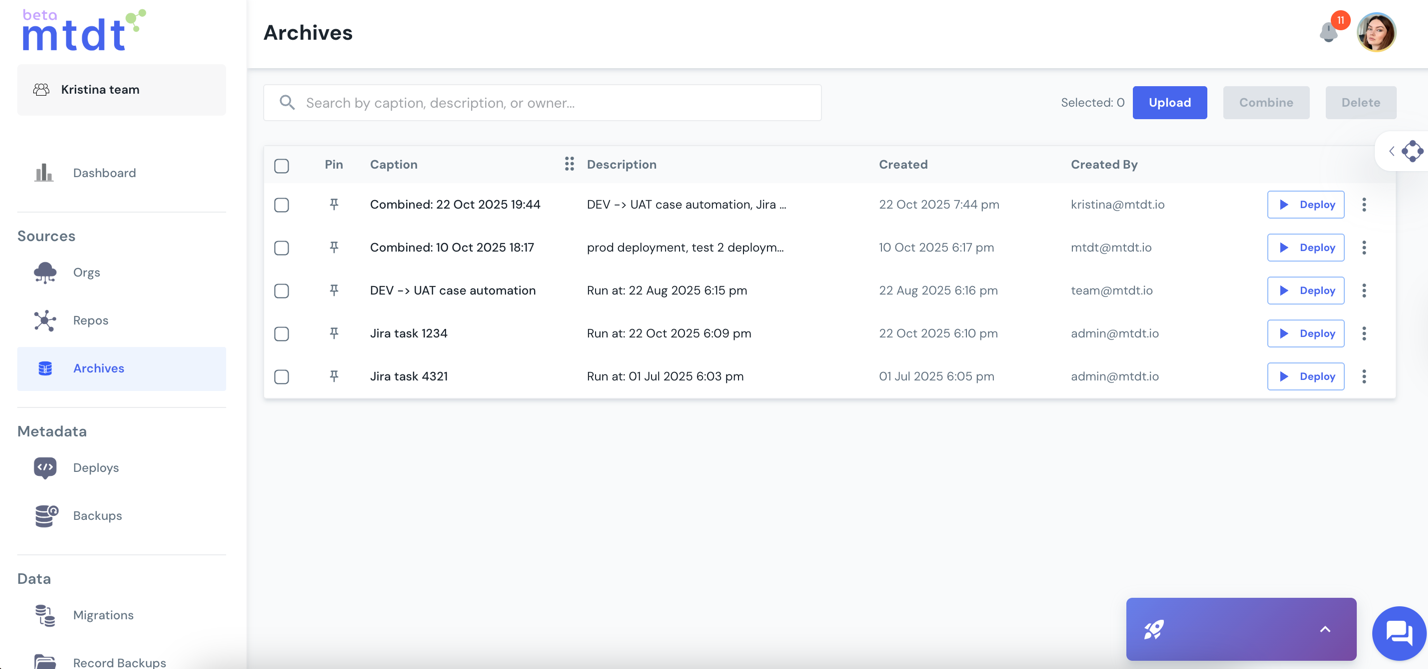
Archives are available in your mtdt Workspace → Sources → Archives section, alongside your Orgs and Repositories. From here, you can:
- Store deployed or validated change sets directly into your archive list
- Download archived packages for backup or inspection
- Upload your own ZIP archives
- Deploy directly from any archive
- Combine multiple archives into one
How It Works
1. Saving a Deployment to Archive
After each deployment or validation (successful or not), mtdt.io automatically gives you two options on the Deployments tab:
- Download – get a ZIP package of deployed metadata
- Store – instantly save this deployment package as an archive
Each stored archive preserves the exact metadata that was deployed, including file versions and structure.
2. Deploying from an Archive
Need to redeploy the same package later? Just create a new deployment, choose “From Archive” as the source, and pick the needed package. The process is identical to any other deployment type – simple and fast. You can also deploy directly from the Archives page with the one-click Deploy button.
3. Combining Archives
This is where the real magic happens.
Imagine you’ve been deploying improvements to your Service department’s automation over several sprints:
- Case Escalation flow
- Service Console layout update
- Customer Satisfaction survey trigger
Now only the first two features are approved for release – the survey trigger still needs more testing.
Instead of rebuilding that deployment, you:
- Store each sprint’s deployment as an archive.
- Combine the Case Escalation and Console Layout archives.
- Deploy this combined archive to Production – all verified, without touching unapproved work.
mtdt.io lets you define the order of archives during merge and even pick specific versions of files if several archives contain the same metadata (for example, a shared Apex class or LWC helper).
That means your final deployment package contains exactly the versions you want – no surprises and no dependency breaks.
Why It’s a Game Changer
- Version clarity – Each deployment is saved as a clear, restorable snapshot.
- Partial releases made simple – Deploy only what’s ready without breaking dependencies.
- Full control over conflicts – Choose which version of a file to keep during merge.
- Zero rebuild time – No need to recreate or manually rebuild change sets.
- Audit-ready – Every archive serves as a historical record of what was deployed, when, and where.
Real-World Use Case: Multi-Org Consistency
A global retail company manages three Salesforce orgs – US, EMEA, and APAC. Each region develops its own features, but leadership wants to maintain a consistent setup across all orgs.
Instead of rebuilding packages for each region, their team now:
- Validates changes in the US org,
- Saves those deployments as archives,
- Combines them into a single “release pack”,
- Deploys the same tested setup to EMEA and APAC in one go.
The result: hours saved on repetitive work and 100% configuration consistency across environments.
Summary
The Archives & Combined Deployments feature turns mtdt.io into a true metadata delivery control center. It gives you full control over how you store, reuse, and share your Salesforce metadata. Every deployment becomes part of a larger story – structured, reusable, and always one click away from production.
No rebuilds. No copy-paste chaos. Just smooth, traceable, version-aware releases.
Related: Deploy and Back Up Metadata to Git · One-Click Rollback
Was this page helpful?
Let us know how we did