"You cannot deploy to a required field" — What It Means and How to Fix It
Short answer: this error means a profile or permission set you're deploying includes field-level security for a field that is universally required at the field-definition level. Since API v30, marking a field Required automatically makes it Visible and Editable for every profile, so there's nothing to grant per-profile — and Salesforce rejects the deploy:
You cannot deploy to a required field: Account.My_Field__c
The fix is to remove that field's field-permissions entry from the profile or permission set (or clear Required on the field itself, if it shouldn't be universally required).
Why Salesforce rejects it
A universally required field — one whose definition has Required checked — is, by platform rule, always visible and always editable for all profiles. Its field-level security is fixed; you can't set it per profile because there's no state left to grant or restrict.
Since API version 30.0, Salesforce enforces this at deploy time: if a Profile or PermissionSet you're deploying contains a <fieldPermissions> block for a required field, the deployment fails with FIELD_INTEGRITY_EXCEPTION and the message above. It's a stable platform rule, not a bug in your package or your deployment tool.
This bites most often when you build a profile or permission set by copying an existing one — the source's field permissions include the required field, and they travel into the deploy even though the target won't accept them.
How to fix it
You have two clean options:
- Drop the field's FLS from the profile/permission set (the usual fix). The field is already visible and editable everywhere, so removing its field-permission entry changes nothing about access — it just stops the deploy from trying to set what can't be set.
- Clear "Required" on the field's definition — only if the field shouldn't actually be universally required. Then its FLS becomes settable per profile again. (Changing this affects every profile and every record, so treat it as a real schema change, not a deploy workaround.)
How mtdt.io helps
Salesforce reports this failure with the bare one-line message and no explanation. In mtdt.io's Deploy History, the failed component carries a hint that decodes it — it names the exact field, explains that it's universally required so its FLS can't be set per profile, and tells you to drop that field's row:
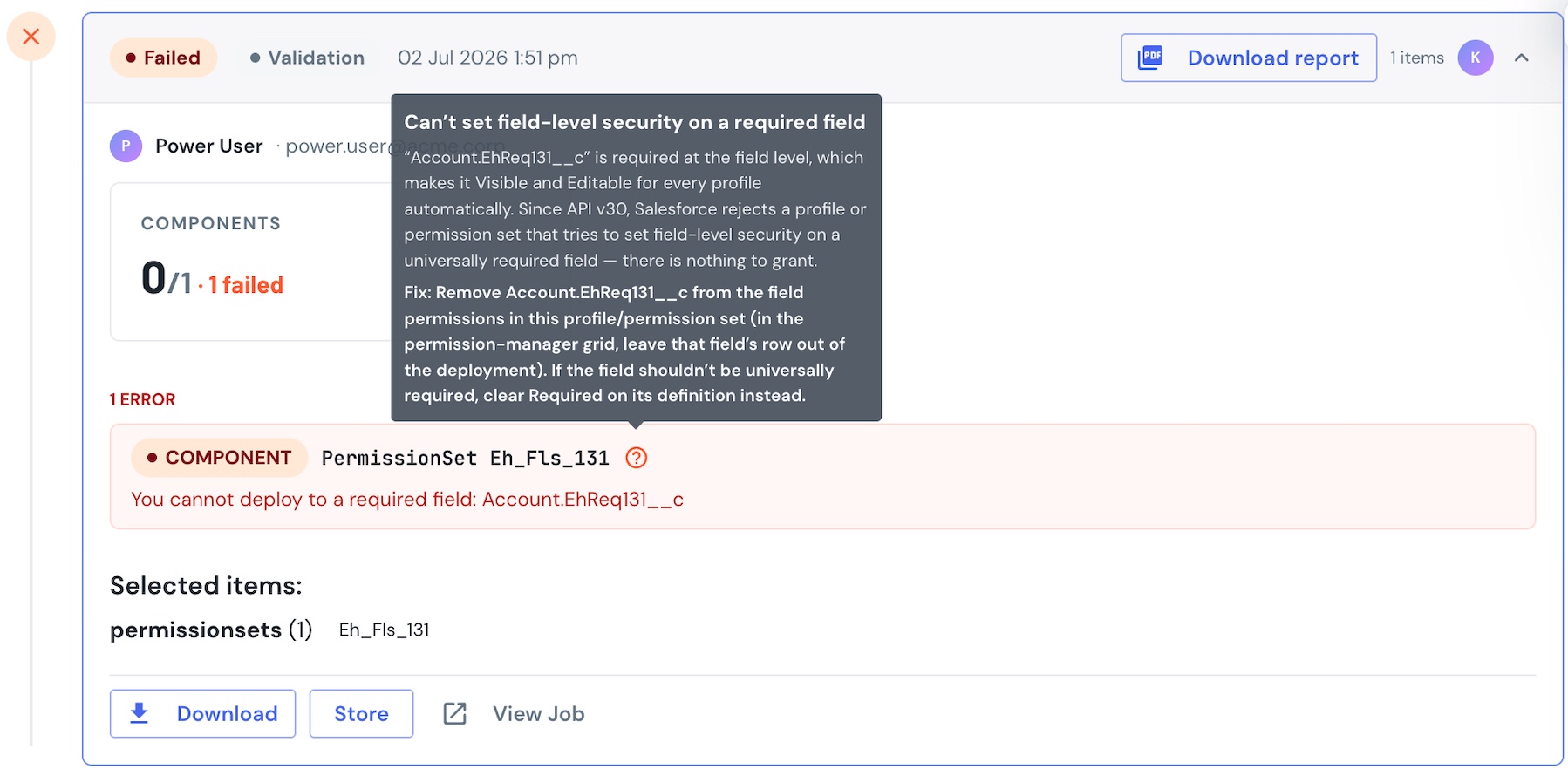
Because mtdt.io compares and deploys profiles and permission sets as a permission-manager grid — one row per permission — you fix this by simply leaving that field's row out of the deployment, rather than hand-editing the profile's XML to find and delete the <fieldPermissions> block. mtdt.io points at the row; you decide what to deploy.
FAQ
What does "You cannot deploy to a required field" mean? A profile or permission set in your deployment is trying to set field-level security on a field that's universally required. Required fields are automatically visible and editable for all profiles, so Salesforce rejects any attempt to set their FLS. It's been enforced since API v30.
How do I fix it? Remove that field's field-permissions entry from the profile or permission set you're deploying. The field stays visible and editable everywhere, so nothing about access changes. Only clear "Required" on the field definition if the field genuinely shouldn't be required.
Why did marking a field Required change its field-level security? By platform rule, a universally required field is Visible + Editable for every profile automatically — Salesforce sets that for you when you check Required. That's why there's nothing left to grant per profile, and why deploying its FLS fails.
Does this happen with permission sets too, or just profiles? Both. A permission set that carries field permissions for a universally required field is rejected the same way a profile is.
Related
- Compare Salesforce Metadata Without Reading XML — the permission-manager grid for profiles and permission sets.
- Permission Sets vs Profiles — where field-level security should live.