Deploying a Master-Detail ↔ Lookup Conversion (and Why Validate Fails)
Short answer: converting a relationship field between Master-Detail and Lookup is a supported Metadata API change — a real deployment works in both directions. What Salesforce blocks is validating it. A test-only (checkOnly / "Validate") deploy that includes the conversion fails with:
Test only deployment cannot update a field from a Master-Detail to LookupTest only deployment cannot update a field from a Lookup to MasterDetail
Salesforce rejects it in test-only mode to avoid data loss or corruption. The fix is to run a real deployment instead — the deploy itself performs the validation. (To validate ahead of production, do a full deploy to a spare sandbox.)
Why Validate is blocked but a real deploy works
Changing the relationship type rewrites how child records relate to their parent, and on a large object that touches data. Salesforce won't do that work in a test-only run — a Validate is supposed to be side-effect-free, and this change can't be. So the platform blocks the conversion during checkOnly and only performs it during a real deployment, where it can apply the change and its data consequences together. This is a platform policy on test-only deploys, not a bug in your package or your deployment tool — it applies to change sets, the CLI, and any tool with a Validate button.
The data preconditions each direction needs
A real deploy still fails if the data isn't ready. These are Salesforce platform rules (Considerations for Converting a Custom Field's Type):
- Master-Detail → Lookup — no roll-up summary fields may exist on the parent object. Once a roll-up summary references the relationship, the conversion is blocked until you delete it.
- Lookup → Master-Detail — every child record must already have a parent. Any record with a blank lookup blocks the conversion. It also can't be done if the child object's org-wide default is Controlled by Parent.
- Permanent deletion caveat — in a Lookup → Master-Detail deploy, detail records must reference a master or be soft-deleted, and a successful deployment permanently deletes any detail records sitting in the Recycle Bin. This is the "data loss" the Validate block exists to prevent.
The side effects worth knowing
The conversion silently changes sharing, and can break reporting:
- Master-Detail → Lookup flips the object's org-wide default to Public Read/Write.
- Lookup → Master-Detail flips it to Controlled by Parent.
- Reports built on the old relationship type can become unusable — Salesforce recommends re-testing custom reports after converting.
How mtdt.io warns you before you waste a Validate run
Because mtdt.io has a first-class Validate button, it catches this before you hit it. When your deployment includes a field whose relationship type differs between source and target, the pre-deployment checks flag it:
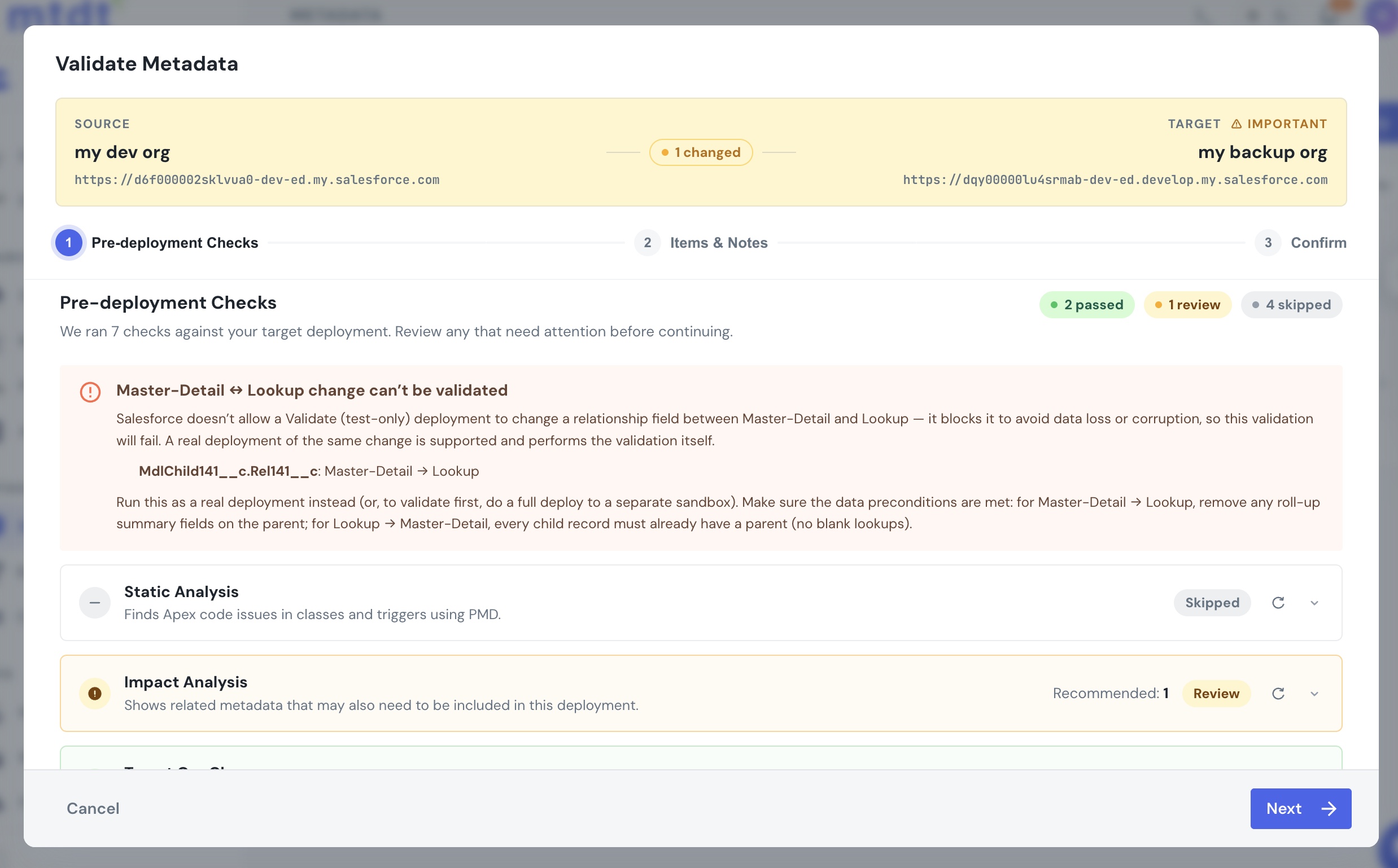
- In Validate mode, mtdt.io shows a Master-Detail ↔ Lookup change can't be validated warning naming the field and direction, so you switch to a real deploy instead of burning a Validate run on a change Salesforce will reject.
- In Deploy mode, it shows a softer note reminding you of the data preconditions (roll-up summaries, blank lookups, the OWD flip).
- If the conversion slips through to a run anyway, the deploy result decodes the terse
Test only deployment cannot update a field…failure into a plain-English explanation and the next step.
To be clear about the limits: mtdt.io steers you off the one path Salesforce forbids and explains the failure — it doesn't make the conversion validate (nothing can), and it doesn't check your record data for orphan children or roll-up summaries. Those remain your call before a real deploy.
FAQ
Can you deploy a Master-Detail to Lookup change in Salesforce? Yes — in a real deployment. Both Master-Detail → Lookup and Lookup → Master-Detail deploy through the Metadata API, as long as the data preconditions are met. It's not a manual-only change. What you can't do is validate it.
Why does "Test only deployment cannot update a field from a Master-Detail to Lookup" appear? Because you're running a Validate (test-only / checkOnly) deployment. Salesforce blocks a Master-Detail ↔ Lookup conversion in test-only mode to avoid data loss, and fails the whole package. Run a real deployment instead — it performs the validation itself.
How do I validate the change before production then? Do a full (real) deployment to a separate test sandbox. A real deploy includes validation as part of the process, so a spare sandbox gives you the pre-flight check that Validate can't.
What has to be true for the conversion to succeed? For Master-Detail → Lookup, delete any roll-up summary fields on the parent first. For Lookup → Master-Detail, every child record must already reference a parent (no blank lookups), and detail records in the Recycle Bin are permanently deleted by the deploy.
Will converting the relationship change my sharing settings? Yes. Master-Detail → Lookup sets the object's org-wide default to Public Read/Write; Lookup → Master-Detail sets it to Controlled by Parent. Re-test custom reports afterward, since reports on the old relationship type can break.
Related
- Pre-deployment checks — where the Master-Detail ↔ Lookup warning runs.
- Common deployment errors — more terse Salesforce deploy errors, decoded.